
OneSync Reader
Jan Bareš Books & Reference
E-book reader with synchronization for your Android and Windows devices.
- Downloads
- 100+
- on Google Play
- Price
- Free
- No in-app purchases
- Updated
- Sep 26
- 2018 · v1.1.0.0
Screenshots
About OneSync Reader
❔ What can you do with this app?
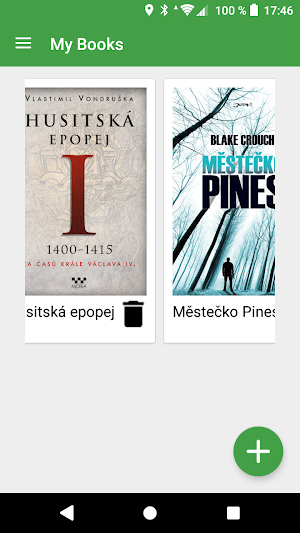
➡ This app is e-book reader for your EPUB e-books. You can also open HTML and TXT files.
➡ You can synchronizace your reading position and bookmarks on all your Android and Windows devices.
➡ You can use this app completely free of charge. No in-app purchases, no ads.
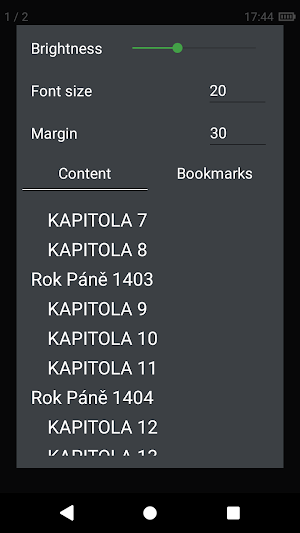
➡ While book is open you can show panel with settings, content and bookmarks by doubletap or long press (you can close that panel by back button or just tap somewhere outside the panel).
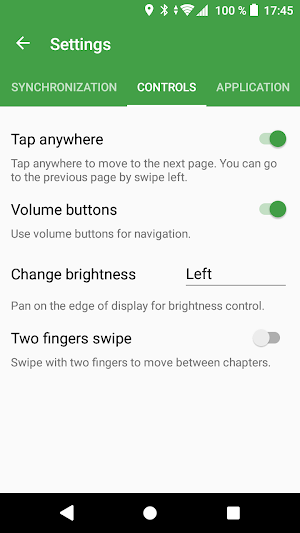
➡ You can navigate to the pages by volume button.
➡ You can control brightness by pan on the edge.
➡ Do you hold the phone in one hand? You can navigate to the next page by tapping anywhere on the screen. You can always go to the previous page by swipe right.
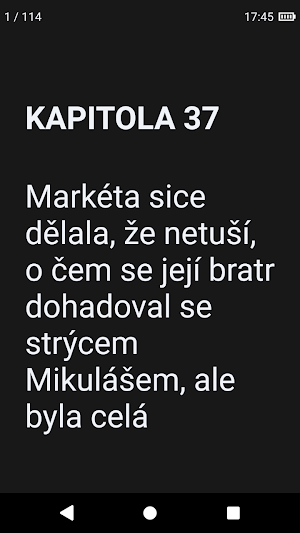
➡ You can read your book in night mode.
➡ You can contribute to the app since it's open source :)
❔ How to synchronize your data?
➡ It's easy, don't worry :)
➡ You can synchronize your reading position and bookmarks.
➡ You can download Windows version on Microsoft Store.
➡ Just connect all your devices to your Dropbox account or sign up with the same e-mail and password (no need to register somewhere, just sign up the same credentials).
➡ This app is e-book reader for your EPUB e-books. You can also open HTML and TXT files.
➡ You can synchronizace your reading position and bookmarks on all your Android and Windows devices.
➡ You can use this app completely free of charge. No in-app purchases, no ads.
➡ While book is open you can show panel with settings, content and bookmarks by doubletap or long press (you can close that panel by back button or just tap somewhere outside the panel).
➡ You can navigate to the pages by volume button.
➡ You can control brightness by pan on the edge.
➡ Do you hold the phone in one hand? You can navigate to the next page by tapping anywhere on the screen. You can always go to the previous page by swipe right.
➡ You can read your book in night mode.
➡ You can contribute to the app since it's open source :)
❔ How to synchronize your data?
➡ It's easy, don't worry :)
➡ You can synchronize your reading position and bookmarks.
➡ You can download Windows version on Microsoft Store.
➡ Just connect all your devices to your Dropbox account or sign up with the same e-mail and password (no need to register somewhere, just sign up the same credentials).
What’s new
Version 1.1.0.0 · Updated September 26, 2018
marking of finished books bux fixes
Alternatives to OneSync Reader
Looking for apps like OneSync Reader? Here are 6 similar Android apps on Google Play. The highest rated is eReader Prestigio: Book Reader (4.6/5), and 5 of the 6 are free to download.
-
All Document Reader : Docx PDF 4.3
-
Lithium: EPUB Reader 4.1
-
Collabora Office 4.1
-
eReader Prestigio: Book Reader 4.6
-
Aldiko Next 3.6
-
OpenDocument Reader Pro 4.3
| App | Rating | Price | Installs | Last updated | Compare |
|---|---|---|---|---|---|
| OneSync Reader | – | Free | 100+ | Sep 26, 2018 | |
| All Document Reader : Docx PDF | 4.3 / 5 | Free | 100,000+ | Oct 22, 2026 | Compare |
| Lithium: EPUB Reader | 4.1 / 5 | Free | 5,000,000+ | Aug 28, 2026 | Compare |
| Collabora Office | 4.1 / 5 | Free | 1,000,000+ | Oct 15, 2026 | Compare |
| eReader Prestigio: Book Reader | 4.6 / 5 | Free | 10,000,000+ | May 15, 2026 | Compare |
| Aldiko Next | 3.6 / 5 | Free | 10,000,000+ | Aug 5, 2026 | Compare |
| OpenDocument Reader Pro | 4.3 / 5 | 2.99 USD | 5,000+ | Sep 24, 2026 | Compare |
Compare OneSync Reader with the top alternatives: ratings, updates, ASO score and keyword gaps →
Similar apps on Google Play
- All Document Reader : Docx PDF
- Lithium: EPUB Reader
- Collabora Office
- eReader Prestigio: Book Reader
- Aldiko Next
- OpenDocument Reader Pro
- Tap Office - Word, Excel, PDF
- Read With Me
- Ebook Reader
- getAbstract: Book Summaries
- Reader for watch (Wear)
- Wear To Do
- Amplenote
- ePlatform by Wheelers
- BiblioBoard Library
- Word Office - Docx, XLS, PDF