
SysPulse: Device Monitor
Tools Contains ads
System dashboard for battery, storage & app monitoring.
- Downloads
- 50+
- on Google Play
- Price
- Free
- No in-app purchases
- Updated
- Feb 10
- 2026 · v1.0
Screenshots


About SysPulse: Device Monitor
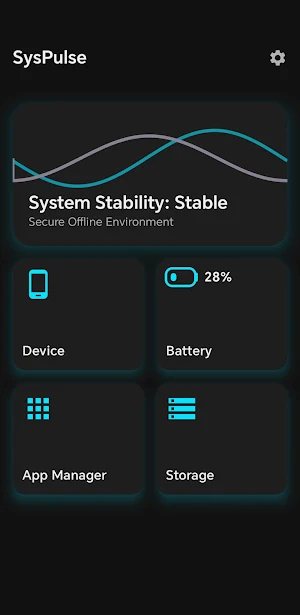
SysPulse is a device monitoring utility for Android that provides information about system performance, battery status, storage usage, and installed applications.
The interface is designed to present device information clearly and efficiently.
🚀 FEATURES
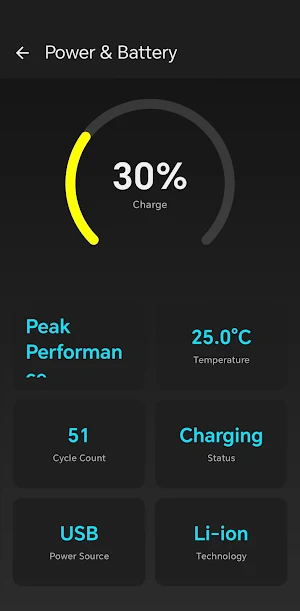
🔋 Battery Monitoring
View detailed battery information beyond the charge percentage:
Real-time voltage, temperature, and power source
Estimated battery health status
Charge cycle count (supported devices)
Visual graphs and status indicators
💾 Storage Analyzer
Review how storage space is used on your device:
Storage breakdown by apps, media, and system files
List of large files stored on the device
Category summaries for images, videos, and audio
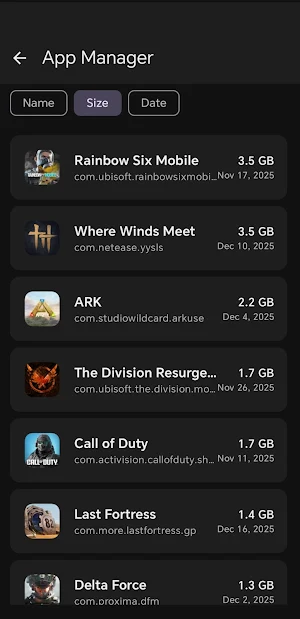
📱 App Manager
Manage installed applications:
List of user and system apps
Sorting by size, name, or installation date
Quick access to app settings and uninstall options
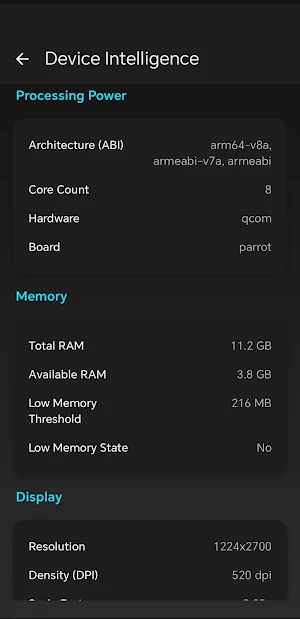
🛠️ Device Information
View hardware and system details:
CPU cores, RAM usage, and storage capacity
Android version, SDK level, and security patch
Available hardware sensors
✨ Interface
Built with Material 3 design components.
🔒 Privacy
All analysis is performed locally on your device. SysPulse does not transmit personal files or app data to external servers.
Requirements
Android 8.0 (Oreo) or higher
Internet connection required for ad-supported features
SysPulse provides local device monitoring tools for viewing system and storage information.
The interface is designed to present device information clearly and efficiently.
🚀 FEATURES
🔋 Battery Monitoring
View detailed battery information beyond the charge percentage:
Real-time voltage, temperature, and power source
Estimated battery health status
Charge cycle count (supported devices)
Visual graphs and status indicators
💾 Storage Analyzer
Review how storage space is used on your device:
Storage breakdown by apps, media, and system files
List of large files stored on the device
Category summaries for images, videos, and audio
📱 App Manager
Manage installed applications:
List of user and system apps
Sorting by size, name, or installation date
Quick access to app settings and uninstall options
🛠️ Device Information
View hardware and system details:
CPU cores, RAM usage, and storage capacity
Android version, SDK level, and security patch
Available hardware sensors
✨ Interface
Built with Material 3 design components.
🔒 Privacy
All analysis is performed locally on your device. SysPulse does not transmit personal files or app data to external servers.
Requirements
Android 8.0 (Oreo) or higher
Internet connection required for ad-supported features
SysPulse provides local device monitoring tools for viewing system and storage information.
What’s new
Version 1.0 · Updated February 10, 2026
🚀 Initial Release of SysPulse! - Battery Health Monitor: Check health status, temperature, and cycle counts. - Storage Analyzer: Find large files and see detailed storage breakdown. - Device Dashboard: View real-time RAM, CPU, and System specs. - App Manager: Easily sort and manage installed applications. - New Premium UI with Dark Mode support.
User reviews

Nice this Apk
Alternatives to SysPulse: Device Monitor
Looking for apps like SysPulse: Device Monitor? Here are 6 similar Android apps on Google Play. The highest rated is My Verizon For Business (4.7/5), and 5 of the 6 are free to download.
-
Verizon Call Filter 4.7
-
F-Secure Mobile Security 4.2
-
Castro Premium - system info 4.7
-
Rheem EcoNet 4.0
-
My Verizon For Business 4.7
-
SharkClean 3.9
| App | Rating | Price | Installs | Last updated | Compare |
|---|---|---|---|---|---|
| SysPulse: Device Monitor | – | Free | 50+ | Feb 10, 2026 | |
| Verizon Call Filter | 4.7 / 5 | Free | 100,000,000+ | Aug 10, 2026 | Compare |
| F-Secure Mobile Security | 4.2 / 5 | Free | 100,000,000+ | Oct 19, 2026 | Compare |
| Castro Premium - system info | 4.7 / 5 | 2.99 USD | 10,000+ | – | Compare |
| Rheem EcoNet | 4.0 / 5 | Free | 100,000+ | – | Compare |
| My Verizon For Business | 4.7 / 5 | Free | 500,000+ | Aug 25, 2026 | Compare |
| SharkClean | 3.9 / 5 | Free | 1,000,000+ | Oct 19, 2026 | Compare |