

Pinterest Video Downloader
Video Players & Editors Contains ads
Download Pinterest bulk videos and images in bulk and directly to gallery
- Downloads
- 5K+
- on Google Play
- Price
- Free
- No in-app purchases
- Updated
- Sep 13
- 2026 · v1.0.1
Screenshots


About Pinterest Video Downloader
Save Pinterest videos and images quickly with Pinterest Bulk Video Saver. Download multiple Pins at once, save high-quality media to your device, and keep your favorite content available offline.
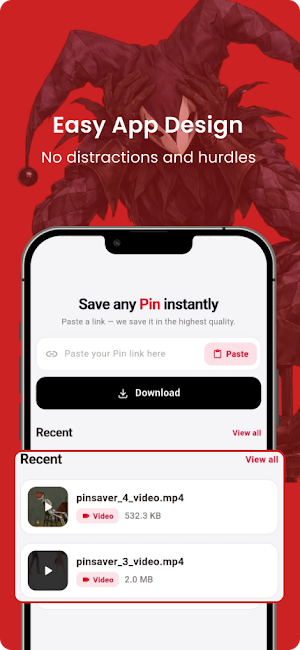
Whether you want to save one Pin or a whole collection, the app makes downloading simple. Paste a Pinterest link, add multiple links, or share a Pin directly to the app and start saving
BULK PIN DOWNLOADS:
Download multiple Pinterest videos and images together instead of saving each Pin one by one. Add a list of links and let the app handle your downloads in one place.
Pinterest Video Downloader:
Save Pinterest videos to your device in the available quality options. Download your favorite videos and watch them later without an internet connection.
Pinterest Image Downloader:
Save Pinterest images directly to your gallery while preserving the available image quality.
Multiple Link Downloads:
Have several Pins to save? Add multiple Pinterest links and download them together for a faster, more convenient workflow.
Share to Download:
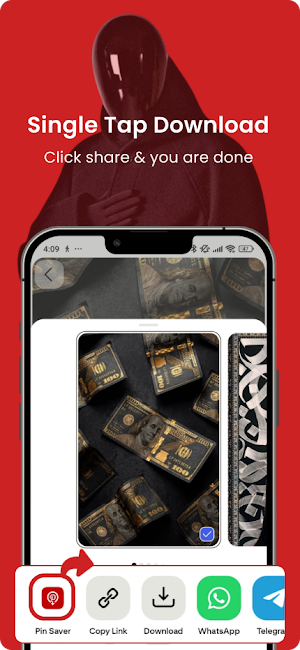
Find something you want to save on Pinterest, tap Share, select Pinterest Bulk Video Saver, and start the download without manually switching between apps.
Fast Download Management:
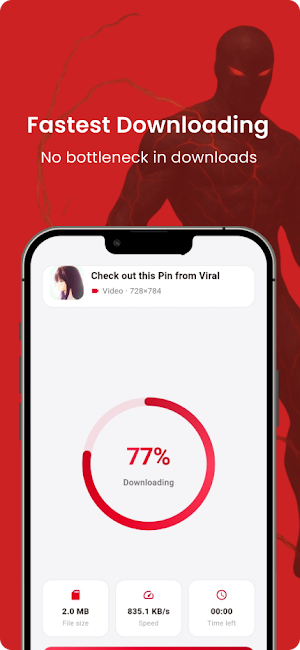
See download progress, file size, speed, and remaining time while your files are being saved. Pause or cancel downloads whenever you need to.
Built-In Gallery:
View your saved Pinterest videos and images in one convenient place. Easily browse, manage, and share your downloaded media.
Offline Playback:
Once your videos are saved, you can watch them without an internet connection.
HOW TO SAVE A PIN:
-Open Pinterest and find the Pin you want to save.
-Tap Share and choose Copy Link.
-Open Pinterest Bulk Video Saver.
-Paste the link or add multiple links.
-Tap Download and save the media to your device.
You can also use Pinterest's Share option to send a Pin directly to the app.
SIMPLE AND PRIVATE:
No Pinterest account or password is required to use the downloader.
The app is designed to be lightweight and easy to use, with only the permissions needed for its download and media-saving features.
Save recipes, DIY tutorials, fashion ideas, wallpapers, artwork, home decor, workout inspiration, travel ideas, and other Pins for later.
IMPORTANT:
Pinterest Bulk Video Saver is an independent third-party application and is not affiliated with, sponsored by, endorsed by, or connected to Pinterest, Inc.
Pinterest and its related trademarks belong to their respective owners.
Please download and save only content that you own or have permission to download. Respect the intellectual property, privacy, and rights of content creators.
Whether you want to save one Pin or a whole collection, the app makes downloading simple. Paste a Pinterest link, add multiple links, or share a Pin directly to the app and start saving
BULK PIN DOWNLOADS:
Download multiple Pinterest videos and images together instead of saving each Pin one by one. Add a list of links and let the app handle your downloads in one place.
Pinterest Video Downloader:
Save Pinterest videos to your device in the available quality options. Download your favorite videos and watch them later without an internet connection.
Pinterest Image Downloader:
Save Pinterest images directly to your gallery while preserving the available image quality.
Multiple Link Downloads:
Have several Pins to save? Add multiple Pinterest links and download them together for a faster, more convenient workflow.
Share to Download:
Find something you want to save on Pinterest, tap Share, select Pinterest Bulk Video Saver, and start the download without manually switching between apps.
Fast Download Management:
See download progress, file size, speed, and remaining time while your files are being saved. Pause or cancel downloads whenever you need to.
Built-In Gallery:
View your saved Pinterest videos and images in one convenient place. Easily browse, manage, and share your downloaded media.
Offline Playback:
Once your videos are saved, you can watch them without an internet connection.
HOW TO SAVE A PIN:
-Open Pinterest and find the Pin you want to save.
-Tap Share and choose Copy Link.
-Open Pinterest Bulk Video Saver.
-Paste the link or add multiple links.
-Tap Download and save the media to your device.
You can also use Pinterest's Share option to send a Pin directly to the app.
SIMPLE AND PRIVATE:
No Pinterest account or password is required to use the downloader.
The app is designed to be lightweight and easy to use, with only the permissions needed for its download and media-saving features.
Save recipes, DIY tutorials, fashion ideas, wallpapers, artwork, home decor, workout inspiration, travel ideas, and other Pins for later.
IMPORTANT:
Pinterest Bulk Video Saver is an independent third-party application and is not affiliated with, sponsored by, endorsed by, or connected to Pinterest, Inc.
Pinterest and its related trademarks belong to their respective owners.
Please download and save only content that you own or have permission to download. Respect the intellectual property, privacy, and rights of content creators.
User reviews

best

very nice app it's amazing 😍🤩

This app allow me to download Pinterest videos easily

I can click share and this app download the videos directly - nice ✨

very good app 💖💖
Alternatives to Pinterest Video Downloader
Looking for apps like Pinterest Video Downloader? Here are 2 similar Android apps on Google Play. All of them are free to download.

| App | Rating | Price | Installs | Last updated | Compare |
|---|---|---|---|---|---|
| Pinterest Video Downloader | – | Free | 5,000+ | Sep 13, 2026 | |
| NetGuard: Data Usage Monitor | – | Free | 100+ | Sep 16, 2026 | Compare |
| Wise Split: Expense Splitter | – | Free | 10+ | Jul 24, 2026 | Compare |