
SnapINKo - E-ink eBook Reader
Books & Reference
A dual-purpose eBook reading app
- Downloads
- 851+
- on Google Play
- Price
- Free
- No in-app purchases
- Updated
- Sep 28
- 2026 · v9.2
Screenshots


About SnapINKo - E-ink eBook Reader
SnapINKo takes its name from INK, as in electronic ink.
INKO also carries the feeling of 「インコ」 in Japanese — a small bird that gently keeps you company.
It is a lightweight reader designed for E Ink reading: quiet, simple, and made to accompany you through every page.
SnapINKo — Supports phones, tablets, and e-readers
SnapINKo is a versatile e-book reader app.
Supported Formats
Text:
EPUB / KEPUB / TXT / HTM / HTML / DOC / DOCX / PDB / PRC / UPDB / MOBI
Comics:
CBZ / CBR / CBM / PDF / RAR / UPDB / image folders
In addition to reading novels and comics, SnapINKo also works as a full-featured PDF viewer.
Page Turning Modes
SnapINKo supports multiple page turning methods:
Swipe
Tap
Volume keys
Bluetooth presenter / remote
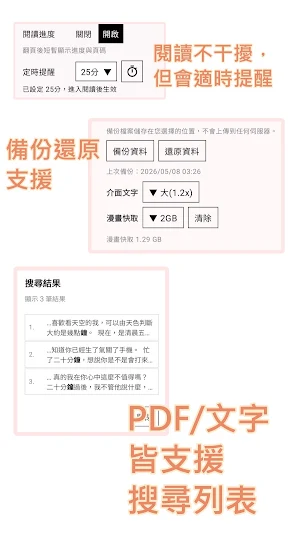
You can set custom reading reminders.
SnapINKo also tracks both single-session reading time and total reading time.
Full PDF Features
High-resolution viewing
Drawing and markup
Notes
Auto page-turn reading
Password-protected PDF support
Table of contents
Search result list
Full Comic Features
Landscape single-page swipe
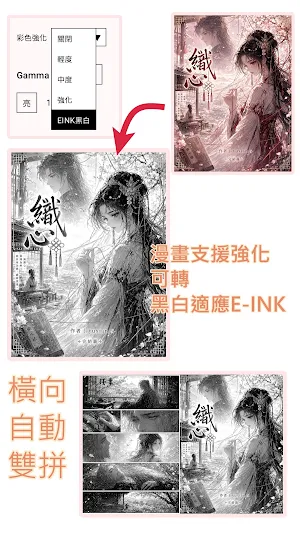
Landscape double-page spread
Portrait white-margin cropping with odd/even mirrored edge trimming
Auto page turning
Free two-finger zoom
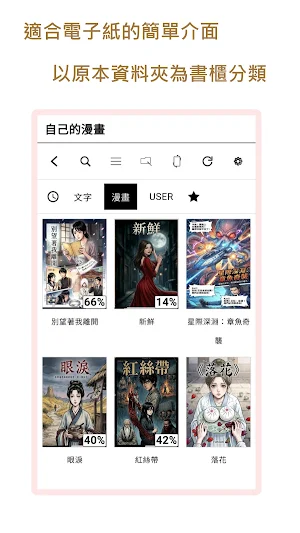
Folder-based comic support
Full Novel Features
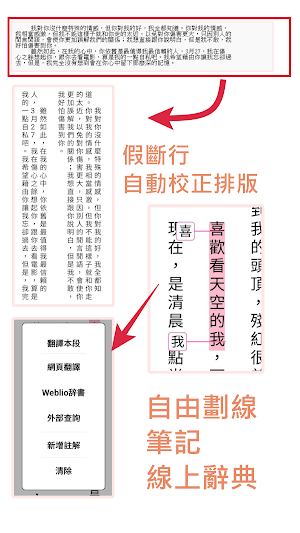
Re-layout of false line breaks
Vertical Chinese reading
Simplified / Traditional Chinese conversion
Highlighting and note-taking, with freely added annotations and note export support
Japanese vertical reading for Aozora Bunko-style texts
Furigana display / hide option
Online dictionary lookup
Search result list
SnapINKo provides global settings.
After global settings are configured, newly opened books will follow those settings by default.
Individual settings can also be applied to each book.
Once a book has been opened, its individual reading settings can be preserved.
To support different e-reader devices, the app requires file access permission.
After selecting an e-book folder, SnapINKo can access books according to that folder.
For devices with a file browser, limited access is usually sufficient.
For e-readers without a file browser, full access can be selected instead.
Both modes are supported.
Network permission is used only for online dictionary lookup.
SnapINKo does not provide folder or file modification features.
It does not rewrite, move, rename, or delete your original files, making it safer to use.
INKO also carries the feeling of 「インコ」 in Japanese — a small bird that gently keeps you company.
It is a lightweight reader designed for E Ink reading: quiet, simple, and made to accompany you through every page.
SnapINKo — Supports phones, tablets, and e-readers
SnapINKo is a versatile e-book reader app.
Supported Formats
Text:
EPUB / KEPUB / TXT / HTM / HTML / DOC / DOCX / PDB / PRC / UPDB / MOBI
Comics:
CBZ / CBR / CBM / PDF / RAR / UPDB / image folders
In addition to reading novels and comics, SnapINKo also works as a full-featured PDF viewer.
Page Turning Modes
SnapINKo supports multiple page turning methods:
Swipe
Tap
Volume keys
Bluetooth presenter / remote
You can set custom reading reminders.
SnapINKo also tracks both single-session reading time and total reading time.
Full PDF Features
High-resolution viewing
Drawing and markup
Notes
Auto page-turn reading
Password-protected PDF support
Table of contents
Search result list
Full Comic Features
Landscape single-page swipe
Landscape double-page spread
Portrait white-margin cropping with odd/even mirrored edge trimming
Auto page turning
Free two-finger zoom
Folder-based comic support
Full Novel Features
Re-layout of false line breaks
Vertical Chinese reading
Simplified / Traditional Chinese conversion
Highlighting and note-taking, with freely added annotations and note export support
Japanese vertical reading for Aozora Bunko-style texts
Furigana display / hide option
Online dictionary lookup
Search result list
SnapINKo provides global settings.
After global settings are configured, newly opened books will follow those settings by default.
Individual settings can also be applied to each book.
Once a book has been opened, its individual reading settings can be preserved.
To support different e-reader devices, the app requires file access permission.
After selecting an e-book folder, SnapINKo can access books according to that folder.
For devices with a file browser, limited access is usually sufficient.
For e-readers without a file browser, full access can be selected instead.
Both modes are supported.
Network permission is used only for online dictionary lookup.
SnapINKo does not provide folder or file modification features.
It does not rewrite, move, rename, or delete your original files, making it safer to use.
What’s new
Version 9.2 · Updated September 28, 2026
V9.2 Major architecture and UI update. Please back up your data before updating. 1. Improved bookshelf layouts, cover arrangement, and foldable support. 2. Added realistic page-turn animation (manual enable). 3. Bookshelf categories can now be renamed by long-pressing. 4. Greatly improved EPUB compatibility and vertical/horizontal layout. 5. Improved memory use, performance, reading stability, and UI reliability. INKo Sakurako is now more integrated into your bookshelf.
Alternatives to SnapINKo - E-ink eBook Reader
Looking for apps like SnapINKo - E-ink eBook Reader? Here is 1 similar Android app on Google Play.

| App | Rating | Price | Installs | Last updated | Compare |
|---|---|---|---|---|---|
| SnapINKo - E-ink eBook Reader | – | Free | 500+ | Sep 28, 2026 | |
| SnapMeter - Film Meter Cam | – | Free | 1,000+ | Nov 2, 2026 | Compare |