

Tabby: Split Bills & Expenses
Yossi LLC Finance In-app purchases
Split bills, track who owes what, and settle up — for trips, rent, and dinners.
- Downloads
- 31+
- on Google Play
- Price
- Free
- In-app purchases
- Updated
- Oct 18
- 2026 · v1.3.0
Screenshots



About Tabby: Split Bills & Expenses
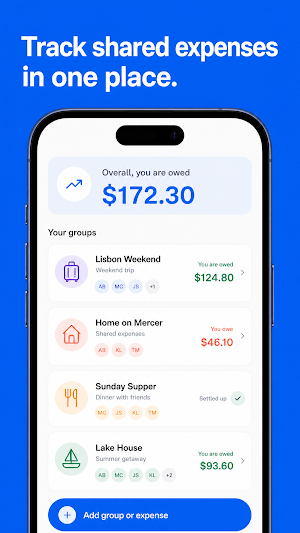
Tabby keeps track of shared expenses. Add what was paid and how to split it — balances update instantly, and settling up takes one tap.
SPLITTING
• Split equally, by exact amounts, percentages, shares, or item by item
• Categories, photos, and comments on every expense, in 150+ currencies
• Recurring expenses for rent and other regular bills
• Pending payments for deposits and hotel holds — tracked, but kept off balances until the real charge lands
GROUPS AND FRIENDS
• Groups for trips, households, and events — plus one-on-one balances with friends
• Add guests who aren't on Tabby yet; when they join, their history merges into their account
• Invite people with a link or QR code, sync contacts, or find people in the same room with Nearby
• Read-only viewers and per-group editing permissions
BALANCES
• See who owes what at a glance
• Simplify debts: fewer payments between people, same result for everyone
• Settle up in one tap — full or partial — with every payment on record
• Send a friendly reminder when someone forgets
• Spending charts by category, person, and month
TABBY PRO — THE AI LAYER
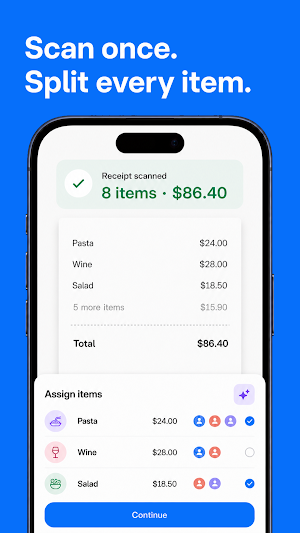
• Scan a receipt and Tabby reads every item, plus tax and tip. Assign items to people and the split is done — no math, no typing.
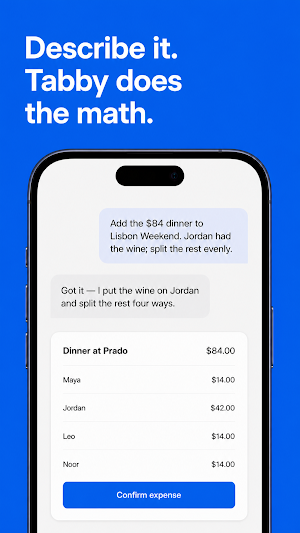
• Ask Tabby to do things for you: "Add $60 for gas, split with Maya and Dan." It drafts the expense; you confirm.
• Ask who owes what, what you spent this month, or what's still outstanding — in plain words, with real answers.
AND THE REST
• Switching from another expense app? Import your history from a CSV export and pick up where you left off
• Your ledger is stored on-device, so the app opens fast and works on bad connections
• App lock with fingerprint or face unlock
• Notification controls with quiet hours, light and dark themes
Unlimited groups, friends, and expenses, every split type, settle up, simplify debts, charts, and import.
SPLITTING
• Split equally, by exact amounts, percentages, shares, or item by item
• Categories, photos, and comments on every expense, in 150+ currencies
• Recurring expenses for rent and other regular bills
• Pending payments for deposits and hotel holds — tracked, but kept off balances until the real charge lands
GROUPS AND FRIENDS
• Groups for trips, households, and events — plus one-on-one balances with friends
• Add guests who aren't on Tabby yet; when they join, their history merges into their account
• Invite people with a link or QR code, sync contacts, or find people in the same room with Nearby
• Read-only viewers and per-group editing permissions
BALANCES
• See who owes what at a glance
• Simplify debts: fewer payments between people, same result for everyone
• Settle up in one tap — full or partial — with every payment on record
• Send a friendly reminder when someone forgets
• Spending charts by category, person, and month
TABBY PRO — THE AI LAYER
• Scan a receipt and Tabby reads every item, plus tax and tip. Assign items to people and the split is done — no math, no typing.
• Ask Tabby to do things for you: "Add $60 for gas, split with Maya and Dan." It drafts the expense; you confirm.
• Ask who owes what, what you spent this month, or what's still outstanding — in plain words, with real answers.
AND THE REST
• Switching from another expense app? Import your history from a CSV export and pick up where you left off
• Your ledger is stored on-device, so the app opens fast and works on bad connections
• App lock with fingerprint or face unlock
• Notification controls with quiet hours, light and dark themes
Unlimited groups, friends, and expenses, every split type, settle up, simplify debts, charts, and import.
Frequently asked questions
How can I split expenses in Tabby?
Equally, by exact amounts, percentages, shares or item by item.
How many currencies are supported?
150+.
Can I add people who aren't on Tabby?
Yes, as guests; their history merges when they join.
Alternatives to Tabby: Split Bills & Expenses
Looking for apps like Tabby: Split Bills & Expenses? Here are 6 similar Android apps on Google Play. The highest rated is Finance Pro: Expense control (4.8/5), and 4 of the 6 are free to download.
-
MyMoney Pro - Expense & Budget 4.7
-
1Money: expense tracker budget 4.1
-
Blue Sky Vitamin 4.8
-
BillOut - Bill Organizer 4.5
-
Finance Pro: Expense control 4.8
-
Budget App — PocketGuard 4.5
| App | Rating | Price | Installs | Last updated | Compare |
|---|---|---|---|---|---|
| Tabby: Split Bills & Expenses | – | Free | 10+ | Oct 18, 2026 | |
| MyMoney Pro - Expense & Budget | 4.7 / 5 | 4.99 USD | 10,000+ | Jul 31, 2026 | Compare |
| 1Money: expense tracker budget | 4.1 / 5 | Free | 5,000,000+ | Feb 25, 2026 | Compare |
| Blue Sky Vitamin | 4.8 / 5 | Free | 1,000+ | Oct 8, 2026 | Compare |
| BillOut - Bill Organizer | 4.5 / 5 | Free | 50,000+ | Jun 21, 2026 | Compare |
| Finance Pro: Expense control | 4.8 / 5 | 3.49 USD | 10,000+ | Sep 2, 2026 | Compare |
| Budget App — PocketGuard | 4.5 / 5 | Free | 100,000+ | Oct 28, 2026 | Compare |
Similar apps on Google Play
- MyMoney Pro - Expense & Budget
- 1Money: expense tracker budget
- Blue Sky Vitamin
- BillOut - Bill Organizer
- Finance Pro: Expense control
- Budget App — PocketGuard
- SimplyWise: Receipts, Expenses
- Keepr: Money & Budget Tracker
- Rocket Mortgage
- Beyond Budget - Budget Planner
- WalletHub: Credit & Budgeting
- Budget & Expense Tracker Monee
- Kittysplit: Bills & cost split
- Splitwise
- Budgeting App - Spend Tracker
- Money Manager: Expense Tracker
- Cashew—Expense Budget Tracker
- Frec: Tax-aware investing
- Cashinator – Split Bills
- Quicken: Intelligent Money
- Monefy: Money & Budget App
- eXpend: Make Budgeting a Habit
- MyMoney—Track Expense & Budget
- Casherwise: Budget & Expenses
- Trabee Pocket : Travel Expense
- Splid – Split group bills
- Spendable: AI Money Tracker
- Budget Planner & App: Spendee
- Zoho Expense - Expense Reports
- Dext: Receipt Tracker
- Settle Up – Group Expenses
- TravelSpend: Travel Budget App
- StaffTraveler