
BatchPad: Photo Border in Bulk
Art & Design In-app purchases Contains ads
BatchPad fixes that by helping you add padding that makes your posts stand out
- Rating
- 5.0
- 17 ratings
- Downloads
- 500+
- on Google Play
- Price
- Free
- In-app purchases
- Updated
- Sep 16
- 2026 · v4.7.2
Screenshots


About BatchPad: Photo Border in Bulk
Tired of social platforms ruining your photos? Auto-cropping and compression often shrink your images and cut out important details.
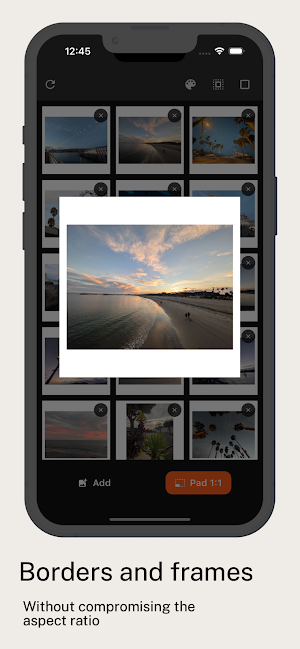
BatchPad fixes that by helping you add professional padding that makes your posts stand out with 35% more screen space—showcasing your work exactly as you intended in full resolution.
Why Choose BatchPad?
- Add white borders to Instagram photos without hassle.
- Fit your images perfectly for Instagram, Facebook, and Twitter.
- Keep every photo in full resolution—no quality loss.
- Trusted by photographers, influencers, and creators around the world.
Command More Attention
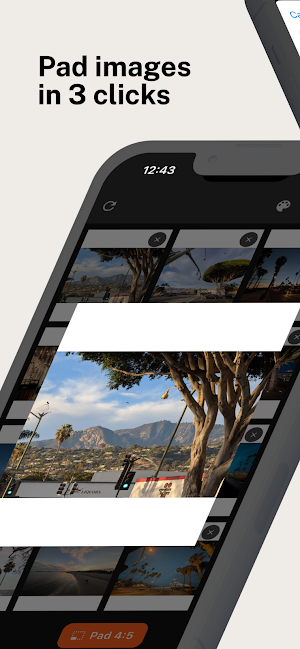
Make your feed pop with 4:5 ratio posts that take up more screen space on Instagram and other platforms. Show your audience the full story without worrying about auto-cropping cutting off key details.
Work Faster, Not Harder
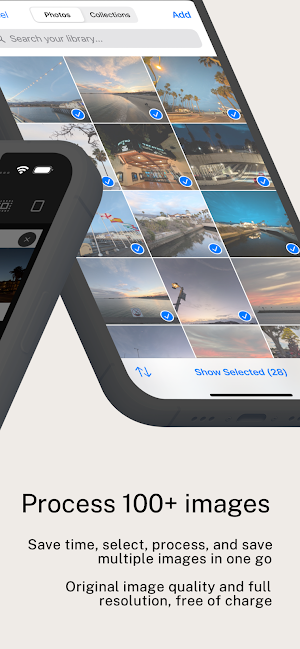
Got a full photoshoot? Use BatchPad’s batch editing feature to resize and pad multiple images at once. Save hours of manual work and focus on creating great content.
Customize Your Style
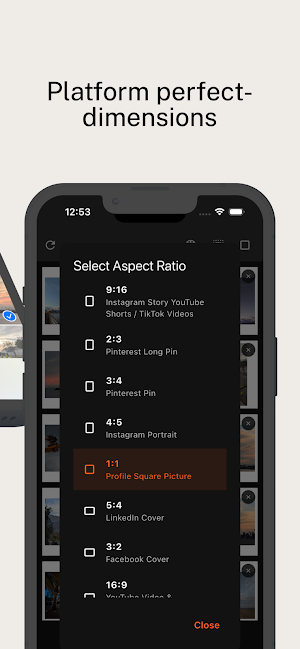
Choose from popular aspect ratios like 4:5, 1:1, and 16:9 and add padding in any color to match your aesthetic. Whether it’s a clean white border or a bold custom frame, you’re in control.
Share with Confidence
Getting your images ready to post is simple:
- Select your photos.
- Adjust padding and preview.
- Share directly to Instagram or any platform.
- No advanced editing skills are required—just upload and go.
Download BatchPad now and join creators everywhere using it to save time, stay creative, and make every post stand out.
BatchPad fixes that by helping you add professional padding that makes your posts stand out with 35% more screen space—showcasing your work exactly as you intended in full resolution.
Why Choose BatchPad?
- Add white borders to Instagram photos without hassle.
- Fit your images perfectly for Instagram, Facebook, and Twitter.
- Keep every photo in full resolution—no quality loss.
- Trusted by photographers, influencers, and creators around the world.
Command More Attention
Make your feed pop with 4:5 ratio posts that take up more screen space on Instagram and other platforms. Show your audience the full story without worrying about auto-cropping cutting off key details.
Work Faster, Not Harder
Got a full photoshoot? Use BatchPad’s batch editing feature to resize and pad multiple images at once. Save hours of manual work and focus on creating great content.
Customize Your Style
Choose from popular aspect ratios like 4:5, 1:1, and 16:9 and add padding in any color to match your aesthetic. Whether it’s a clean white border or a bold custom frame, you’re in control.
Share with Confidence
Getting your images ready to post is simple:
- Select your photos.
- Adjust padding and preview.
- Share directly to Instagram or any platform.
- No advanced editing skills are required—just upload and go.
Download BatchPad now and join creators everywhere using it to save time, stay creative, and make every post stand out.
What’s new
Version 4.7.2 · Updated September 16, 2026
Back up and restore your entire setup — batch settings, groups, carousel plans, custom ratios and layouts — as a single file. New auto-fill recipes place photos for you: fine art editorial, urban candid, asymmetric modern, or surprise me. Refreshed onboarding, a smoother Carousel Plan editor, and stability fixes throughout.
User reviews

Batch padding multiple, full resolution photos and outputting them all at once is awesome!
Alternatives to BatchPad: Photo Border in Bulk
Looking for apps like BatchPad: Photo Border in Bulk? Here are 2 similar Android apps on Google Play. The highest rated is Name Analytics: Find Baby Name (5.0/5), and all 2 are free to download.


| App | Rating | Price | Installs | Last updated | Compare |
|---|---|---|---|---|---|
| BatchPad: Photo Border in Bulk | 5.0 / 5 | Free | 500+ | Sep 16, 2026 | |
| Name Analytics: Find Baby Name | 5.0 / 5 | Free | 100+ | – | Compare |
| Timeli | – | Free | 50+ | Sep 16, 2026 | Compare |