

Xtreme Math Calculator
Tools In-app purchases Contains ads
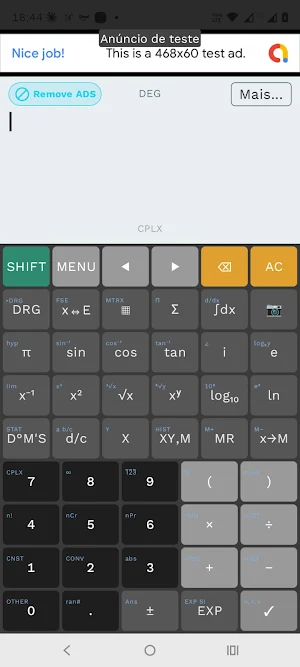
Advanced calculator with graphing, fractions, symbolic algebra, and high precision.
- Downloads
- 28+
- on Google Play
- Price
- Free
- In-app purchases
- Updated
- Jul 28
- 2026 · v1.0.3
Screenshots


About Xtreme Math Calculator
Discover the power of mathematics in the palm of your hand with our Advanced Scientific Calculator! Designed for students, engineers, and professionals, this app transforms your device into an extremely powerful and versatile calculation tool, capable of solving everything from basic arithmetic to complex university-level equations.
With a high-precision mathematical engine (supporting up to 100 decimal places), our calculator ensures you have the exact answer for the most demanding situations.
**KEY FEATURES:**
**Advanced Mathematics and Algebra:**
• Solver for linear and polynomial equations (including systems of equations).
• Symbolic algebra: solve derivatives, definite and indefinite integrals, and limits.
• Complete operations with complex numbers (rectangular and polar forms).
• Calculations with matrices (inverse, transpose, determinants) and vectors.
• Mathematical series (summation and product).
**Intelligent Graphing Engine:**
• Plot graphs of 2D mathematical functions and explore amazing 3D graphs.
• Visualize and calculate areas under the curve (graphical integrals).
• Support for graphing polar and parametric equations.
• "Trace" function: drag, find roots, intersections, and minimum and maximum points with ease.
**Natural Expression Display (N.E.V.):**
• Write and view expressions the same way they appear in your textbooks.
• Full support for stacked fractions, roots, and extended exponents.
• Intelligent multiline history to scroll, view, and reuse previous calculations.
**Everyday Calculations and Extra Features:**
• Basic arithmetic with support for periodic numbers and automatic conversion to fractions.
• Trigonometric and hyperbolic functions in degrees, radians, and grads.
• Statistics, regression analysis, permutations, and combinations. • Customizable display formats (Scientific, Engineering, Fixed Point) and SI prefixes.
• 10 extended memory slots for saving expressions and results.
**Adaptive Layouts and Premium Themes:**
The calculator adapts to your device, offering optimized "Pocket" layouts for smartphones in portrait mode, "Compact" mode for landscape, and "Expanded" for tablets. Customize your experience by choosing from several high-quality themes, including a modern and elegant Dark Mode.
Download now and have the best, fastest, and most complete calculation experience on your Android!
With a high-precision mathematical engine (supporting up to 100 decimal places), our calculator ensures you have the exact answer for the most demanding situations.
**KEY FEATURES:**
**Advanced Mathematics and Algebra:**
• Solver for linear and polynomial equations (including systems of equations).
• Symbolic algebra: solve derivatives, definite and indefinite integrals, and limits.
• Complete operations with complex numbers (rectangular and polar forms).
• Calculations with matrices (inverse, transpose, determinants) and vectors.
• Mathematical series (summation and product).
**Intelligent Graphing Engine:**
• Plot graphs of 2D mathematical functions and explore amazing 3D graphs.
• Visualize and calculate areas under the curve (graphical integrals).
• Support for graphing polar and parametric equations.
• "Trace" function: drag, find roots, intersections, and minimum and maximum points with ease.
**Natural Expression Display (N.E.V.):**
• Write and view expressions the same way they appear in your textbooks.
• Full support for stacked fractions, roots, and extended exponents.
• Intelligent multiline history to scroll, view, and reuse previous calculations.
**Everyday Calculations and Extra Features:**
• Basic arithmetic with support for periodic numbers and automatic conversion to fractions.
• Trigonometric and hyperbolic functions in degrees, radians, and grads.
• Statistics, regression analysis, permutations, and combinations. • Customizable display formats (Scientific, Engineering, Fixed Point) and SI prefixes.
• 10 extended memory slots for saving expressions and results.
**Adaptive Layouts and Premium Themes:**
The calculator adapts to your device, offering optimized "Pocket" layouts for smartphones in portrait mode, "Compact" mode for landscape, and "Expanded" for tablets. Customize your experience by choosing from several high-quality themes, including a modern and elegant Dark Mode.
Download now and have the best, fastest, and most complete calculation experience on your Android!
What’s new
Version 1.0.3 · Updated July 28, 2026
Correção de bugs
Alternatives to Xtreme Math Calculator
Looking for apps like Xtreme Math Calculator? Here are 6 similar Android apps on Google Play. All of them are free to download.
-
Sonum
-
FocusSwift: Foco e Pomodoro
-
Nexo
-
Nexus 2048: Puzzle Cyberpunk
-
Coravi: Namoro e Paquera
-
Vibe Quente
| App | Rating | Price | Installs | Last updated | Compare |
|---|---|---|---|---|---|
| Xtreme Math Calculator | – | Free | 10+ | Jul 28, 2026 | |
| Sonum | – | Free | 5+ | Jul 27, 2026 | Compare |
| FocusSwift: Foco e Pomodoro | – | Free | 50+ | Jul 28, 2026 | Compare |
| Nexo | – | Free | 1+ | Aug 3, 2026 | Compare |
| Nexus 2048: Puzzle Cyberpunk | – | Free | 5+ | Jun 8, 2026 | Compare |
| Coravi: Namoro e Paquera | – | Free | 5,000+ | Oct 27, 2026 | Compare |
| Vibe Quente | – | Free | 100+ | – | Compare |