

PrepForge
Productivity In-app purchases Contains ads
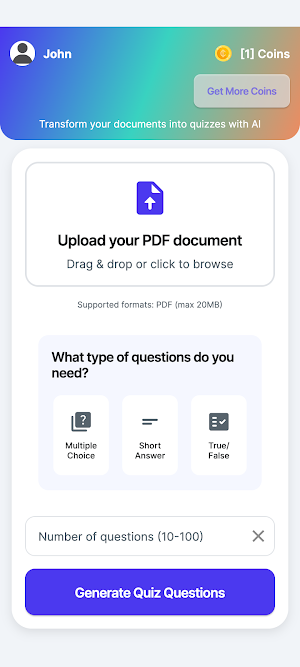
Upload documents and turn them into interactive quizzes.
- Downloads
- 100+
- on Google Play
- Price
- Free
- In-app purchases
- Updated
- Jul 25
- 2025 · v1.0.3
Screenshots
About PrepForge
PrepForge is your intelligent quiz generator designed to transform any PDF document into personalized, interactive quizzes. Whether you're a student, teacher, trainer, or lifelong learner, PrepForge helps you understand, review, and test knowledge from your learning materials—effortlessly and accurately.
🔍 How It Works:
Upload Your Content
Start by uploading a PDF file—lecture notes, study guides, or training manuals.
AI-Powered Quiz Generation
Our AI scans the document and automatically generates multiple types of questions:
Multiple Choice
True or False
Short Answer
Questions are varied by difficulty (Easy, Medium, Hard) and crafted using intelligent keyword extraction and context understanding.
Practice & Learn
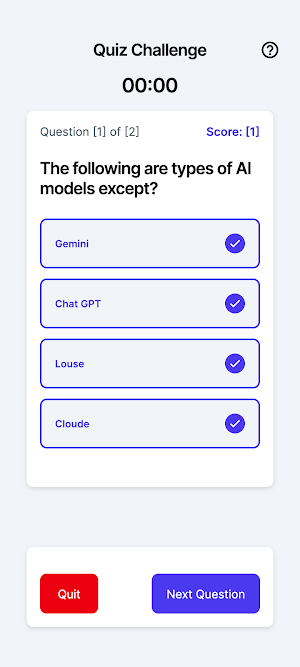
Users can take quizzes directly within the app. Each question is interactive, and short answers are validated using smart matching (case-insensitive, keyword-based, and fuzzy logic) to account for human typing variations.
Instant Feedback
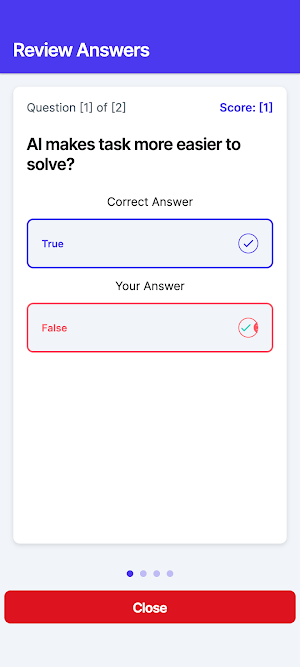
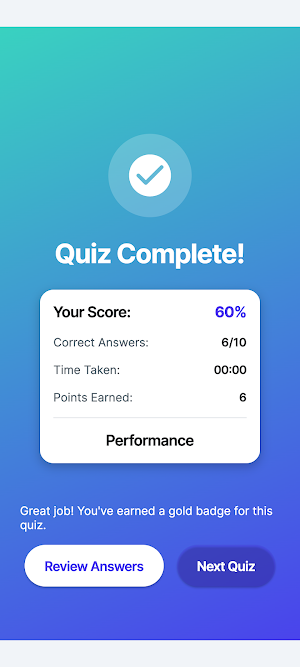
After submitting your answers, get real-time feedback with correct answers, explanations (optional), and performance summaries.
Track Your Progress
Monitor your quiz history, scores, and improvement over time through your personalized dashboard.
Flexible for All Users
Students can use PrepForge to reinforce class material.
Teachers can generate questions from course materials to test or prepare students.
Professionals can turn reports, manuals, or training content into practice material.
Secure & Private
Your uploaded documents are processed securely. We prioritize your privacy and data integrity.
⚡ Key Features:
- AI-based quiz creation from PDFs
- Multiple choice, true/false, and short-answer support
- Smart short-answer validation
- Randomized question difficulty
- User-friendly quiz interface
- Performance tracking and insights
- Modern, tech-inspired design and intuitive UX
PrepForge turns passive reading into active learning. With just a document, you're a tap away from a full study session tailored to your content. Whether you're prepping for an exam or designing a quick practice quiz, PrepForge does the heavy lifting—so you can focus on learning.
🔍 How It Works:
Upload Your Content
Start by uploading a PDF file—lecture notes, study guides, or training manuals.
AI-Powered Quiz Generation
Our AI scans the document and automatically generates multiple types of questions:
Multiple Choice
True or False
Short Answer
Questions are varied by difficulty (Easy, Medium, Hard) and crafted using intelligent keyword extraction and context understanding.
Practice & Learn
Users can take quizzes directly within the app. Each question is interactive, and short answers are validated using smart matching (case-insensitive, keyword-based, and fuzzy logic) to account for human typing variations.
Instant Feedback
After submitting your answers, get real-time feedback with correct answers, explanations (optional), and performance summaries.
Track Your Progress
Monitor your quiz history, scores, and improvement over time through your personalized dashboard.
Flexible for All Users
Students can use PrepForge to reinforce class material.
Teachers can generate questions from course materials to test or prepare students.
Professionals can turn reports, manuals, or training content into practice material.
Secure & Private
Your uploaded documents are processed securely. We prioritize your privacy and data integrity.
⚡ Key Features:
- AI-based quiz creation from PDFs
- Multiple choice, true/false, and short-answer support
- Smart short-answer validation
- Randomized question difficulty
- User-friendly quiz interface
- Performance tracking and insights
- Modern, tech-inspired design and intuitive UX
PrepForge turns passive reading into active learning. With just a document, you're a tap away from a full study session tailored to your content. Whether you're prepping for an exam or designing a quick practice quiz, PrepForge does the heavy lifting—so you can focus on learning.
User reviews

I expect the ads, it's little and only is needed when you are out of coins, honestly the benefits outweight the ads involved especially if it's not shouting in your face, all the best to the devs.. also for some questions I found that the last bottom option gets cut out of space for the answers due to the length of ...
Alternatives to PrepForge
Looking for apps like PrepForge? Here are 6 similar Android apps on Google Play. The highest rated is Poster Maker - AI Flyer Design (4.4/5), and all 6 are free to download.
-
Cruxly AI Tutor Quiz Flashcard
-
Kickresume: AI Resume Builder 4.4
-
Krisp AI Meeting Note Taker 3.8
-
Exam Booster – Class 10
-
Poster Maker - AI Flyer Design 4.5
-
PicLumen 3.7
| App | Rating | Price | Installs | Last updated | Compare |
|---|---|---|---|---|---|
| PrepForge | – | Free | 100+ | Jul 25, 2025 | |
| Cruxly AI Tutor Quiz Flashcard | – | Free | 1,000+ | Jul 31, 2026 | Compare |
| Kickresume: AI Resume Builder | 4.4 / 5 | Free | 100,000+ | Aug 18, 2026 | Compare |
| Krisp AI Meeting Note Taker | 3.8 / 5 | Free | 100,000+ | Oct 19, 2026 | Compare |
| Exam Booster – Class 10 | – | Free | 100+ | May 19, 2026 | Compare |
| Poster Maker - AI Flyer Design | 4.4 / 5 | Free | 100,000+ | Oct 21, 2026 | Compare |
| PicLumen | 3.7 / 5 | Free | 500+ | Jul 14, 2025 | Compare |
Compare PrepForge with the top alternatives: ratings, updates, ASO score and keyword gaps →
Similar apps on Google Play
- Cruxly AI Tutor Quiz Flashcard
- Kickresume: AI Resume Builder
- Krisp AI Meeting Note Taker
- Exam Booster – Class 10
- Poster Maker - AI Flyer Design
- PicLumen
- DesignEvo - Logo Maker
- Genomapp: Raw DNA Analysis
- Fireflies: AI notetaker
- GlossGenius: Booking, Payments
- KitLegit: Apparel Verification
- HairApp: AI Hairstyle Try On