

BingoPlus
Vertekalon Tools
BingoPlus - Recipe ideas and ingredient matching for practical everyday cooking!
- Downloads
- 5+
- on Google Play
- Price
- Free
- No in-app purchases
- Updated
- Jul 17
- 2026 · v1.0
Screenshots


About BingoPlus
🍽️ A simpler way to plan meals
BingoPlus is a practical recipe companion for people who want clear meal ideas, ingredient guidance, and an easier way to decide what to cook. Explore a built-in collection of dishes for breakfast, lunch, and dinner, then compare recipes with ingredients already in your kitchen. BingoPlus keeps recipe information focused and easy to follow, helping you approach everyday meal planning in an organized way.
🥗 Explore the recipe collection
Browse 20 recipe ideas featuring familiar foods such as chicken, salmon, eggs, tofu, turkey, shrimp, vegetables, grains, legumes, fruit, and dairy. Each recipe in BingoPlus includes a title, preparation time, displayed calorie value, ingredient checklist, and numbered cooking steps. Recipe labels include breakfast, lunch, dinner, vegan, quick, low-carb, high-protein, vegetarian, and other relevant categories available in the catalog.
🔎 Find a suitable dish quickly
Search by recipe name, ingredient, or label. Use dedicated filters for breakfast, lunch, dinner, vegan, or quick recipes when you already know what type of meal you want to view. BingoPlus presents compact recipe cards with preparation time, calories, labels, and an ingredient match percentage, allowing you to compare available ideas at a glance.
🧺 Organize your pantry list
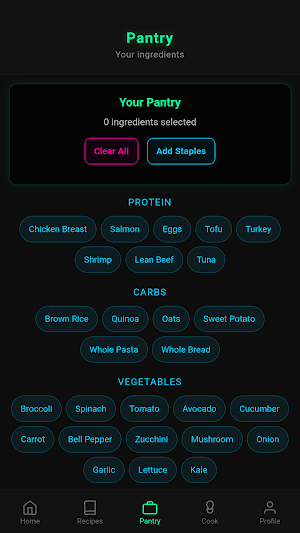
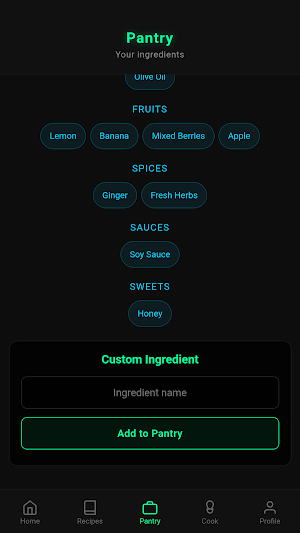
Tell BingoPlus which built-in ingredients you currently have. Choose items from groups including proteins, carbohydrates, vegetables, legumes, dairy, fats, fruit, spices, sauces, and sweet additions. Add a set of common staples in one tap, remove individual items, or clear the pantry to start again. You can also enter a custom ingredient by name. Selections from the built-in ingredient catalog are stored on your device between sessions.
💡 See what you can prepare
The Cook section compares your selected pantry ingredients with every recipe in the collection. Meals for which all listed ingredients are selected appear under Ready to Cook. Relevant dishes with at least half of their ingredients selected appear under Almost Ready, together with a match percentage and a list of missing items. BingoPlus helps answer the familiar question "What can I make with what I have?" through simple ingredient comparison.
📋 Follow clear recipe details
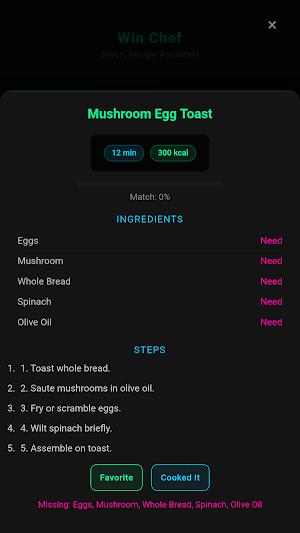
Open any recipe to view its preparation time, displayed calorie value, ingredient status, and ordered instructions. Ingredients are marked as Have or Need according to your pantry selections, so you can review readiness before starting. A visual match bar provides another quick summary. After preparing a dish, mark it as cooked and BingoPlus adds the recipe and date to your recent cooking list.
⭐ Keep favorite recipes close
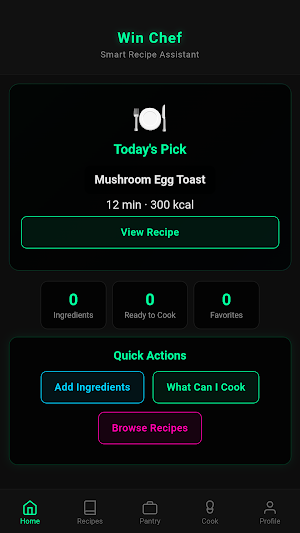
Mark recipes as favorites and access them from the Home screen. Remove a favorite whenever your preferences change. BingoPlus also displays recently cooked dishes, making it easier to revisit previous choices or review what you prepared recently. Favorite recipes and recent cooking entries are stored on your device for convenient access in later sessions.
👤 Record your preferences
Use the Profile section to save a display name, a dietary preference, your usual number of portions, and a personal goal selection. Available dietary entries are Balanced, High Protein, Vegan, and Low Carb. Goal entries include Lose Weight, Maintain, and Build Muscle. These selections are profile records and do not provide medical or dietary advice. BingoPlus lets you update the entries or reset pantry selections, favorites, cooking history, and profile data.
📱 A cooking companion
Plan breakfast, review dinner possibilities, check which dishes match your pantry, or look for a quick high-protein recipe. BingoPlus brings recipe search, ingredient selection, match results, favorites, cooking steps, and recent cooking entries into one consistent experience. With BingoPlus, meal choices become clearer, available ingredients are easier to review, and each cooking session
BingoPlus is a practical recipe companion for people who want clear meal ideas, ingredient guidance, and an easier way to decide what to cook. Explore a built-in collection of dishes for breakfast, lunch, and dinner, then compare recipes with ingredients already in your kitchen. BingoPlus keeps recipe information focused and easy to follow, helping you approach everyday meal planning in an organized way.
🥗 Explore the recipe collection
Browse 20 recipe ideas featuring familiar foods such as chicken, salmon, eggs, tofu, turkey, shrimp, vegetables, grains, legumes, fruit, and dairy. Each recipe in BingoPlus includes a title, preparation time, displayed calorie value, ingredient checklist, and numbered cooking steps. Recipe labels include breakfast, lunch, dinner, vegan, quick, low-carb, high-protein, vegetarian, and other relevant categories available in the catalog.
🔎 Find a suitable dish quickly
Search by recipe name, ingredient, or label. Use dedicated filters for breakfast, lunch, dinner, vegan, or quick recipes when you already know what type of meal you want to view. BingoPlus presents compact recipe cards with preparation time, calories, labels, and an ingredient match percentage, allowing you to compare available ideas at a glance.
🧺 Organize your pantry list
Tell BingoPlus which built-in ingredients you currently have. Choose items from groups including proteins, carbohydrates, vegetables, legumes, dairy, fats, fruit, spices, sauces, and sweet additions. Add a set of common staples in one tap, remove individual items, or clear the pantry to start again. You can also enter a custom ingredient by name. Selections from the built-in ingredient catalog are stored on your device between sessions.
💡 See what you can prepare
The Cook section compares your selected pantry ingredients with every recipe in the collection. Meals for which all listed ingredients are selected appear under Ready to Cook. Relevant dishes with at least half of their ingredients selected appear under Almost Ready, together with a match percentage and a list of missing items. BingoPlus helps answer the familiar question "What can I make with what I have?" through simple ingredient comparison.
📋 Follow clear recipe details
Open any recipe to view its preparation time, displayed calorie value, ingredient status, and ordered instructions. Ingredients are marked as Have or Need according to your pantry selections, so you can review readiness before starting. A visual match bar provides another quick summary. After preparing a dish, mark it as cooked and BingoPlus adds the recipe and date to your recent cooking list.
⭐ Keep favorite recipes close
Mark recipes as favorites and access them from the Home screen. Remove a favorite whenever your preferences change. BingoPlus also displays recently cooked dishes, making it easier to revisit previous choices or review what you prepared recently. Favorite recipes and recent cooking entries are stored on your device for convenient access in later sessions.
👤 Record your preferences
Use the Profile section to save a display name, a dietary preference, your usual number of portions, and a personal goal selection. Available dietary entries are Balanced, High Protein, Vegan, and Low Carb. Goal entries include Lose Weight, Maintain, and Build Muscle. These selections are profile records and do not provide medical or dietary advice. BingoPlus lets you update the entries or reset pantry selections, favorites, cooking history, and profile data.
📱 A cooking companion
Plan breakfast, review dinner possibilities, check which dishes match your pantry, or look for a quick high-protein recipe. BingoPlus brings recipe search, ingredient selection, match results, favorites, cooking steps, and recent cooking entries into one consistent experience. With BingoPlus, meal choices become clearer, available ingredients are easier to review, and each cooking session
Alternatives to BingoPlus
Looking for apps like BingoPlus? Here are 6 similar Android apps on Google Play. The highest rated is CookBook - Recipe Manager (4.7/5), and all 6 are free to download.
-
Unimeal: Fasting and Diet 4.4
-
CookBook - Recipe Manager 4.7
-
Eat Smart Kiwi: Food Diary 4.5
-
DASH Diet Meal Planner 3.8
-
Nutrisystem 4.2
-
Fit Recipes for Weight Loss 4.5
| App | Rating | Price | Installs | Last updated | Compare |
|---|---|---|---|---|---|
| BingoPlus | – | Free | 5+ | Jul 17, 2026 | |
| Unimeal: Fasting and Diet | 4.4 / 5 | Free | 1,000,000+ | Sep 11, 2026 | Compare |
| CookBook - Recipe Manager | 4.7 / 5 | Free | 100,000+ | Oct 5, 2026 | Compare |
| Eat Smart Kiwi: Food Diary | 4.5 / 5 | Free | 50,000+ | Sep 29, 2026 | Compare |
| DASH Diet Meal Planner | 3.8 / 5 | Free | 10,000+ | Sep 1, 2026 | Compare |
| Nutrisystem | 4.2 / 5 | Free | 10,000+ | Aug 7, 2026 | Compare |
| Fit Recipes for Weight Loss | 4.5 / 5 | Free | 100,000+ | – | Compare |
Compare BingoPlus with the top alternatives: ratings, updates, ASO score and keyword gaps →
Similar apps on Google Play
- Unimeal: Fasting and Diet
- CookBook - Recipe Manager
- Eat Smart Kiwi: Food Diary
- DASH Diet Meal Planner
- Nutrisystem
- Fit Recipes for Weight Loss
- SLOeats
- Save Recipes - Mr. Cook
- Recipe Keeper
- Keto Diet: Tracker & Recipes
- StrongrFastr Meal & Gym Plans
- Fork Ranger - sustainable food
- Just the Recipe: Recipe Keeper
- BLW Meals: Starting Solids
- Mealime Meal Plans & Recipes
- Pepper - Recipe Organizer
- My Recipe Box: My Cookbook
- ReciMe: Recipes & Meal Planner
- Instant Connect ™
- Oh She Glows - Healthy Recipes
- eMeals - Meal Planning Recipes