
wunderBudget
Widgetal Digital LLC Finance In-app purchases
See where your money goes. Bank sync, AI categories, real budgets.
- Price
- Free
- In-app purchases
- Updated
- Sep 25
- 2026 · v1.1
Screenshots
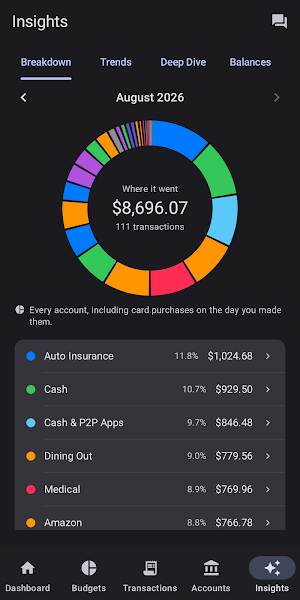


About wunderBudget
Connect to your real bank accounts, let AI categorize every transaction
automatically, and get a clear picture of where your money goes — without the spreadsheet.
BUDGETS THAT ACTUALLY WORK
Most budget apps make you do all the work. wunderBudget syncs your transactions automatically, then uses AI to sort them into categories. You review, confirm, and move on.
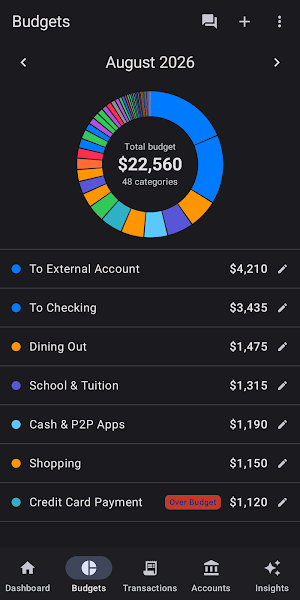
Set a monthly limit on any category. The dashboard shows what to watch and what you planned — so nothing slips through.
CONNECTED TO YOUR REAL FINANCES
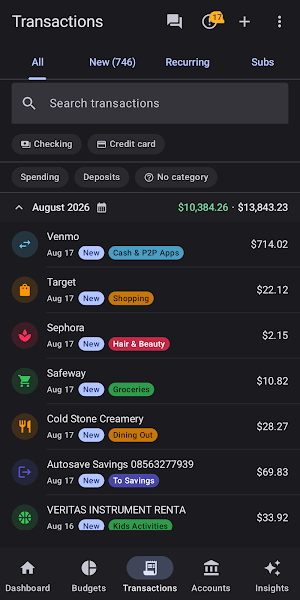
wunderBudget uses Plaid to connect directly to thousands of banks and credit unions. Checking, savings, and credit cards — all in one place. Transactions appear automatically, with a badge on the Transactions tab so you always know when something new arrives. No manual entry required — though you can add transactions by hand, and import or export CSV whenever you want to.
AI THAT LEARNS YOUR HABITS
Every transaction is analyzed by AI and assigned to the right category.
High-confidence matches are applied automatically. Anything uncertain lands in a review queue — one tap confirms it and teaches the app your preference for next time.
A DASHBOARD BUILT AROUND HOW YOU THINK
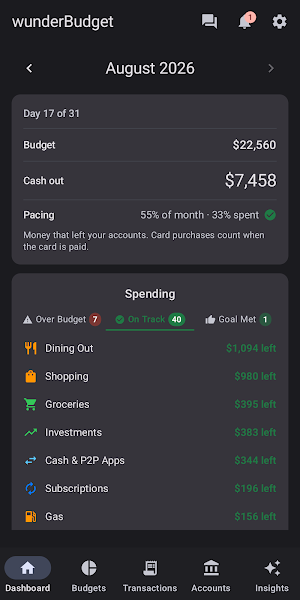
Pacing card — what's budgeted, and what's been spent to date.
Spending — three tabs, one honest view of your month:
— Over Budget — categories where you've exceeded your limit
— On Track — categories running under budget
— Goal Met — categories that have hit their target for the month
Savings Goals — assign a budget category and track progress automatically.
Credit Card Debt — four months of spending and payments at a glance.
Recent Activity — the five most recent transactions from the last import.
Navigate back through previous months to review your spending history in the same layout.
MEET CHIP, YOUR AI FINANCIAL ASSISTANT
Chip is wunderBudget's built-in AI assistant. Ask anything about your finances in plain English and get an accurate answer drawn from your own data.
· "Gas last month"
· "What was over budget in May?"
· "Compare dining in April vs May"
· "How much can I still spend on dining this month?"
· "Is my spending up or down?"
· "What will I spend on groceries this month?"
Ask for a monthly summary — "Summarize May" — and Chip writes a plain-English analysis of your spending. Then keep the conversation going: "Where can I cut back?" "What should I focus on next month?"
Chip is also available as an in-app support assistant — tap the chat bubble
anywhere to get help with features and settings without leaving the app.
REPORTS THAT ACTUALLY TELL YOU SOMETHING
Spending Breakdown — where every dollar went this month
Monthly Trends — income, expenses, and net across six months
Deep Dive — zoom into any category, month by month
Balances — every connected account's balance in one place
Cards — credit card balances, spending, and payment activity
PRIVATE BY DESIGN, AND HONEST ABOUT IT
AI features are opt-in, and the app tells you exactly what each one sends before you decide:
· Categorization sends transaction titles and amounts to Anthropic
· Chip sends category totals and budget figures — never merchant names or
account numbers
· Support chat sends only what you type
Decline and the app still works — transactions simply land in the review queue for you to categorize yourself. Anthropic does not train on this data.
Your budgets, savings goals, and chat history stay on your device. Two-factor
authentication is supported, with an authenticator app or SMS. Optional app lock uses your fingerprint or face unlock, hides financial data in the app switcher, and locks automatically after inactivity.
PRICING
wunderBudget is free to explore with a 7-day trial — no charge until the trial
ends, cancel anytime.
Monthly: $7.99/month
Annual: $69.99/year — save 27% vs monthly
Both plans include all bank connections, the full Reports suite, and Chip AI
Insights.
Terms of Use: https://wunderbudget.com/terms.html
What’s new
Version 1.1 · Updated September 25, 2026
• Restore points: your data is saved before you disconnect a bank and after new transactions arrive. See Settings → Restore points. • Bank statement import: AI categorizes new rows, with filters to check its guesses and fill in missing categories. • Replaced a card? Merge its history into the new one from Accounts → Closed accounts. • Transfers between your own accounts no longer count as spending. • Unknown balances show "Unavailable", not $0. • Syncing no longer duplicates statement imports.
Alternatives to wunderBudget
Looking for apps like wunderBudget? Here are 5 similar Android apps on Google Play. All of them are free to download.





| App | Rating | Price | Installs | Last updated | Compare |
|---|---|---|---|---|---|
| wunderBudget | – | Free | 0+ | Sep 25, 2026 | |
| My Lists | – | Free | 1+ | Aug 25, 2026 | Compare |
| YAWA PWS | – | Free | 1+ | Jul 23, 2026 | Compare |
| YAWA CAN | – | Free | 5+ | Oct 23, 2026 | Compare |
| YAWA NOAA | – | Free | 10+ | Oct 23, 2026 | Compare |
| POS Calculator | – | Free | 5+ | Oct 25, 2026 | Compare |
Compare wunderBudget with the top alternatives: ratings, updates, ASO score and keyword gaps →