WhatsBack: Message Recovery
Recover deleted messages, save message notification & check notification history
About WhatsBack: Message Recovery
WhatsBack is a smart notification history and deleted message saver for Android. It securely stores supported message notifications on your device, helping you view messages that were captured before they were deleted.
Whether you want to keep an important message, check your notification history, or find a message that disappeared, WhatsBack keeps your captured notifications organized and easy to access.
✨ SAVE DELETED MESSAGE NOTIFICATIONS
When a supported message notification arrives, WhatsBack can save the available notification content locally on your device.
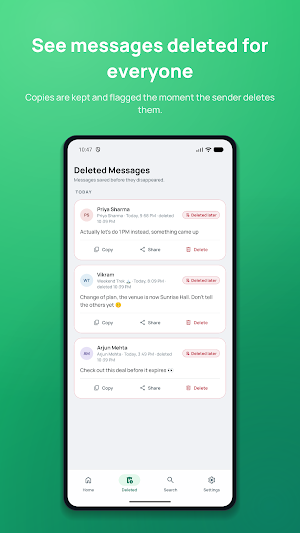
If the sender later deletes that message, the notification copy previously captured by WhatsBack may still be available.
🔔 SMART NOTIFICATION HISTORY
Keep useful message notifications organized in one place.
WhatsBack can help you:
• Save supported message notifications
• View previously captured messages
• Find messages that were later deleted
• Maintain a local notification history
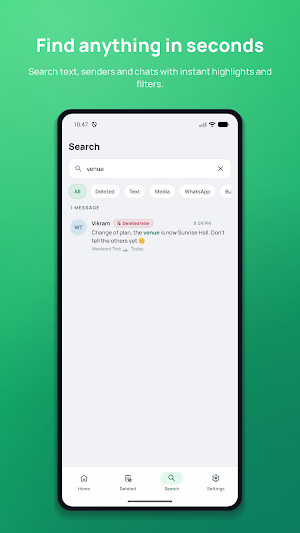
• Search saved messages
• Browse saved conversations
• Identify recently captured notifications
• Copy or share saved text
• Delete individual saved messages
• Clear your entire notification history
🔍 FIND SAVED MESSAGES FAST
Looking for an old notification?
Use built-in search to quickly find captured messages by sender, conversation, or message content.
🗑️ DELETED MESSAGES
WhatsBack provides a dedicated area for messages that may have been captured before they disappeared.
See the original notification text that was available to Android when the notification was received.
📱 SUPPORT FOR MESSAGING NOTIFICATIONS
WhatsBack is designed to capture supported messaging notifications made available through Android's Notification Access system.
Support may vary depending on the messaging app, Android version, notification settings, conversation settings, and device manufacturer.
🔒 PRIVATE & LOCAL
Privacy matters.
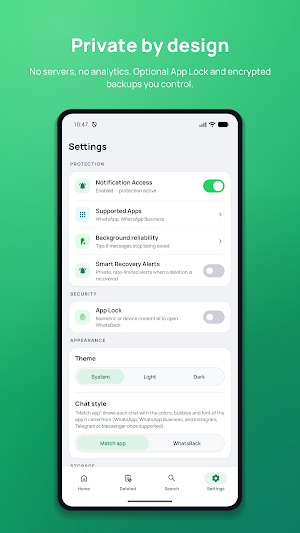
Captured notification information is stored locally on your device.
WhatsBack does not need to access private encrypted messaging databases to save notification content.
You remain in control of your saved history and can delete stored information from the app whenever you want.
⚡ HOW DOES WHATSBACK WORK?
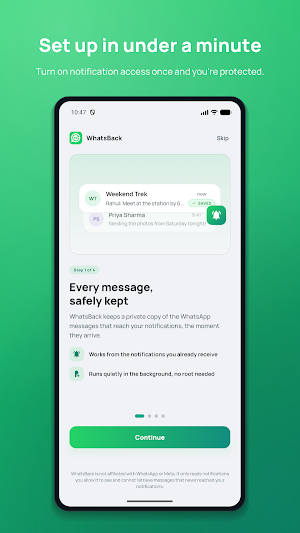
Getting started is simple:
Install WhatsBack.
Open the app.
Enable Notification Access.
Receive supported message notifications.
WhatsBack stores supported notification content locally.
View your saved notification history whenever you need it.
If a message is later deleted, WhatsBack may still contain the notification copy that was captured before deletion.
🌙 MODERN AND SIMPLE
Enjoy a clean Android experience with:
• Modern Material Design
• Light and Dark Mode
• Easy navigation
• Organized conversations
• Deleted message filters
• Fast local search
• Simple privacy controls
🛡️ IMPORTANT LIMITATIONS
WhatsBack is a notification-history utility. It does not directly recover messages from messaging servers or encrypted databases.
WhatsBack cannot recover a message that was never captured.
A message may not be available when:
• WhatsBack was not installed when the notification arrived
• Notification Access was disabled
• The messaging app did not generate a notification
• The conversation was muted
• Notification previews/content were hidden
• Android did not provide the message content
• The notification was unsupported
• Device or battery settings prevented notification processing
Media such as photos, videos, voice messages, stickers, GIFs, and documents may not be recoverable when the actual media was not made available to WhatsBack.
WhatsBack does not bypass encryption, security protections, or private messaging databases.
ℹ️ DISCLAIMER
WhatsBack is an independent notification history and message-saving utility.
WhatsBack is not affiliated with, associated with, sponsored by, authorized by, or endorsed by WhatsApp LLC or Meta Platforms, Inc.
Install WhatsBack and keep the message notifications that matter to you — before they're gone.
Similar Apps
WhatsBack: Message Recovery
Recover deleted messages, save message notification & check notification history

Unofficial Guide for GTA VI
Explore GTA VI history, characters, locations, updates, bookmarks and guides.

Testzo: Android Closed Testing
Managed Android closed testing, QA tasks, tester batches & testing reports.
Thermix - Mobile Heat Monitor
Monitor battery health, temperature, charging speed, CPU usage & device care.
Bluetooth Master Controller
Bluetooth Master controller using for Arduino projects using Microcontroller

Bharat Hub | Sports, TV, Astro
Daily Bhakti, Panchang, Astrology, Live TV, Radio, News & Telugu Calendar
