GlassNote: Image Overlay
Stop switching apps. Float images & screenshots. Visual multitasking made easy.
About GlassNote: Image Overlay
Want to see more on one screen without constantly switching windows?
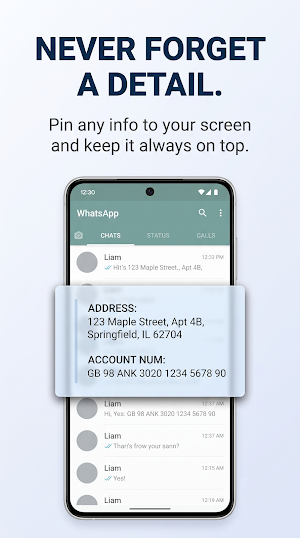
GlassNote is your visual assistant. Pin any information—a website snippet, a screenshot, or a photo—so it floats above other apps as a transparent window ("Ghost").
Copy data, compare products, and work on multiple sources simultaneously. Stop relying on short-term memory—keep what matters right in front of your eyes.
✨ Experience a new standard of convenience. Why install GlassNote?
• No more errors: When copying complex passwords or IBANs, see the source right above your keyboard. Zero mistakes.
• True Multitasking: It’s like having a second monitor on your phone. Watch, read, and work at the same time.
• Perfect for Video: Are you a creator? Place a script image near the camera lens and record professional vlogs without stuttering.
• Instant Shopping: Compare product photos and prices side-by-side to choose the best deal without jumping between tabs.
📱 How to create a "Ghost"?
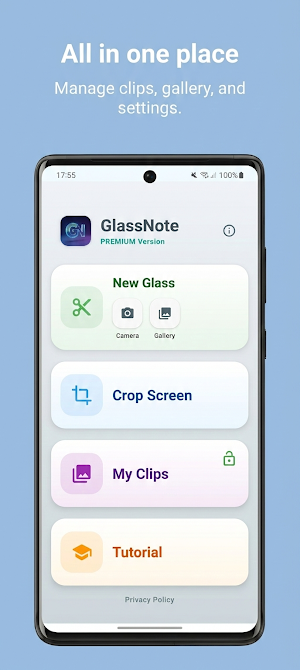
• Classic Clip: Select the screen area you want to pin.
• Camera with Crop: Take a photo (e.g., a document) and cut out just the part you need.
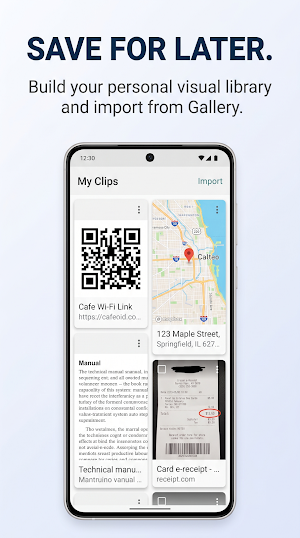
• Import from Gallery: Load a saved screenshot or graphic and pin it.
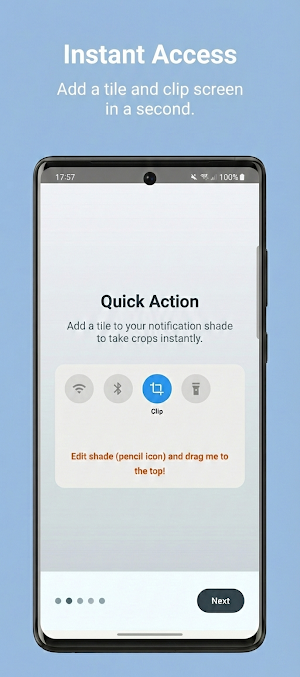
• Quick Action (PRO): Pull down the notification panel and tap the tile—clip the screen in a split second!
💎 FREE vs PRO version:
The free version allows you to create ghosts for quick, everyday tasks (up to 15 seconds on screen), save them to My Clips, and adjust their opacity. Upgrade to GlassNote PRO (One-time purchase, no subscriptions!) to unlock total freedom:
⏱️ Unlimited Time: Keep your ghosts on screen as long as you need (no 15s limit).
🖱️ Ghost Mode (Touch Lock): Lock the ghost so it ignores touch. You can type and click on apps underneath while still seeing the overlay!
⚡ Quick Tile: Instant access from anywhere in the system.
Download GlassNote and see how much easier mobile work can be!
GlassNote: Image Overlay details
GlassNote: Image Overlay is a free Productivity app for Android with 100+ installs on Google Play and a 5.0/5 average rating from 1 rating. It was released on January 25, 2026 and last updated on July 29, 2026. It's developed by WearBatteryNot. It requires Android 8.0 or later. The app offers in-app purchases.
- Category
- Productivity
- Rating
- 5.0 / 5 (1 rating)
- Installs
- 100+
- Price
- Free
- In-app purchases
- Yes
- Ads
- No ads
- Current version
- 1.3.4
- Requires Android
- 8.0
- Content rating
- Everyone
- Released
- January 25, 2026
- Last updated
- July 29, 2026
- Developer
- WearBatteryNot
What’s new in GlassNote: Image Overlay
🎉 No More Subscriptions! GlassNote PRO is now a one-time purchase. Buy once, use forever! (Current subscribers automatically get a lifetime license). 🔓 More Free Features! We’ve unlocked the Gallery import and "My Clips" folder. They are now completely free for everyone! ⏱️ Adjusted Free Limits: The on-screen clip timer for the free version is now 15 seconds. ⚙️ Under the Hood: Updated to the latest Android standards (API 36) for better performance and stability.
Version 1.3.4 · Updated July 29, 2026
Similar Apps
EdrawMind: AI Mind map & Note
Unlock your mind's potential with AI-powered mind mapping

MultiTimer: Multiple timers
Kick off multiple timers! Start a stopwatch, countdown, cooking timer, and more.
Good Lock : Custom Lock Screen
Original Good Lock: Aesthetic lock screen widgets, wallpapers, clock, calendar.
ScreenMaster:Screenshot Markup
Powerful screenshot app, with various image annotation methods.
Cretapedia
Discover and learn in 3D
Chaos Audio: Effects & Amp AI
Stratus and Nimbus: AI effects builder, 300k+ neural amp models, IRs, looper
