
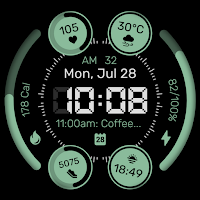
Watch face CNW-41
Personalization
High resolution. Complication. Background black/color on/off. 30 themes color.
- Downloads
- 61+
- on Google Play
- Price
- $0.49
- No in-app purchases
- Updated
- Jul 6
- 2025 · v1.0.0
Screenshots


About Watch face CNW-41
⌚️ Watch face CNW-41
🟥 Information:
- High resolution, sharp image quality
- Sport style
- Digital time
- Day, date, month
- Weather
- Step count, step goal, heart rate, calories
- Sunrise, sunset
- Complication
- 5 index image
- Background black/color on/off
- Battery level, battery optimization with three AOD brightness levels
- 30 themes color palette: See more photos on Google Play store
🟨 How to custom this watch face?
1. Press and hold watch face screen
2. Tap “Customize” button
3. Swipe left or right, up or down to customize watch face
🟦 How to install watch face on your watch?
1. Install watch face from Google Play store
2. Press and hold watch face screen
3. Swipe right to left and tap “Add watch face”
4. Scroll to the bottom of the page and selectwatch face in the “downloaded” section
🟧 Compatible with smart watches running Wear OS 5+ SDK 34+
For example: Galaxy Watch 6, Galaxy Watch 7 Ultra, Ticwatch Pro 5, Pixcel Watch 2, Watch 2 Pro,...
🟩 See all my paid watch faces & free watch faces: https://play.google.com/store/apps/developer?id=cuonguyen
🟪 Follow my social media pages for the latest watch face updates:
https://www.facebook.com/cnwwatchface
https://www.instagram.com/cnwwatchface
https://www.pinterest.com/cnwwatchface
https://x.com/cnwwatchface
https://www.threads.com/@cnwwatchface
🟥 Information:
- High resolution, sharp image quality
- Sport style
- Digital time
- Day, date, month
- Weather
- Step count, step goal, heart rate, calories
- Sunrise, sunset
- Complication
- 5 index image
- Background black/color on/off
- Battery level, battery optimization with three AOD brightness levels
- 30 themes color palette: See more photos on Google Play store
🟨 How to custom this watch face?
1. Press and hold watch face screen
2. Tap “Customize” button
3. Swipe left or right, up or down to customize watch face
🟦 How to install watch face on your watch?
1. Install watch face from Google Play store
2. Press and hold watch face screen
3. Swipe right to left and tap “Add watch face”
4. Scroll to the bottom of the page and selectwatch face in the “downloaded” section
🟧 Compatible with smart watches running Wear OS 5+ SDK 34+
For example: Galaxy Watch 6, Galaxy Watch 7 Ultra, Ticwatch Pro 5, Pixcel Watch 2, Watch 2 Pro,...
🟩 See all my paid watch faces & free watch faces: https://play.google.com/store/apps/developer?id=cuonguyen
🟪 Follow my social media pages for the latest watch face updates:
https://www.facebook.com/cnwwatchface
https://www.instagram.com/cnwwatchface
https://www.pinterest.com/cnwwatchface
https://x.com/cnwwatchface
https://www.threads.com/@cnwwatchface
What’s new
Version 1.0.0 · Updated July 6, 2025
Release
Alternatives to Watch face CNW-41
Looking for apps like Watch face CNW-41? Here are 6 similar Android apps on Google Play. 3 of the 6 are free to download.
-
Watch face CNW0009
-
Watch face Vintage CNW0011
-
Watch face Neon Plus
-
Watch face CNW-53
-
Watch face CNW-52
-
Watch face CNW-51
| App | Rating | Price | Installs | Last updated | Compare |
|---|---|---|---|---|---|
| Watch face CNW-41 | – | $0.49 | 50+ | Jul 6, 2025 | |
| Watch face CNW0009 | – | Free | 10,000+ | Jul 3, 2025 | Compare |
| Watch face Vintage CNW0011 | – | Free | 5,000+ | Jul 3, 2025 | Compare |
| Watch face Neon Plus | – | Free | 1,000+ | Jul 3, 2025 | Compare |
| Watch face CNW-53 | – | 0.49 USD | 10+ | – | Compare |
| Watch face CNW-52 | – | 0.49 USD | 100+ | Jul 19, 2025 | Compare |
| Watch face CNW-51 | – | 0.49 USD | 50+ | Dec 24, 2025 | Compare |
Compare Watch face CNW-41 with the top alternatives: ratings, updates, ASO score and keyword gaps →