
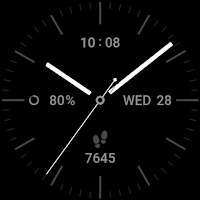
Watch face Vintage CNW0011
Personalization
Chronograph second hand. Battery optimization with three AOD brightness levels
- Rating
- 4.8
- 38 ratings
- Downloads
- 5.6K+
- on Google Play
- Price
- Free
- No in-app purchases
- Updated
- Jul 3
- 2025
Screenshots
Save to Pinterest


About Watch face Vintage CNW0011
⌚️ Watch face Vintage CNW0011
🟥 Display & Custom
- Date, analog time, digital time
- Chronograph second hand
- Battery level, battery optimization with three AOD brightness levels
- Display steps count
- Customize multiple color themes: 20 vintage color. See more photos on Google Play store
🟨 How to custom this watch face?
1. Press and hold watch face screen
2. Tap “Customize” button
3. Swipe left or right, up or down to customize watch face
🟦 How to install watch face on your watch?
1. Install watch face from Google Play store
2. Press and hold watch face screen
3. Swipe right to left and tap “Add watch face”
4. Scroll to the bottom of the page and selectwatch face in the “downloaded” section
🟧 Compatible with smart watches running Wear OS. For example: Galaxy Watch 6, Galaxy Watch 7 Ultra, Ticwatch Pro 5, Pixcel Watch 2, Watch 2 Pro,...
🟩 See my other watch faces: https://play.google.com/store/apps/developer?id=cuonguyen
🟪 Follow my social media pages for the latest watch face updates:
https://www.facebook.com/cuonguyen.wf
https://www.instagram.com/cuonguyen.wf
https://www.threads.net/@cuonguyen.wf
https://x.com/cuonguyen_wf
https://www.pinterest.com/cuonguyen_wf/
What’s new
Updated July 3, 2025
Update API
Alternatives to Watch face Vintage CNW0011
Looking for apps like Watch face Vintage CNW0011? Here are 6 similar Android apps on Google Play. 2 of the 6 are free to download.
-
Watch face CNW0009
-
Watch face CNW0018
-
Watch face CNW0017
-
Watch face Neon Plus
-
Watch face CNW0014
-
Watch face CNW0013
| App | Rating | Price | Installs | Last updated | Compare |
|---|---|---|---|---|---|
| Watch face Vintage CNW0011 | 4.8 / 5 | Free | 5,000+ | Jul 3, 2025 | |
| Watch face CNW0009 | – | Free | 10,000+ | Jul 3, 2025 | Compare |
| Watch face CNW0018 | – | 0.99 USD | 50+ | Jul 3, 2025 | Compare |
| Watch face CNW0017 | – | Free | 1,000+ | Jul 3, 2025 | Compare |
| Watch face Neon Plus | – | 0.99 USD | 1,000+ | Jul 3, 2025 | Compare |
| Watch face CNW0014 | – | 0.99 USD | 10+ | Jul 3, 2025 | Compare |
| Watch face CNW0013 | – | 0.99 USD | 1,000+ | Jul 3, 2025 | Compare |