
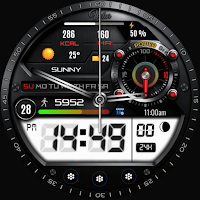
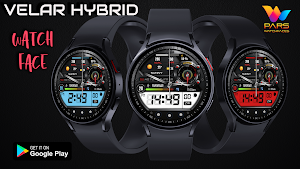
Velar Hybrid Watch Face
Personalization
Color Your Time with Smart Simplicity
- Downloads
- 186+
- on Google Play
- Price
- $0.99
- No in-app purchases
- Updated
- Oct 5
- 2026
Screenshots
Save to Pinterest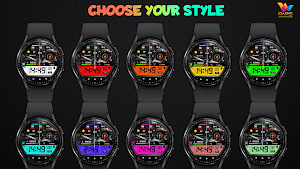
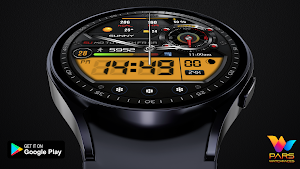


About Velar Hybrid Watch Face
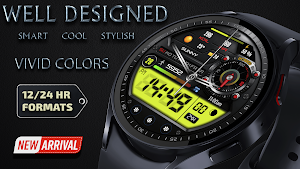
Upgrade your smartwatch with a watch face that perfectly balances elegance and functionality.
🔥 Key Features:
🎨 20 Vivid Background Colors
⚙️ 1 Custom Complication
⌚ Hybrid Design
🌤 Weather Information
🔋 Battery Percentage
👣 Step Counter
❤️ Heart Rate Counter
Velar Hybrid Watch Face is compatible with all watches using Wear OS SDK 34 and Api 34+.
IMPORTANT NOTE: The companion application installed on your phone is for informational purposes only. The watch face will be automatically installed on your watch. All you need to do is activate the Always Set Watch Face section from the settings menu in the Play Store application on your watch. This will automatically bring the watch face to your home screen. For more information, please check the link below.
https://www.parswatchfaces.com/set/
PLEASE NOTE: In some watch brands and models, functions specific to Samsung Galaxy series watches may not work.
* Please check the pictures of the watch face for more information.
NOTES:
- Make sure you have allowed the access sensors.
- Step target set to 10k.
- Turning on the pedometer by clicking on the Pedometer text may not work on some watch models other than Samsung watch models.
- This watch face is compatible with Samsung Galaxy Watch 4,Watch 5, Watch 6, Watch 7, Pixel Watch etc.It supports all Wear OS devices with API Level 30+.
ISTALLING NOTES:
1 - Make sure the watch is properly connected to the phone.
The Phone app just acts as a placeholder to make it easy to set up and find the watch face on your Wear OS watch
PS: If you get stuck in the payment cycle, don't worry, only one payment will be made even if you are asked to pay a second time. Wait 5 minutes or restart your watch and try again.
There may be a synchronization issue between your device and Google servers.
or
2 - Alternatively, try to install the watch face from the web browser on your PC.
PS: While installing the watch face, the developer has no any control about the installation.
Before writing a negative comment or giving 1 star rating please read the Installation Guide carefully in the link below and please contact us via e-mail if you get any other problem.
https://www.parswatchfaces.com/installation-guide/
NOTE :If you get the message "Your devices are not compatible" instead of app on phone, please use Play Store in WEB browser from PC or Laptop.
IMPORTANT NOTICE :
After installation, the watch face can load the last heart rate measurement result, but it doesn't have to.
The watch face does not automatically measure and does not automatically display the heart rate result.
To view your current heart rate score, you'll need to take a manual measurement.
To do this, sit still, wait a few minutes and click on the heart rate display area.
Wait a few seconds. The watch face will take a measurement and display the current result.
Do this whenever you want to see your current heart rate.
MY WATCH FACES CATALOG
https://play.google.com/store/apps/dev?id=7655501335678734997
FOLLOW US :
FACEBOOK
https://www.facebook.com/profile.php?id=100078915463662
INSTAGRAM
https://www.instagram.com/parswf/
TELEGRAM
https://t.me/parswatchfaces
if you have any question, please contact with me: [email protected]
I would be very grateful for the rate and review in the Store.
Thanks.
🔥 Key Features:
🎨 20 Vivid Background Colors
⚙️ 1 Custom Complication
⌚ Hybrid Design
🌤 Weather Information
🔋 Battery Percentage
👣 Step Counter
❤️ Heart Rate Counter
Velar Hybrid Watch Face is compatible with all watches using Wear OS SDK 34 and Api 34+.
IMPORTANT NOTE: The companion application installed on your phone is for informational purposes only. The watch face will be automatically installed on your watch. All you need to do is activate the Always Set Watch Face section from the settings menu in the Play Store application on your watch. This will automatically bring the watch face to your home screen. For more information, please check the link below.
https://www.parswatchfaces.com/set/
PLEASE NOTE: In some watch brands and models, functions specific to Samsung Galaxy series watches may not work.
* Please check the pictures of the watch face for more information.
NOTES:
- Make sure you have allowed the access sensors.
- Step target set to 10k.
- Turning on the pedometer by clicking on the Pedometer text may not work on some watch models other than Samsung watch models.
- This watch face is compatible with Samsung Galaxy Watch 4,Watch 5, Watch 6, Watch 7, Pixel Watch etc.It supports all Wear OS devices with API Level 30+.
ISTALLING NOTES:
1 - Make sure the watch is properly connected to the phone.
The Phone app just acts as a placeholder to make it easy to set up and find the watch face on your Wear OS watch
PS: If you get stuck in the payment cycle, don't worry, only one payment will be made even if you are asked to pay a second time. Wait 5 minutes or restart your watch and try again.
There may be a synchronization issue between your device and Google servers.
or
2 - Alternatively, try to install the watch face from the web browser on your PC.
PS: While installing the watch face, the developer has no any control about the installation.
Before writing a negative comment or giving 1 star rating please read the Installation Guide carefully in the link below and please contact us via e-mail if you get any other problem.
https://www.parswatchfaces.com/installation-guide/
NOTE :If you get the message "Your devices are not compatible" instead of app on phone, please use Play Store in WEB browser from PC or Laptop.
IMPORTANT NOTICE :
After installation, the watch face can load the last heart rate measurement result, but it doesn't have to.
The watch face does not automatically measure and does not automatically display the heart rate result.
To view your current heart rate score, you'll need to take a manual measurement.
To do this, sit still, wait a few minutes and click on the heart rate display area.
Wait a few seconds. The watch face will take a measurement and display the current result.
Do this whenever you want to see your current heart rate.
MY WATCH FACES CATALOG
https://play.google.com/store/apps/dev?id=7655501335678734997
FOLLOW US :
https://www.facebook.com/profile.php?id=100078915463662
https://www.instagram.com/parswf/
TELEGRAM
https://t.me/parswatchfaces
if you have any question, please contact with me: [email protected]
I would be very grateful for the rate and review in the Store.
Thanks.
What’s new
Updated October 5, 2026
First Release
Alternatives to Velar Hybrid Watch Face
Looking for apps like Velar Hybrid Watch Face? Here are 6 similar Android apps on Google Play. The highest rated is MD242 Hybrid watch face (4.5/5).
-
YSR003 Hybrid Watch Face
-
BRN129 - LOGAN 4.4
-
SD119
-
MD242 Hybrid watch face 4.5
-
SamWatch AD IX
-
DB062 Vanguard Hybrid
| App | Rating | Price | Installs | Last updated | Compare |
|---|---|---|---|---|---|
| Velar Hybrid Watch Face | – | $0.99 | 100+ | Oct 5, 2026 | |
| YSR003 Hybrid Watch Face | – | 0.99 USD | 50+ | Oct 20, 2026 | Compare |
| BRN129 - LOGAN | 4.4 / 5 | 1.99 USD | 1,000+ | – | Compare |
| SD119 | – | 0.99 USD | 1+ | Aug 11, 2026 | Compare |
| MD242 Hybrid watch face | 4.5 / 5 | 2.19 USD | 100,000+ | Oct 10, 2026 | Compare |
| SamWatch AD IX | – | 2.5 USD | 100+ | Jul 26, 2024 | Compare |
| DB062 Vanguard Hybrid | – | 1.49 USD | 100+ | Aug 15, 2026 | Compare |
Similar apps on Google Play
- YSR003 Hybrid Watch Face
- BRN129 - LOGAN
- SD119
- MD242 Hybrid watch face
- SamWatch AD IX
- DB062 Vanguard Hybrid
- MD315 Analog Watch Face
- MD322 Analog watch face
- MD312 Analog watch face
- CARDILOT CTS41 Watch face
- FSW288 Analog,Classic
- Finter Hybrid Watch Face
- BFF12- Digital & Analog: Metal
- Hybrid JUST URX123 Watch face
- DB051 Hybrid Sport Watch Face
- Pars Arios Hybrid Watch Face
- Ballozi DESAN GHOST Hybrid
- DB040 Hybrid Sport
- MAGARNO CTS26 Watch face
- Alvion Hybrid Watch Face
- DB061 Next Gen Hybrid
- SY39 Watch Face for Wear OS
- NTV508 - Hybrid W watch face
- MD234 Analog watch face
- Diagonal Frosted ZKin Watch
- Analog Watchface FSW298
- NTV506 - Aircraf Pro Watchface
- Ballozi MERTEK Digital Retro