
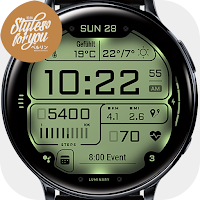
S4U Luminary - LCD watch face
Personalization
Customizable LCD watch face for WearOS.
- Rating
- 4.9
- 48 ratings
- Downloads
- 2.4K+
- on Google Play
- Price
- $1.49
- No in-app purchases
- Updated
- Sep 25
- 2026
Screenshots


About S4U Luminary - LCD watch face
Upgrade your WearOS experience with the S4U Luminary. A digital LCD watch face with customizable colors and multiple custom complications.
Highlights:
- digital LCD watch face
- color customization
- 3 custom complications (for custom data)
- 4 custom shortcuts to reach your favourite widget
- watch face shows the time, steps, heart rate, weekday and the day of the month.
AOD:
The watch face have a always on display.
Colors are synchronized with the normal view.
Keep in mind, when you using the always on display it will reduce your battery endurance!)
Color adjustments:
1. Press and hold finger on the watch display.
2. Press the button to adjust.
3. Swipe left or right to switch between the different customizable items.
4. Swipe up or down to change the options/color of the items.
Available customization options:
Color shade: 3 option
Lights ON or OFF: LCD lights
Color: 29 colors
Additional functionality:
+ tap the battery indicator to open battery details
Heart rate measurement:
*** IMPORTANT NOTE ***.
After installation, the watch face may load the result of the last heart rate measurement, but it does not have to. The watch face does not automatically measure or display the result of the heart rate measurement.
To view your current heart rate, you must take a manual measurement. To do this, click on the heart rate display. Keep your arm still and balanced for a few seconds during the measurement process. The heart icon will flash during the measurement process. When the "ERR" message appears, the measurement has failed. In this case just try it again. Do this whenever you want to see your current heart rate.
The heart rate is measured directly by the sensor of the watch. The value is not synchronized with any other application. They work independently and can therefore differ from each other! Some models may not fully support the features offered.
****
Setting up app shortcuts and custom complications:
1. Press and hold the watch display.
2. Push the customize button.
3. Swipe from right to left until you reach the "complications".
4. 4 app shortcuts and 3 custom complications are highlighted. Click on it to set what you want here.
Thats it.
If you like the design, it is definitely worth to have a look at my other creations. More designs will be available for Wear OS in the future. Just check out my website: https://www.s4u-watches.com.
For quick contact with me, use the email. I also would be happy for every feedback in the play store. What you like, what you don't like or any suggestions for the future. I try to have everything in view.
My Social Media to be always up to date:
Instagram: https://www.instagram.com/matze_styles4you/
facebook: https://www.facebook.com/styles4you
Youtube: https://www.youtube.com/c/styles4you-watches
Twitter: https://twitter.com/MStyles4you
Highlights:
- digital LCD watch face
- color customization
- 3 custom complications (for custom data)
- 4 custom shortcuts to reach your favourite widget
- watch face shows the time, steps, heart rate, weekday and the day of the month.
AOD:
The watch face have a always on display.
Colors are synchronized with the normal view.
Keep in mind, when you using the always on display it will reduce your battery endurance!)
Color adjustments:
1. Press and hold finger on the watch display.
2. Press the button to adjust.
3. Swipe left or right to switch between the different customizable items.
4. Swipe up or down to change the options/color of the items.
Available customization options:
Color shade: 3 option
Lights ON or OFF: LCD lights
Color: 29 colors
Additional functionality:
+ tap the battery indicator to open battery details
Heart rate measurement:
*** IMPORTANT NOTE ***.
After installation, the watch face may load the result of the last heart rate measurement, but it does not have to. The watch face does not automatically measure or display the result of the heart rate measurement.
To view your current heart rate, you must take a manual measurement. To do this, click on the heart rate display. Keep your arm still and balanced for a few seconds during the measurement process. The heart icon will flash during the measurement process. When the "ERR" message appears, the measurement has failed. In this case just try it again. Do this whenever you want to see your current heart rate.
The heart rate is measured directly by the sensor of the watch. The value is not synchronized with any other application. They work independently and can therefore differ from each other! Some models may not fully support the features offered.
****
Setting up app shortcuts and custom complications:
1. Press and hold the watch display.
2. Push the customize button.
3. Swipe from right to left until you reach the "complications".
4. 4 app shortcuts and 3 custom complications are highlighted. Click on it to set what you want here.
Thats it.
If you like the design, it is definitely worth to have a look at my other creations. More designs will be available for Wear OS in the future. Just check out my website: https://www.s4u-watches.com.
For quick contact with me, use the email. I also would be happy for every feedback in the play store. What you like, what you don't like or any suggestions for the future. I try to have everything in view.
My Social Media to be always up to date:
Instagram: https://www.instagram.com/matze_styles4you/
facebook: https://www.facebook.com/styles4you
Youtube: https://www.youtube.com/c/styles4you-watches
Twitter: https://twitter.com/MStyles4you
What’s new
Updated September 25, 2026
Version (1.1.3) - Companion App Minor fixes.
Alternatives to S4U Luminary - LCD watch face
Looking for apps like S4U Luminary - LCD watch face? Here are 6 similar Android apps on Google Play. The highest rated is S4U RC ONE - USA watch face (4.4/5), and 2 of the 6 are free to download.
-
S4U EYE2 Digital watch face
-
S4U RC ONE - Basic watch face 4.4
-
S4U RC ONE - USA watch face 4.4
-
S4U Dive Winter - watch face
-
S4U Nitro - Classic watch face
-
S4U London Winter - Watch face
| App | Rating | Price | Installs | Last updated | Compare |
|---|---|---|---|---|---|
| S4U Luminary - LCD watch face | 4.9 / 5 | $1.49 | 1,000+ | Sep 25, 2026 | |
| S4U EYE2 Digital watch face | – | 1.49 USD | 5,000+ | Sep 30, 2026 | Compare |
| S4U RC ONE - Basic watch face | 4.4 / 5 | Free | 500,000+ | Oct 6, 2026 | Compare |
| S4U RC ONE - USA watch face | 4.4 / 5 | Free | 100,000+ | Oct 6, 2026 | Compare |
| S4U Dive Winter - watch face | – | 1.49 USD | 1,000+ | Oct 5, 2026 | Compare |
| S4U Nitro - Classic watch face | – | 1.69 USD | 5,000+ | Sep 21, 2026 | Compare |
| S4U London Winter - Watch face | – | 1.49 USD | 1,000+ | Oct 19, 2026 | Compare |
Similar apps on Google Play
- S4U EYE2 Digital watch face
- S4U RC ONE - Basic watch face
- S4U RC ONE - USA watch face
- S4U Dive Winter - watch face
- S4U Nitro - Classic watch face
- S4U Luminary - LCD watch face
- S4U London Winter - Watch face
- S4U Mystique - Gold watch face
- S4U Dive - Diver watch face
- S4U Legends soccer watch face
- S4U Arctic Blue watch face
- S4U Shift Racing watch face
- S4U Spider Hybrid watch face
- S4U Race digital watch face
- S4U London classic watch face
- S4U Abandon Time watch face
- S4U Ancient SE watch face
- S4U Ancient Winter SE
- S4U Tempest digital watch face
- S4U R3D TWO Digital watch face
- S4U Kyoto realistic watch face
- S4U Ancient Winter watch face
- S4U Macau Neo Watch face
- S4U Cyberpunk watch face
- S4U Luxe SP silver watch face
- S4U Luxe - Golden watch face
- S4U Monterey chrono watch face
- S4U RC ONE - Retro watch face
- S4U Macau Pilot watch face
- S4U Chicago Golden watch face
- S4U RC ONE Winter watch face
- S4U Macau RX Racing Watch face
- S4U RC ONE - Racing watch face
- S4U Ancient Gold Watch Face