
PWW16 - Analog Watch Face
Personalization
PWW16 - Analog Watch Face, is stylish Sport Watch Face for Wear OS
- Downloads
- 256+
- on Google Play
- Price
- $0.99
- No in-app purchases
- Updated
- Oct 9
- 2025
Screenshots
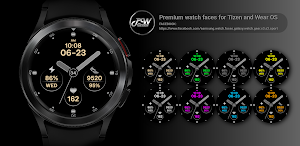
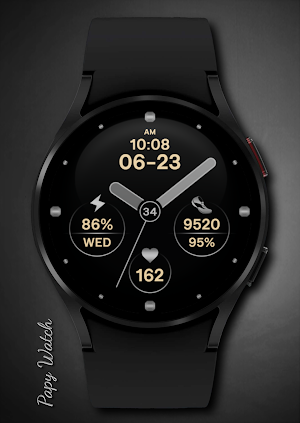
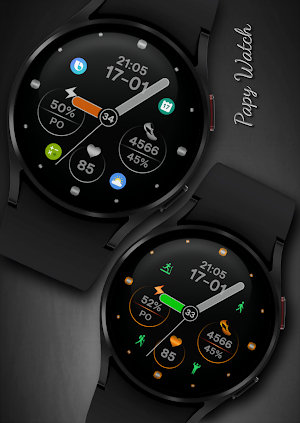
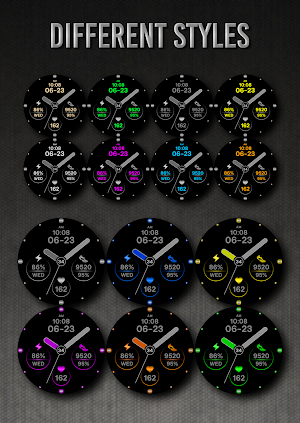


About PWW16 - Analog Watch Face
We are in social media - Here you will find many more watch faces and many coupons.
Telegram:
https://t.me/PW_Papy_Watch_Faces_Tizen_WearOS
FB:
https://www.facebook.com/samsung.watch.faces.galaxy.watch.gear.s3.s2.sport
Instagram:
https://www.instagram.com/gears3_watchface_papy_watch
PWW16 - Analog Watch Face, is stylish Sport Watch Face for Wear OS
I would like to introduce you to a stylish watch face with a premium look and many setting options.
This watch face supports all Wear OS devices with API Level 28+
Some features may not be available on some watches.
Contains information:
- 12/24hr Digital Time based on phone settings
- Date
- Day
- Steps
- Daily goals %
- Battery %
- 7 App Shortcuts - You can set any application you want
- Always ON Display
- BPM Heart Rate
HEARTRATE NOTES:
The watch face does not automatically measure and does not automatically display the HR result.
To view your current heart rate data you'll need to
take a manual measurement.
To do this, tap on the heart rate display area.
Wait a few seconds. The watch face will take a
measurement and displaythe current result.
Installation Notes:
1 - Make sure the watch is properly connected to the phone
After a few minutes the watch face will transferred on watch : check the watch faces installed by the Wearable app on the phone.
or
2 - If you are having synchronization problems between your phone and Play Store, install the app directly from watch: search "PWW16" from Play Store on watch and hit on install button.
3 - Alternatively, try installing the watch face from web browser on your PC.
Make sure you have enabled all permissions from settings -> applications -> permissions.
Customization:
Possibility to change the color of the text
Possibility to change the color of the background
Possibility to change the color of the hands
Possibility to select any application you want 7x
- 1. Touch and hold display
- 2. Tap on customize option
✉ If you have any questions, please contact us by e-mail [email protected]
We will be happy to assist you!
Telegram:
https://t.me/PW_Papy_Watch_Faces_Tizen_WearOS
FB:
https://www.facebook.com/samsung.watch.faces.galaxy.watch.gear.s3.s2.sport
Instagram:
https://www.instagram.com/gears3_watchface_papy_watch
PWW16 - Analog Watch Face, is stylish Sport Watch Face for Wear OS
I would like to introduce you to a stylish watch face with a premium look and many setting options.
This watch face supports all Wear OS devices with API Level 28+
Some features may not be available on some watches.
Contains information:
- 12/24hr Digital Time based on phone settings
- Date
- Day
- Steps
- Daily goals %
- Battery %
- 7 App Shortcuts - You can set any application you want
- Always ON Display
- BPM Heart Rate
HEARTRATE NOTES:
The watch face does not automatically measure and does not automatically display the HR result.
To view your current heart rate data you'll need to
take a manual measurement.
To do this, tap on the heart rate display area.
Wait a few seconds. The watch face will take a
measurement and displaythe current result.
Installation Notes:
1 - Make sure the watch is properly connected to the phone
After a few minutes the watch face will transferred on watch : check the watch faces installed by the Wearable app on the phone.
or
2 - If you are having synchronization problems between your phone and Play Store, install the app directly from watch: search "PWW16" from Play Store on watch and hit on install button.
3 - Alternatively, try installing the watch face from web browser on your PC.
Make sure you have enabled all permissions from settings -> applications -> permissions.
Customization:
Possibility to change the color of the text
Possibility to change the color of the background
Possibility to change the color of the hands
Possibility to select any application you want 7x
- 1. Touch and hold display
- 2. Tap on customize option
✉ If you have any questions, please contact us by e-mail [email protected]
We will be happy to assist you!
What’s new
Updated October 9, 2025
- Application improvements - Update the application to Android 14 (API level 34)
Alternatives to PWW16 - Analog Watch Face
Looking for apps like PWW16 - Analog Watch Face? Here are 6 similar Android apps on Google Play. The highest rated is PWW19 - Analog Watch Face (3.2/5), and 2 of the 6 are free to download.
-
PWW19 - Analog Watch Face 3.2
-
PWW42 - Sport Digi Watch Face
-
PWW75- Ladies Neon Flower Wear
-
PWW80 - Digi Feminine Blooms
-
PWW79 - Fluttering Beauty
-
PWW78 - Digi Easy Time Display
| App | Rating | Price | Installs | Last updated | Compare |
|---|---|---|---|---|---|
| PWW16 - Analog Watch Face | – | $0.99 | 100+ | Oct 9, 2025 | |
| PWW19 - Analog Watch Face | 3.2 / 5 | Free | 50,000+ | Oct 9, 2025 | Compare |
| PWW42 - Sport Digi Watch Face | – | Free | 10,000+ | – | Compare |
| PWW75- Ladies Neon Flower Wear | – | 1.99 USD | 100+ | Oct 22, 2025 | Compare |
| PWW80 - Digi Feminine Blooms | – | 1.99 USD | 100+ | Oct 22, 2025 | Compare |
| PWW79 - Fluttering Beauty | – | 1.99 USD | 100+ | Oct 22, 2025 | Compare |
| PWW78 - Digi Easy Time Display | – | 1.49 USD | 50+ | Oct 22, 2025 | Compare |
Similar apps on Google Play
- PWW19 - Analog Watch Face
- PWW42 - Sport Digi Watch Face
- PWW75- Ladies Neon Flower Wear
- PWW80 - Digi Feminine Blooms
- PWW79 - Fluttering Beauty
- PWW78 - Digi Easy Time Display
- PWW77 - Simple Lady Watch Face
- PWW74 - Simple Colorful
- PWW73 - Simple Analog
- PWW72 - Sport Digi Watch Face
- PWW69 - Sport Digi Watch Face
- PWW64 - Skull Digi Watch Face
- PWW62 - Digi Flower
- PWW65 - Mother's Day-Butterfly
- PWW61 - USA Freedom Time
- PWW55 - Digi Flowers
- PWW54 - Mother's Day-Butterfly
- PWW60 - Analog Watch Face
- PWW59 - Sport Digi Watch Face
- PWW11 - Ladies Floral
- PWW13 - Ladies Floral
- PWW53 - Ladies Digi Floral
- PWW52 - Ladies Digi Floral
- PWW51 - Sport Digi Watch Face
- PWW50 - Sport Digi Watch Facev
- PWW48 - Sport Digi Watch Face
- PWW46 - Sport Digi Watch Face
- PWW47 - Sport Digi Watch Face
- PWW45 - Mother's Day-Butterfly
- PWW44 - Mother's Day-Flowers
- PWW10 - Ladies Digi Floral
- PWW09 - Mother's Day-Flowers
- PWW39 - Sport Digi Watch Face
- PWW41 - Ladies Digi Watch Face
- PWW20 - Analog Watch Face
- PWW37 - Sport Digi Watch Face
- PWW38 - Sport Digi Watch Face
- PWW08 - Ladies Digi Watch Face
- PWW07 - Mother's Day - Heart
- PWW16 - Analog Watch Face
- PWW40 - Sport Digi Watch Face
- PWW36 - Sport Digi Watch Face
- PWW35 - Analog Watch Face
- PWW34 - Analog Watch Face
- PWW33 - Sport Digi Watch Face
- PWW32 - Sport Digi Watch Face
- PWW31 - Sport Digi Watch Face
- PWW28 - Sport Digi Watch Face
- PWW27 - Sport Digi Watch Face
- PWW26 - Sport Digi Watch Face
- PWW25 - Sport Digi Watch Face
- PWW24 - Analog Watch Face
- PWW23 - Sport Digi Watch Face
- PWW22 - Sport Digi Watch Face
- PWW15 - Sport Digi Watch Face
- PWW14 - Sport Digi Watch Face
- PWW17 - Analog Watch Face
- PWW01 - Analog Watch Face
- PWW04 - Ladies Digi Watch Face
- PWW21 - Analog Watch Face
- PWW05 - Ladies Digi Watch Face
- PWW06 - Blossom Watch
- PWW18 - Analog Watch Face
- PWW03-Mother's Day-Butterfly