
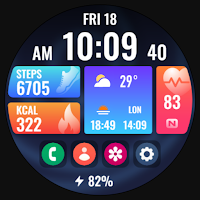
PRIME Home OS Watch Face
Personalization
Modular - Tiles - Blocks Watch Face by PRADO DESIGN
- Rating
- 4.2
- 59 ratings
- Downloads
- 1.6K+
- on Google Play
- Price
- $1.99
- No in-app purchases
- Updated
- Aug 29
- 2024 · v1.0.2
Screenshots


About PRIME Home OS Watch Face
Telegram Channel
https://t.me/pradodesign
Only for Wear OS devices API 30+
ATTENTION
If you see the message "Your devices are not compatible", go to the Play Store in your browser.
BUY 1 GET 1
https://pradodesignbr.com/BOGO
Features:
1. 12h/24h based on your phone settings
2. Heart Rate
3. Battery Level
4. Steps
5. Burned Calories
6. Date
7. Customizable Fields
8. Changeable background
9. Always On Display
10. Shortcuts
Touch and hold the display to customize your watch face.
For full functionality please manually enable sensors and receive complication data permissions!
SETTING WEATHER COMPLICATION
Press and hold the center of the watch > customize > choose a major complication and choose your weather complication provider.
The weather app needs to have the weather location set before it can set a complication.
We recommend the SimpleWeather app
https://play.google.com/store/apps/details?id=com.thewizrd.simpleweather
HEART RATE
Allow access to heart rate after installing the watch face.
Tap the heart icon to start measuring heart rate.
Make sure the watch screen is turned on and that you are wearing it correctly on your wrist when measuring your heart rate.
Newsletter
Sign up to stay updated with new watch faces and promotions!
http://eepurl.com/h0T0kn
Website
https://pradodesignbr.com
Instagram
https://www.instagram.com/pradodesignbr
Facebook
https://www.facebook.com/pradodesignbr
https://t.me/pradodesign
Only for Wear OS devices API 30+
ATTENTION
If you see the message "Your devices are not compatible", go to the Play Store in your browser.
BUY 1 GET 1
https://pradodesignbr.com/BOGO
Features:
1. 12h/24h based on your phone settings
2. Heart Rate
3. Battery Level
4. Steps
5. Burned Calories
6. Date
7. Customizable Fields
8. Changeable background
9. Always On Display
10. Shortcuts
Touch and hold the display to customize your watch face.
For full functionality please manually enable sensors and receive complication data permissions!
SETTING WEATHER COMPLICATION
Press and hold the center of the watch > customize > choose a major complication and choose your weather complication provider.
The weather app needs to have the weather location set before it can set a complication.
We recommend the SimpleWeather app
https://play.google.com/store/apps/details?id=com.thewizrd.simpleweather
HEART RATE
Allow access to heart rate after installing the watch face.
Tap the heart icon to start measuring heart rate.
Make sure the watch screen is turned on and that you are wearing it correctly on your wrist when measuring your heart rate.
Newsletter
Sign up to stay updated with new watch faces and promotions!
http://eepurl.com/h0T0kn
Website
https://pradodesignbr.com
https://www.instagram.com/pradodesignbr
https://www.facebook.com/pradodesignbr
What’s new
Version 1.0.2 · Updated August 29, 2024
- Watch face updated to the new "Watch Face Format". - Bugs fixed.
User reviews

Great design and polished graphics 👍

The Tiles formation is superb. Colourful backgrounds are an added beauty. Thanks Prado. ❤️

This face is my go to . Very intuitive simple and all the data you need.

Belissima watchface

Amazing! 🔥

Prado design continues to produce the best looking and informative watch faces. I own several and I am very picky about what watch faces I purchase. Well done!
Alternatives to PRIME Home OS Watch Face
Looking for apps like PRIME Home OS Watch Face? Here are 6 similar Android apps on Google Play. 1 of the 6 are free to download.
-
PRIME 031 - Minimal Digital
-
PRADO 50 Widgets
-
PRIME Home OS 2 Watch Face
-
PRADO 48 Analog Watch Face
-
PRADO 46 Shortcuts
-
PRADO 45 Digital Watch Face
| App | Rating | Price | Installs | Last updated | Compare |
|---|---|---|---|---|---|
| PRIME Home OS Watch Face | 4.2 / 5 | $1.99 | 1,000+ | Aug 29, 2024 | |
| PRIME 031 - Minimal Digital | – | Free | 100+ | May 26, 2022 | Compare |
| PRADO 50 Widgets | – | 0.49 USD | 500+ | Oct 22, 2024 | Compare |
| PRIME Home OS 2 Watch Face | – | 0.99 USD | 1,000+ | Sep 5, 2024 | Compare |
| PRADO 48 Analog Watch Face | – | 0.49 USD | 500+ | Oct 22, 2024 | Compare |
| PRADO 46 Shortcuts | – | 0.49 USD | 1,000+ | May 20, 2025 | Compare |
| PRADO 45 Digital Watch Face | – | 0.99 USD | 1,000+ | Aug 1, 2024 | Compare |
Similar apps on Google Play
- PRIME 031 - Minimal Digital
- PRADO 50 Widgets
- PRIME Home OS 2 Watch Face
- PRIME Home OS Watch Face
- PRADO 48 Analog Watch Face
- PRADO 46 Shortcuts
- PRADO 45 Digital Watch Face
- PRADO 41 Moon Phase
- PRADO 40 Blocks Tiles
- PRADO 39 Digital Watch Face
- PRADO 37 Digital Watch Face
- PRIME 041 - Digital Watch Face
- PRIDE RAINBOW Watch Face
- PRADO 35 Digital Watch Face
- PRADO 34 Digital Watch Face
- PRADO 33 Digital Watch Face
- PRADO 30 Weather Watch Face
- PRADO 29 Weather Watch Face
- PRADO 27 Weather - Km & Mile
- PRADO 26 Weather Watch Face
- PRADO 25 Weather Watch Face
- PRADO 24 Weather - Km & Mile
- PRADO 23 Weather Watch Face
- PRADO 22 Weather Watch Face
- ACTIVE 42 Wear OS Watch Face
- PRADO 12 Digital Watch Face
- PRADO 11 Digital Watch Face
- PRADO 21 Weather Watch Face
- PRADO 19 Digital Watch Face
- PRADO 06 Hybrid Watch Face
- ACTIVE 39 Hybrid Watch Face
- PRADO 05 Digital Watch Face
- PRADO 04 Digital Watch Face
- PRADO 03 Digital Watch Face
- PRADO 02 Hybrid Watch Face
- PRADO 01 Digital Watch Face
- PRIME 005 Digital Watch Face
- PRIME 011 Digital Watch Face
- PRIME 042 Digital Watch Face
- PRADO X81 Digital Watch Face
- PRADO X165 Digital Watch Face
- PRADO X143 Digital Watch Face
- PRADO X168 HUD Watch Face
- PRADO X167 HUD Watch Face
- PRADO X166 Analog Watch Face
- PRADO X164 Digital Watch Face
- PRADO X162 Hybrid Watch Face
- PRIME 033 Hybrid Watch Face
- PRADO X155 Wear OS Watch Face
- PRADO X153: Digital Watch Face
- PRADO X151 Digital Watch Face
- PRADO X148 Hybrid Watch Face
- PRADO X146 Digital Watch Face
- PRADO X142 - Digital WatchFace
- PRADO X2 - Digital Watch Face
- PRADO X139 - Hybrid Watch Face
- P014 - Digital Watch Face
- PRADO X115 - Digital
- PRADO X121 - Hybrid Watch Face
- ACTIVE 11 - Digital Watch Face
- PRADO X112 - Hybrid Watch Face
- P006 - Hybrid Watch Face
- P005 - Digital Watch Face
- P004 - Analog Watch Face
- PRADO X101 - Hybrid Watch Face
- PRADO X9 - Digital Watch Face
- PRIME 015 - Digital Watch Face
- PRIME 021 - Digital Watch Face
- PRADO X98 - Digital Watch Face
- PRADO X96 - Digital Watch Face
- PRADO X95 - Hybrid Watch Face
- PRADO X86 - Hybrid Watch Face
- PRADO X75 Digital Watch Face
- ACTIVE 41 - Futuristic Digital
- PRIME 001 - Retro Watch Face
- PRADO X74 - Digital Watch Face
- PRADO X62 - Digital Watch Face
- ACTIVE 48 - Futuristic Digital
- PRADO X37 Digital Watch Face
- PRADO X15 - Hybrid Watch Face
- ACTIVE 51 - Futuristic Digital
- P003 - Modern Digital
- PRADO X1 - Modern Digital
- PRADO X59: Futuristic Digital
- PRADO X39 - Hybrid Watch Face
- PRIME 003 Modern Digital
- PRIME 012 - Digital Retro
- ACTIVE Seven - Modern Digital
- PRADO X4 Digital Retro
- PRADO X25 - Hybrid Watch Face
- PRIME Widgets for KWGT