
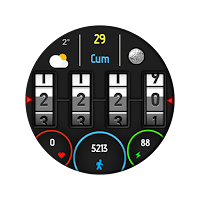
Pars Digi Numeric
Personalization
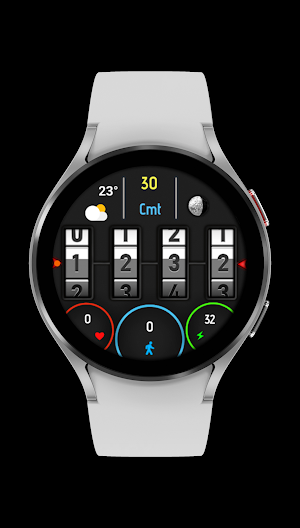
Excellent digital watch face with lock digit numbers and informative screen
- Downloads
- 50+
- on Google Play
- Price
- $0.99
- No in-app purchases
- Updated
- Oct 1
- 2023
Screenshots
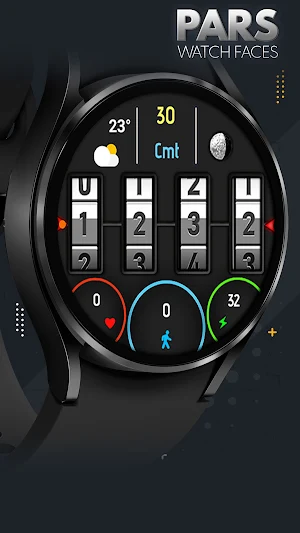
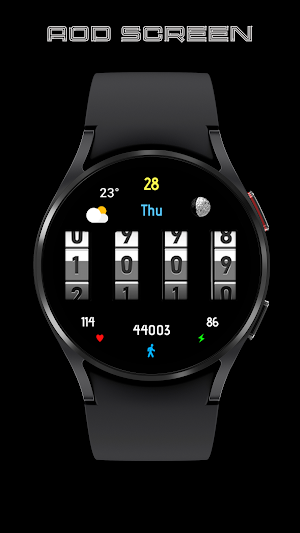
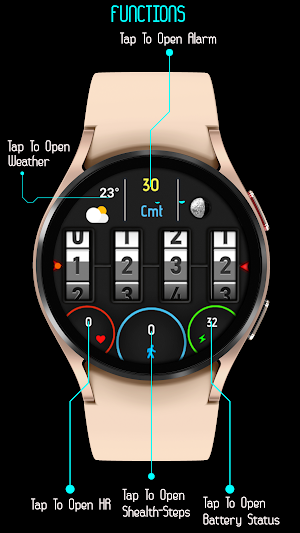


About Pars Digi Numeric
Pars Digi Numeric Watch Face
The perfect looks and easy to read Digital watch face, by Pars for Wear OS.
FEATURES
Digital Design
* Digital clock with 12/24hr formats
* Weather Information
* Day of the week (Multi-languages).
* Date of the month.
* Battery, Heart Rate & Steps Indicators
* Battery status.
* Steps counter.
* Heart Rate counter.
* Alarm, Steps, Heart Rate, Battery Sttaus and Weather App shortcuts.
* Always on view.
* Moon Phase
ISTALLING NOTES:
1 - Make sure the watch is properly connected to the phone, open the Phone App on the phone and tap "DOWNLOAD TO WATCH" and follow the instructions on the watch.
A few minutes after tapping the set watch button, the watch face will be installed. You can choose the installed watch face.
The Phone app just acts as a placeholder to make it easy to set up and find the watch face on your Wear OS watch
Note: If you get stuck in the payment cycle, don't worry, only one payment will be made even if you are asked to pay a second time. Wait 5 minutes or restart your watch and try again.
There may be a synchronization issue between your device and Google servers.
or
2 - Alternatively, try to install the watch face from the web browser on your PC.
NOTE: While installing the watch face, the developer has no any control about the installation.
Before writing a negative comment or giving 1 star rating please read the Installation Guide carefully in the link below and please contact us via e-mail if you get any other problem.
Thank you.
https://www.parswatchfaces.com/installation-guide/
MY WATCH FACES CATALOG
https://play.google.com/store/apps/dev?id=7655501335678734997
NOTE : If you get the message "Your devices are not compatible" instead of app on phone, please use Play Store in WEB browser from PC or Laptop.
NOTE :Make sure you have allowed the access sensor.
IMPORTANT NOTICE :
After installation, the watch face can load the last heart rate measurement result, but it doesn't have to.
The watch face does not automatically measure and does not automatically display the heart rate result.
To view your current heart rate score, you'll need to take a manual measurement.
To do this, sit still, wait a few minutes and click on the heart rate display area.
Wait a few seconds. The watch face will take a measurement and display the current result.
Do this whenever you want to see your current heart rate.
FOLLOW US :
FACEBOOK
https://www.facebook.com/profile.php?id=100078915463662
INSTAGRAM
https://www.instagram.com/parswf/
TELEGRAM
https://t.me/parswatchfaces
if you have any question, please contact with me: [email protected]
I would be very grateful for the rate and review in the Store.
Thanks.
The perfect looks and easy to read Digital watch face, by Pars for Wear OS.
FEATURES
Digital Design
* Digital clock with 12/24hr formats
* Weather Information
* Day of the week (Multi-languages).
* Date of the month.
* Battery, Heart Rate & Steps Indicators
* Battery status.
* Steps counter.
* Heart Rate counter.
* Alarm, Steps, Heart Rate, Battery Sttaus and Weather App shortcuts.
* Always on view.
* Moon Phase
ISTALLING NOTES:
1 - Make sure the watch is properly connected to the phone, open the Phone App on the phone and tap "DOWNLOAD TO WATCH" and follow the instructions on the watch.
A few minutes after tapping the set watch button, the watch face will be installed. You can choose the installed watch face.
The Phone app just acts as a placeholder to make it easy to set up and find the watch face on your Wear OS watch
Note: If you get stuck in the payment cycle, don't worry, only one payment will be made even if you are asked to pay a second time. Wait 5 minutes or restart your watch and try again.
There may be a synchronization issue between your device and Google servers.
or
2 - Alternatively, try to install the watch face from the web browser on your PC.
NOTE: While installing the watch face, the developer has no any control about the installation.
Before writing a negative comment or giving 1 star rating please read the Installation Guide carefully in the link below and please contact us via e-mail if you get any other problem.
Thank you.
https://www.parswatchfaces.com/installation-guide/
MY WATCH FACES CATALOG
https://play.google.com/store/apps/dev?id=7655501335678734997
NOTE : If you get the message "Your devices are not compatible" instead of app on phone, please use Play Store in WEB browser from PC or Laptop.
NOTE :Make sure you have allowed the access sensor.
IMPORTANT NOTICE :
After installation, the watch face can load the last heart rate measurement result, but it doesn't have to.
The watch face does not automatically measure and does not automatically display the heart rate result.
To view your current heart rate score, you'll need to take a manual measurement.
To do this, sit still, wait a few minutes and click on the heart rate display area.
Wait a few seconds. The watch face will take a measurement and display the current result.
Do this whenever you want to see your current heart rate.
FOLLOW US :
https://www.facebook.com/profile.php?id=100078915463662
https://www.instagram.com/parswf/
TELEGRAM
https://t.me/parswatchfaces
if you have any question, please contact with me: [email protected]
I would be very grateful for the rate and review in the Store.
Thanks.
What’s new
Updated October 1, 2023
First Release
Alternatives to Pars Digi Numeric
Looking for apps like Pars Digi Numeric? Here are 6 similar Android apps on Google Play. The highest rated is Comics Pow (5.0/5), and 2 of the 6 are free to download.
-
Pars Neva Analog
-
Pars Lidia Digital Watch Face
-
Hybrid Sportive Watch Face
-
Life Is Beautiful
-
Comics Pow 5.0
-
Colorful Modern Digital
| App | Rating | Price | Installs | Last updated | Compare |
|---|---|---|---|---|---|
| Pars Digi Numeric | – | $0.99 | 50+ | Oct 1, 2023 | |
| Pars Neva Analog | – | Free | 1,000+ | Oct 5, 2026 | Compare |
| Pars Lidia Digital Watch Face | – | Free | 10,000+ | – | Compare |
| Hybrid Sportive Watch Face | – | 0.99 USD | 100+ | Apr 7, 2024 | Compare |
| Life Is Beautiful | – | 0.49 USD | 1+ | Apr 4, 2024 | Compare |
| Comics Pow | 5.0 / 5 | 0.99 USD | 100+ | Oct 5, 2026 | Compare |
| Colorful Modern Digital | – | 0.99 USD | 50+ | Apr 7, 2024 | Compare |
Compare Pars Digi Numeric with the top alternatives: ratings, updates, ASO score and keyword gaps →
Similar apps on Google Play
- Pars Neva Analog
- Pars Lidia Digital Watch Face
- Hybrid Sportive Watch Face
- Life Is Beautiful
- Comics Pow
- Colorful Modern Digital
- Pop Art Wassup
- Analog Prime Watch Face
- Pars Comics Double Color
- Pars Golden Pattern
- Pars Color Inform
- Digital Watch Face NV
- Pars Sweet Frog Animation
- Pars Sweet Parrot
- Tourbillion Analog Watch Face
- Pars Machine Animation
- Black Modern Analog
- Digital Watch Face NE
- Valentine's Day
- Power Of Love
- Valentine Day Analog
- Love Time Valentine Watch Face
- Pars Modern Analog
- Steampunk Digital Animation
- Pars Universe
- Pars Golden Turbine
- Oxide Digital
- Pars Color Waves
- Pars Geartech Animation
- Gods Of War
- Pars Fireball
- Pars Watch Faces
- Digital Watch Face
- Sweet Cat Digital Watch Face
- Color Roman Analog
- Pars Premium Analog
- Santa Claus
- Pars Xmas
- Pars Noel Analog Watch Face
- Merry Christmas Watch
- Merry Christmas Watch Face
- Pars Tropic Flowers
- Pars Vintage Analog
- Pars Bat Analog Watch Face
- Pars Lara Hybrid Watch Face
- Pars Era Hybrid Watch Face
- Pars Elektra Hybrid Watch Face
- Pars Black Analog
- Pars Funny Face
- Autumn Flowers
- Beautiful Floral
- Pars Vera Analog Watch Face
- Pars Aztec Analog Watch Face
- Pars Almina Analog Watch Face
- Pars Halloween Witch
- Pars Halloween
- Happy Halloween Watch Face
- Halloween Red Night Horror
- Pars Day Loop
- Pars Mandala
- Pars Clear Digital Weather
- Pars Simple Analog Watch Face
- Halloween Pumpkin Horror
- Happy Halloween Boo
- Pars Luxian Hybrid Watch Face
- Pars Digital Inform
- Pars Three Crescents
- Scary Pumpkin
- Autumn Floral Digital
- Pars Digi Numeric
- Pars Comics Blackish
- Pars Watercolor
- Pars Tuspa Digital Watch Face
- Pars Tropic Digital V2
- Pars Teos Classic Watch Face
- Pars Surprised Lady
- Pars Prusa Hybrid Watch Face
- Pars Pop Art Digital
- Pars Neon Digital
- Pars Military Comouflage
- Pars Lovely Girl
- Pars Lavinia Hybrid Watch Face
- Pars Karia Colored Watch Face
- Pars Ikon Colored Watch Face
- Pars Hybrid Lux
- Pars Hitit Hybrid Watch Face
- Pars Back To School
- Pars Color Animation
- Pars Riot Of Colors
- Pars Dephne
- Pars Tropical Digital
- Pars Sweet Puppy Animation
- Pars Lagina Digital Watch Face
- Pars Pop Art Joy
- Pars Sardes Hybrid Watch Face
- Pars Music Forever
- Pars Mountain
- Pars Turkey Analog Watch Face
- Pars Orhai Analog Watch Face
- Pars Cornet Digital Watch Face
- Pars Knidos Digital Watch Face
- Pars Europa Analog Watch Face
- Pars Turanj Digital Watch Face
- Pars Charming Lady
- Pars Beach Time
- Pars Comic Double Color
- Pars Samarra Animation
- Pars Lovely Owls
- Pars Color Leaves
- Pars Curly Girl
- Pars Minimal
- Pars Sport XT
- Pars Comics Animation
- Pars Simple Smart Analog
- Arabian Nights Watch Face
- Pars Hiera Analog Watch Face
- Pars 90's Digital Watch Face
- Pars Wooden Analog Watch Face
- Pars Chrono Digital Watch Face
- Pars Color Palette
- Pars Navy Blue Analog
- Pars Blue Eyed Lady
- Pars Ion Hybrid Watch Face
- Pars Aqua
- Pars Big Roman Classic
- Pars Amos Digital
- Pars Guitar
- Pars Classic Analog
- Comics Digital
- Pars Happy Couple
- Pars Cheerful Lady Watch Face
- Pars Alpinist Digital
- Pars Forest Adventure
- Pars Maths White Analog
- Pars Egea Digital Watch Face
- Pars Vintage Analog
- Pars Comics NG
- Pars Alania Digital
- Pars Colored Bubble
- Pars Hagia Sofia
- Pars Flowers
- Pars Feel The Music
- Pars Cowboy
- Pars Comics Digital NV
- Mustafa Kemal
- Pars Efes Digital
- Pars Cyber Digital Watch Face
- Pars Digi Training
- Pars Perge Digital Watch Face
- Pars Sci Animated