
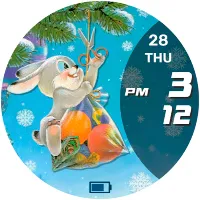
New Year's bunny
Personalization
Watch face for smart watches on the Wear OS platform
- Downloads
- 80+
- on Google Play
- Price
- $0.99
- No in-app purchases
- Updated
- Aug 24
- 2025
Screenshots
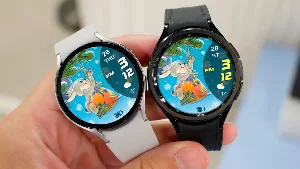
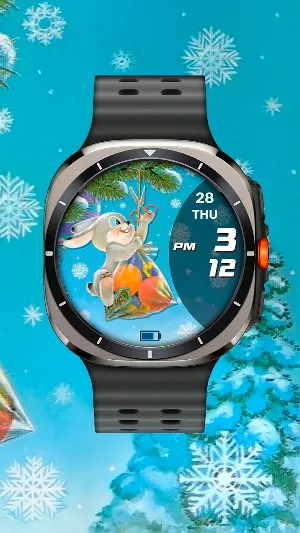

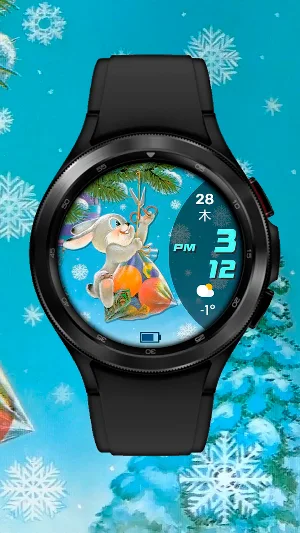


About New Year's bunny
The watch face for smart watches on the Wear OS platform supports the following functionality:
- Automatic switching of 12/24 hour modes. The watch display mode is synchronized with the set mode on your smartphone
- Multilingual display of the day of the week. The language is synchronized with the settings of your smartphone
- Display of battery charge as an icon with a changeable scale
CUSTOMIZATION:
You can customize the color of the time digits through the watch face menu.
I made an original AOD mode for this watch face. To display it, you need to activate it in the menu of your watch. In this case, the AOD mode can work in two modes
- Economy is enabled by default (has the value "AOD Dark" in the menu)
- Bright (has the value "AOD Bright" in the menu). Please note! In this mode, battery consumption will be higher
To display the weather, you need to assign the Weather app data output to this information zone in the watch face settings. You can output data from another app installed on the watch. But in this case, there is no guarantee that the data will be displayed correctly, since not all apps are optimized for this.
I also added 3 tap zones to the watch face, which you can configure to quickly call up apps installed on your watch. Configuration and assignment occurs through the watch face menu
IMPORTANT! I can only guarantee the correct operation of the information zone and tap zones on Samsung watches. Unfortunately, I cannot guarantee operation on watches from other manufacturers. Please take this into account when purchasing a watch face.
There is also one feature in the weather display on the Samsung Galaxy Watch Ultra watch - as of 11/18/24, weather data (stock Samsung app) in this watch is displayed incorrectly due to software. You can use weather data from third-party applications.
For comments and suggestions, please write to e-mail: [email protected]
Join us on social networks
https://vk.com/eradzivill
https://radzivill.com
https://t.me/eradzivill
https://www.facebook.com/groups/radzivill
Sincerely,
Eugeniy Radzivill
- Automatic switching of 12/24 hour modes. The watch display mode is synchronized with the set mode on your smartphone
- Multilingual display of the day of the week. The language is synchronized with the settings of your smartphone
- Display of battery charge as an icon with a changeable scale
CUSTOMIZATION:
You can customize the color of the time digits through the watch face menu.
I made an original AOD mode for this watch face. To display it, you need to activate it in the menu of your watch. In this case, the AOD mode can work in two modes
- Economy is enabled by default (has the value "AOD Dark" in the menu)
- Bright (has the value "AOD Bright" in the menu). Please note! In this mode, battery consumption will be higher
To display the weather, you need to assign the Weather app data output to this information zone in the watch face settings. You can output data from another app installed on the watch. But in this case, there is no guarantee that the data will be displayed correctly, since not all apps are optimized for this.
I also added 3 tap zones to the watch face, which you can configure to quickly call up apps installed on your watch. Configuration and assignment occurs through the watch face menu
IMPORTANT! I can only guarantee the correct operation of the information zone and tap zones on Samsung watches. Unfortunately, I cannot guarantee operation on watches from other manufacturers. Please take this into account when purchasing a watch face.
There is also one feature in the weather display on the Samsung Galaxy Watch Ultra watch - as of 11/18/24, weather data (stock Samsung app) in this watch is displayed incorrectly due to software. You can use weather data from third-party applications.
For comments and suggestions, please write to e-mail: [email protected]
Join us on social networks
https://vk.com/eradzivill
https://radzivill.com
https://t.me/eradzivill
https://www.facebook.com/groups/radzivill
Sincerely,
Eugeniy Radzivill
Alternatives to New Year's bunny
Looking for apps like New Year's bunny? Here are 6 similar Android apps on Google Play.
-
Minimalist watch face
-
Russian analog watch face
-
New Year's Bunnies
-
Winter Night
-
SPORTIK
-
Animated Cat
| App | Rating | Price | Installs | Last updated | Compare |
|---|---|---|---|---|---|
| New Year's bunny | – | $0.99 | 50+ | Aug 24, 2025 | |
| Minimalist watch face | – | 0.49 USD | 500+ | Aug 24, 2025 | Compare |
| Russian analog watch face | – | 0.99 USD | 100+ | – | Compare |
| New Year's Bunnies | – | 0.49 USD | 100+ | – | Compare |
| Winter Night | – | 0.49 USD | 100+ | Aug 25, 2025 | Compare |
| SPORTIK | – | 1.99 USD | 500+ | Aug 25, 2025 | Compare |
| Animated Cat | – | 0.99 USD | 100+ | – | Compare |
Compare New Year's bunny with the top alternatives: ratings, updates, ASO score and keyword gaps →
Similar apps on Google Play
- Minimalist watch face
- Russian analog watch face
- New Year's Bunnies
- Winter Night
- SPORTIK
- Animated Cat
- Fitness watch face
- Pre-revolutionary Pedometer
- Hare with a Christmas Tree
- New Year's watch face
- Modern Classic LCD
- Orthodox Icons
- Space Dog
- Wolf Catches Eggs
- Border Troops of Russia
- Quasar
- Time Machine
- Mr. Battery
- Sports & Weather
- Living Abstraction
- Live Jellyfish
- Futurizm
- Da Vinci's Cat
- Diving watch
- Cuckoo Clock
- Futuristic LED watch
- New Year's bunny
- Diamonds Watch
- ER Crown
- New Year postcards
- Predator Watch
- NY Countdown
- New Year's mood
- Tear-off calendar of the USSR
- Merry Christmas
- Cat "Marseille"
- Boxer Watch
- Pre-revolutionary WF (English)
- Colored Bad Clock
- Orange Mood
- Gas discharge watches
- Classic with open balance
- Classic with battery
- Pre-revolutionary watch face
- Parade of the Planets
- TV Table
- Analog Sport
- LED Watch
- Kids watch
- Andro Watch
- Earth and Moon
- Military Watch
- ZUKI (English version)
- Very Important Person
- Young Girl
- Smart Tiles 2
- ACHS-1
- Mystical Planet
- VDV
- TV USSR
- Nice Classic
- Back in USSR (B)
- Russia - Moscow
- Ambulance Watchface
- 7th November Watchface
- Russian Watchface
- Russian Sport (animated)
- Советский электросчетчик v.2
- Soviet electricity meter
- Smart Tiles (English version)
- Умные плитки
- Циферблат "Зуки" для спорта