
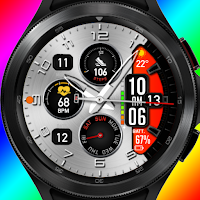
Ntv526 - Sophisticated face
Personalization
Watchface designed for Samsung Galaxy Watch 4, Watch 4 Classic, WearOS!
- Downloads
- 100+
- on Google Play
- Price
- $0.99
- No in-app purchases
- Updated
- Sep 9
- 2026
Screenshots


About Ntv526 - Sophisticated face
Personalize your watch with Ntv Watchface!
𝗔𝗧𝗧𝗘𝗡𝗧𝗜𝗢𝗡
If you see the message "Your devices are not compatible", please open watchface's link in your browser, and install it from the Play Store in your browser.
Features:
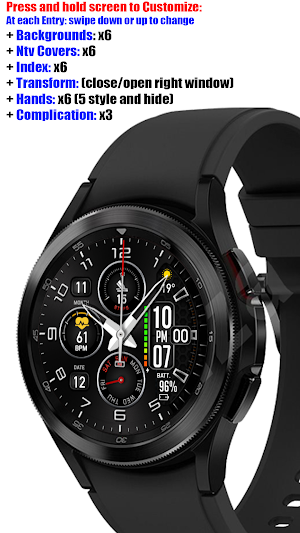
Press and hold screen to Customize: At each Entry: swipe down or up to change
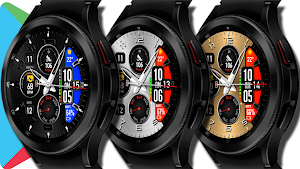
+ Backgrounds: x6
+ Ntv Covers: x6
+ Index: x6
+ Transform: (close/open right window)
+ Hands: x6 (5 style and hide)
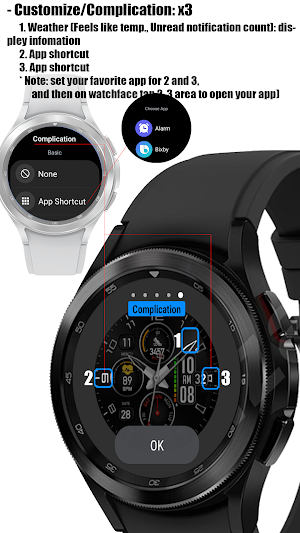
+ Complication: x3
1. Custom zone display infomation: Weather (Feels like temp., Unread notification count)
2. Custom App shortcut
3. Custom App shortcut
* Note: set your favorite app for 2 and 3,
and then on watchface tap 2, 3 area to open your app
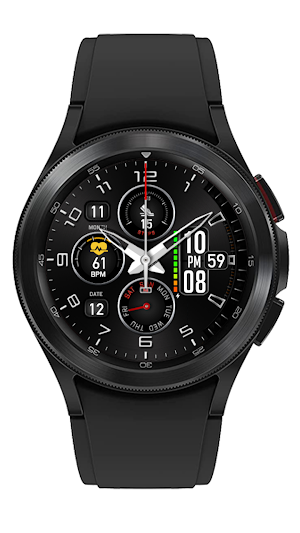
+ Analog clock
+ Digital clock: 12H/24H
+ Day: hands
+ Date: number
+ Month: number
+ Battery percentage: number and dot bar
+ Step counts
+ Step goal percentage of 10.000 steps display %: circle bar
+ Heart rate: number
After install, make sure: "Allow watchface to access sensor data about your vital sign". Connect watch with phone via bluetooth. (If you don't receive the popup message, please long press on the watch face, select Customize/Complicaition to ensure full permission for the watch face). Keep the watch on your wrist and tap heart rate area and wait a moment and for the heart rate monitor to work and display (this may take some time).
+ AOD mode
*** NOTE: Please just select your watch to Install watchface. No phone selection required. If you see message “Your devices isn’t compatible” or don't see your watch in INSTALL button on Google Play Store app, please reopen link for the second time or open link on the web brower to install watchface. Thank for your support!
📧 Any suggestions, questions, please email at: [email protected]
________________
Version for Tizen (Galaxy Watch 3, Galaxy Watch, Gear S3...): https://galaxy.store/ntv526
_________________
Persionnalize your watch with Ntv Watchfaces!
CHPlay Store: https://play.google.com/store/apps/dev?id=8003850771982135982
Galaxy Store: https://galaxy.store/NWF
Coupon and share: https://t.me/NewWatchFaces
Telegram channel: https://t.me/NewWatchFacesLink
Watchface Reviews: https://t.me/wfreview
Fb Page: https://www.facebook.com/newwatchfaces
Instalgram: https://www.instagram.com/Ntv_79
YouTube: http://youtube.com/c/ntv79
Thanks all of you for always support me!
𝗔𝗧𝗧𝗘𝗡𝗧𝗜𝗢𝗡
If you see the message "Your devices are not compatible", please open watchface's link in your browser, and install it from the Play Store in your browser.
Features:
Press and hold screen to Customize: At each Entry: swipe down or up to change
+ Backgrounds: x6
+ Ntv Covers: x6
+ Index: x6
+ Transform: (close/open right window)
+ Hands: x6 (5 style and hide)
+ Complication: x3
1. Custom zone display infomation: Weather (Feels like temp., Unread notification count)
2. Custom App shortcut
3. Custom App shortcut
* Note: set your favorite app for 2 and 3,
and then on watchface tap 2, 3 area to open your app
+ Analog clock
+ Digital clock: 12H/24H
+ Day: hands
+ Date: number
+ Month: number
+ Battery percentage: number and dot bar
+ Step counts
+ Step goal percentage of 10.000 steps display %: circle bar
+ Heart rate: number
After install, make sure: "Allow watchface to access sensor data about your vital sign". Connect watch with phone via bluetooth. (If you don't receive the popup message, please long press on the watch face, select Customize/Complicaition to ensure full permission for the watch face). Keep the watch on your wrist and tap heart rate area and wait a moment and for the heart rate monitor to work and display (this may take some time).
+ AOD mode
*** NOTE: Please just select your watch to Install watchface. No phone selection required. If you see message “Your devices isn’t compatible” or don't see your watch in INSTALL button on Google Play Store app, please reopen link for the second time or open link on the web brower to install watchface. Thank for your support!
📧 Any suggestions, questions, please email at: [email protected]
________________
Version for Tizen (Galaxy Watch 3, Galaxy Watch, Gear S3...): https://galaxy.store/ntv526
_________________
Persionnalize your watch with Ntv Watchfaces!
CHPlay Store: https://play.google.com/store/apps/dev?id=8003850771982135982
Galaxy Store: https://galaxy.store/NWF
Coupon and share: https://t.me/NewWatchFaces
Telegram channel: https://t.me/NewWatchFacesLink
Watchface Reviews: https://t.me/wfreview
Fb Page: https://www.facebook.com/newwatchfaces
Instalgram: https://www.instagram.com/Ntv_79
YouTube: http://youtube.com/c/ntv79
Thanks all of you for always support me!
What’s new
Updated September 9, 2026
Watchface designed for WearOS devices, Samsung Galaxy Watch 4, 5, 6, 7, 8 Classic, Ultra, Google Pixel watch...
User reviews

Excellent Design.. all Data's are so nicely displayed.. 😍 .. Lovely plate colours.. Thanks Tran Nghia. ♥️
Alternatives to Ntv526 - Sophisticated face
Looking for apps like Ntv526 - Sophisticated face? Here are 6 similar Android apps on Google Play.
-
Minimal Classic Face NTV564
-
Weather Sport Hybrid NTV20
-
Tiles Sport Weather NTV562
-
Digital Weather Sport NTV561
-
Classic Minimal Plus NTV559
-
Aircraft Digital Face NTV558
| App | Rating | Price | Installs | Last updated | Compare |
|---|---|---|---|---|---|
| Ntv526 - Sophisticated face | – | $0.99 | 100+ | Sep 9, 2026 | |
| Minimal Classic Face NTV564 | – | 0.99 USD | 1,000+ | Sep 7, 2026 | Compare |
| Weather Sport Hybrid NTV20 | – | 0.99 USD | 1,000+ | – | Compare |
| Tiles Sport Weather NTV562 | – | 0.99 USD | 1,000+ | Sep 9, 2026 | Compare |
| Digital Weather Sport NTV561 | – | 0.99 USD | 1,000+ | – | Compare |
| Classic Minimal Plus NTV559 | – | 0.99 USD | 1,000+ | Sep 9, 2026 | Compare |
| Aircraft Digital Face NTV558 | – | 0.99 USD | 500+ | Sep 9, 2026 | Compare |
Similar apps on Google Play
- Minimal Classic Face NTV564
- Weather Sport Hybrid NTV20
- Tiles Sport Weather NTV562
- Digital Weather Sport NTV561
- Classic Minimal Plus NTV559
- Aircraft Digital Face NTV558
- Big Digital Scratch NTV557
- Tiles Window Watch Face NTV556
- Modern and Minimal Plus NTV560
- 24H - Big Digital Sport NTV009
- 12H - Big Digital Sport NTV008
- Car Color Hybrid Face NTV172
- Digital Weather Sport NTV318
- Digital Color Minimal NTV007
- Big Digital Color Sport NTV006
- Colorful Info WatchFace NTV005
- Brutal Analog Hybrid NTV128
- Digital Sport Outdoor NTV367
- Digital Sport watchface NTV401
- Ultra Hybrid watchface NTV101
- NTV275 - Power Sport Premium
- NTV555 - Black Digital Mod
- NTV115 - Flower watch face
- NTV144 - Brutal Watch face
- NTV153 - Digital Sport Weather
- NTV117 - Black Simple Plus
- NTV413 - Old Wood watchface
- NTV553 - N-Digital Classic B
- NTV234B - Big Flip Style B
- NTV234 - Big Flip Style
- NTV383 - Unlimited watch face
- NTV123 - Hybrid Colors
- NTV90 - Christmas watchface
- NTV535 - Modern View Sport II
- NTV317 - Digital watchface
- NTV408 - Digital Sport
- NTV249 - Big Sport Premium
- NTV158 - Digital Flip Style
- NTV550 - N Digital Sport
- NTV542 - Digital Minimal 003
- NTV551 - N-Digital Classic
- NTV303 - Hybrid Sport
- NTV229 - Hybrid Multi Faces
- NTV228 - Steering Wheel
- NTV64 - Digital Color
- NTV114 - Black and White
- NTV92 - Digital Flip Style
- NTV532 - Ultra Sport Watchface
- NTV146 - Contrast watch face
- NTV506 - Aircraf Pro Watchface
- NTV330 - Hybrid III Pro
- NTV002 - Minimal II watch face
- NTV257 - Hybrid Pro Edition
- NTV384 - Minimal II Pro
- NTV168 - Modern Digital Pro
- NTV381 - Brutal Black Pro
- NTV352 - Digital Pro watchface
- NTV137 - Brutal II watch face
- NTV145 - CyberWatch Pro
- NTV300 - Brutal Pro Watch face
- NTV151 - Hybrid Pro Watch face
- NTV340 - Big Digital Watchface
- NTV252 - Classic Pro Watchface
- NTV327 - Minimal Pro watchface
- NTV134 - Unlimited Watch Face
- NTV512 - N Digital Watch face
- NTV527 - Iron Watch Face Pro
- NTV509 - Informative watchface
- Ntv526 - Sophisticated face
- NTV526 - Sophisticated Weather
- NTV508 - Hybrid W watch face
- NTV505 - Hybrid watch face
- NTV525 - Modern View watchface
- NTV521 - AnaDigital watch face
- Ntv504 - N Design watch face
- NTV522 - Window watch face
- Ntv296 - Hybrid Watch face
- NTV515 - N Style watch face
- NTV520 - Digital watch face
- NTV514 - Hybrid Watch Face
- NTV516 - N Digital watch face
- NTV439 - Hybrid watch face
- NTV518 - Hybrid watch face
- NTV001 - N-Minimal Watch face
- NTV517 - Digital watch face
- NTV410 - Classic Watch face
- NTV414 - Classic watch face
- NTV198 - Classic Gold