
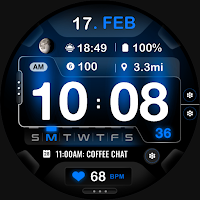
ML2U 212 Watch Face
Personalization
Wear OS Watchface With Customizable Complication
- Downloads
- 808+
- on Google Play
- Price
- $1.49
- No in-app purchases
- Updated
- Aug 20
- 2026
Screenshots
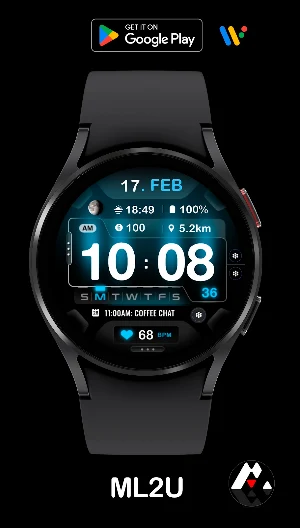
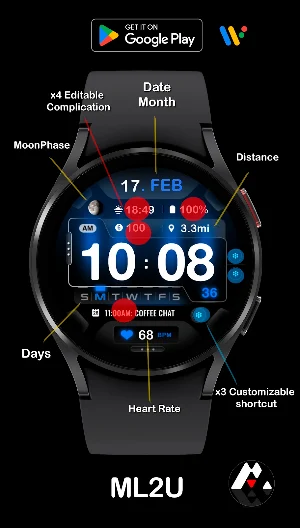
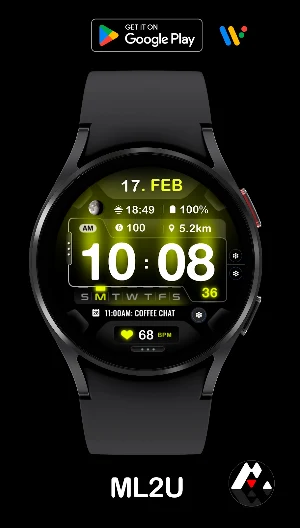


About ML2U 212 Watch Face
FEATURES:
- 12/24hr based on phone settings
- Date/Month(Tap for Calendar)
- Distance(Tap for Google Map)
- Heart Rate(Tap for detail)
- 3 customizable shortcuts
- 4 customizable complications
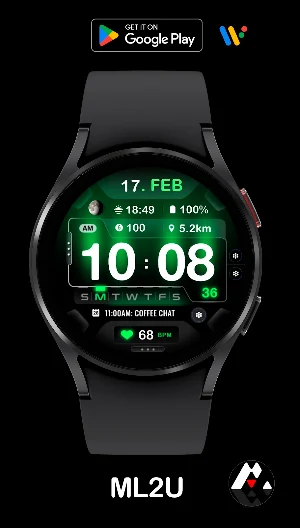
- Changeable color
- Alarm(Tap Hour first digit)
- Music(Tap Hour second digit)
- Phone(Tap Minute first digit)
- Setting(Tap Minute second digit)
- Message(Tap bottom of the screen)
To customise your watch face, simply touch and hold the display, then tap the Customise button.
This watch face is compatible with all Wear OS devices with API Level 30+, including Samsung Galaxy Watch 4, 5, 6, 7, Ultra, Pixel Watch 3, 2, 1, and others.
Watch face don’t automatically apply on your watch screen after the installation. You need to set it on your watch’s screen.
Thank you very much for your support!!
ML2U
- 12/24hr based on phone settings
- Date/Month(Tap for Calendar)
- Distance(Tap for Google Map)
- Heart Rate(Tap for detail)
- 3 customizable shortcuts
- 4 customizable complications
- Changeable color
- Alarm(Tap Hour first digit)
- Music(Tap Hour second digit)
- Phone(Tap Minute first digit)
- Setting(Tap Minute second digit)
- Message(Tap bottom of the screen)
To customise your watch face, simply touch and hold the display, then tap the Customise button.
This watch face is compatible with all Wear OS devices with API Level 30+, including Samsung Galaxy Watch 4, 5, 6, 7, Ultra, Pixel Watch 3, 2, 1, and others.
Watch face don’t automatically apply on your watch screen after the installation. You need to set it on your watch’s screen.
Thank you very much for your support!!
ML2U
What’s new
Updated August 20, 2026
Rebuild with targetSDK 36.
User reviews

This is SO COOL! I couldn't fit ONE piece of info I wanted, but it's not neccessary. I love the shading and color choice for the background. Disclaimer: I only paid 20 cents for it, but remember, I don't keep a watch face unless I'm going to use it regularly, even for 20 cents, so hanging onto it is a huge endorsement.
Alternatives to ML2U 212 Watch Face
Looking for apps like ML2U 212 Watch Face? Here are 6 similar Android apps on Google Play. 1 of the 6 are free to download.
-
ML2U 188 Watch Face
-
ML2U 189 Watch Face
-
ML2U 224 Watch Face
-
ML2U 182 Watch Face
-
ML2U 109 Watch Face
-
ML2U 227 Watch Face
| App | Rating | Price | Installs | Last updated | Compare |
|---|---|---|---|---|---|
| ML2U 212 Watch Face | – | $1.49 | 500+ | Aug 20, 2026 | |
| ML2U 188 Watch Face | – | 0.99 USD | 1,000+ | Aug 12, 2026 | Compare |
| ML2U 189 Watch Face | – | 0.99 USD | 500+ | Aug 6, 2026 | Compare |
| ML2U 224 Watch Face | – | 0.99 USD | 1,000+ | Aug 20, 2026 | Compare |
| ML2U 182 Watch Face | – | 0.99 USD | 1,000+ | Aug 12, 2026 | Compare |
| ML2U 109 Watch Face | – | Free | 1,000+ | Aug 18, 2026 | Compare |
| ML2U 227 Watch Face | – | 0.99 USD | 1+ | Mar 21, 2025 | Compare |
Similar apps on Google Play
- ML2U 188 Watch Face
- ML2U 189 Watch Face
- ML2U 224 Watch Face
- ML2U 182 Watch Face
- ML2U 109 Watch Face
- ML2U 227 Watch Face
- ML2U 225 Watch Face
- ML2U 223 Watch Face
- ML2U 222 Watch Face
- ML2U 221 Watch Face
- ML2U 220 Watch Face
- ML2U 219 Watch Face
- ML2U 218 Watch Face
- ML2U 217 Watch Face
- ML2U 216 Watch Face
- ML2U 215 Watch Face
- ML2U 214 Watch Face
- ML2U 213 Watch Face
- ML2U 212 Watch Face
- ML2U 211 Watch Face
- ML2U 199 Watch Face
- ML2U 198 Watch Face
- ML2U 197 Watch Face
- ML2U 196 Watch Face
- ML2U 195 Watch Face
- ML2U 194 Watch Face
- ML2U 193 Watch Face
- ML2U 192 Watch Face
- ML2U 191 Watch Face
- ML2U 190 Watch Face
- ML2U 187 Watch Face
- ML2U 185 Watch Face
- ML2U 184 Watch Face
- ML2U 186 Watch Face
- ML2U 183 Watch Face
- ML2U 181 Watch Face
- ML2U 180 Watch Face
- ML2U 179 Watch Face
- ML2U 178 Watch Face
- ML2U 177 Watch Face
- ML2U 176 Watch Face
- ML2U 372 Watch Face
- ML2U 175 Watch Face
- ML2U 174 Watch Face
- ML2U 319 Watch Face
- ML2U 173 Watch Face
- ML2U 172 Watch Face
- ML2U 171 Watch Face
- ML2U 170 Watch Face
- ML2U 169 Watch Face
- ML2U 515 Watch Face
- ML2U 168 Watch Face
- ML2U 167 Watch Face
- ML2U 166 Watch Face
- ML2U 165 Watch Face
- ML2U 164 Watch Face
- ML2U 405 Watch Face
- ML2U 317 Watch Face
- ML2U 163 Watch Face
- ML2U 162 Watch Face
- ML2U 161 Watch Face
- ML2U 160 Watch Face
- ML2U 159 Watch Face
- ML2U 158 Watch Face
- ML2U 371 Watch Face
- ML2U 157 Watch Face
- ML2U 156 Watch Face
- ML2U 514 Watch Face
- ML2U 155 Watch Face
- ML2U 154 Watch Face
- ML2U 153 Watch Face
- ML2U 151 Watch Face
- ML2U 152 Watch Face
- ML2U 150 Watch Face
- ML2U 149 Watch Face
- ML2U 513 Watch Face
- ML2U 148 Watch Face
- ML2U 316 Watch Face
- ML2U 147 Watch Face
- ML2U 146 Watch Face
- ML2U 145 Watch Face
- ML2U 144 Watch Face
- ML2U 143 Watch Face
- ML2U 142 Watch Face
- ML2U 141 Watch Face
- ML2U 140 Watch Face
- ML2U 139 Watch Face
- ML2U 138 Watch Face
- ML2U 137 Watch Face
- ML2U 136 Watch Face
- ML2U 135 Watch Face
- ML2U 126 Watch Face
- ML2U 134
- ML2U 129 Watch Face
- ML2U 127 Watch Face
- ML2U 128
- ML2U 314
- ML2U 133
- ML2U 125
- ML2U 132
- ML2U 131
- ML2U 130
- ML2U 512
- ML2U 124
- ML2U 112
- ML2U 123
- ML2U 509
- ML2U 309 Watch Face
- ML2U 113 Watch Face
- ML2U 122 Watch Face
- ML2U 312 Watch Face
- ML2U 121 Watch Face
- ML2U 508 Watch Face
- ML2U 120 Watch Face
- ML2U 115 Watch Face
- ML2U 119 Watch Face
- ML2U 307 Watch Face
- ML2U 118 Watch Face
- ML2U 117 Watch Face
- ML2U 207 Watch Face
- ML2U 116 Watch Face
- ML2U 310 Watch Face
- ML2U 114 Watch Face
- ML2U 110 Watch Face
- ML2U 111 Watch Face
- ML2U 59 Watch Face
- ML2U 306 Watch face
- ML2U 208 Watch Face
- ML2U 108 Watch Face
- ML2U 507 Watch Face
- ML2U 107 Watch Face
- ML2U 106 Watch Face
- ML2U 79 Watch Face
- ML2U 506 Watch Face
- ML2U 206 Watch Face
- ML2U 104 Watch Face
- ML2U 404 Watch Face
- ML2U 105 Watch Face
- ML2U 305 Watch Face
- ML2U 505 Watch Face
- ML2U 102 Watch Face
- ML2U 103 Watch Face
- ML2U 504 Watch Face
- ML2U 101 Watch Face
- ML2U 304 Watch Face
- ML2U 100 Watch Face
- ML2U 99 Watch Face
- ML2U 205 Watch Face
- ML2U 502 Watch Face
- ML2U 503 Watch Face