

JW372 jwstudio
Personalization
This watch face supports Wear OS devices
- Downloads
- 1+
- on Google Play
- Price
- $1.89
- No in-app purchases
- Updated
- Sep 8
- 2026
Screenshots


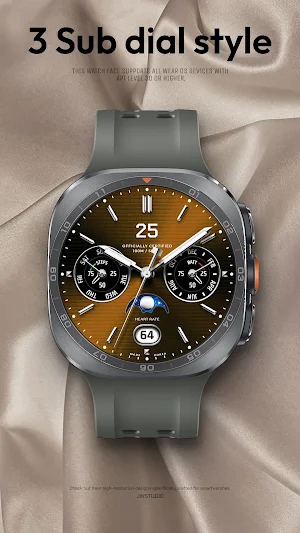
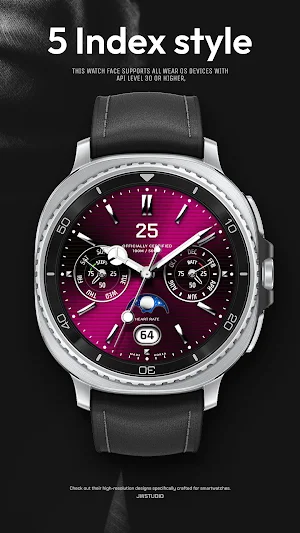


About JW372 jwstudio
JWSTUDIO's watch faces pursue a premium design for Wear OS.
+++++++++++++++++++++++++++++++++++++++++++++++
[How to install]
Before pressing the payment button, make sure your watch is selected.
Select your watch by pressing the small triangle next to the payment button.
Select the menu at the top right of the Play Store app (three dots) > Share > Chrome browser > Install on other devices > Clock and proceed.
After installation, select it from the download list, register it as a favorite, and use it. You can view the download list by clicking 'Add Watch Screen' on the far right of the favorites list that appears when you press the watch screen.
+++++++++++++++++++++++++++++++++++++++++++++++
[Features]
- 6 BG Color
- 3 Sub dial Style
- 5 Index Style
- 4 Hands Style
- AOD Simple mode
[function]
- 4 preset app shortcut
- 1 customizable shortcut keys
- 4 customizable fields/information display
+++++++++++++++++++++++++++++++++++++++++++++++
[Custom]
1 - Touch and hold the display.
2 - Tap on Custom Options
For inquiries, please contact the email below.
[email protected]
+++++++++++++++++++++++++++++++++++++++++++++++
[How to install]
Before pressing the payment button, make sure your watch is selected.
Select your watch by pressing the small triangle next to the payment button.
Select the menu at the top right of the Play Store app (three dots) > Share > Chrome browser > Install on other devices > Clock and proceed.
After installation, select it from the download list, register it as a favorite, and use it. You can view the download list by clicking 'Add Watch Screen' on the far right of the favorites list that appears when you press the watch screen.
+++++++++++++++++++++++++++++++++++++++++++++++
[Features]
- 6 BG Color
- 3 Sub dial Style
- 5 Index Style
- 4 Hands Style
- AOD Simple mode
[function]
- 4 preset app shortcut
- 1 customizable shortcut keys
- 4 customizable fields/information display
+++++++++++++++++++++++++++++++++++++++++++++++
[Custom]
1 - Touch and hold the display.
2 - Tap on Custom Options
For inquiries, please contact the email below.
[email protected]
Alternatives to JW372 jwstudio
Looking for apps like JW372 jwstudio? Here are 6 similar Android apps on Google Play.
-
MJ192 Sleek Office Watch Face
-
JW236 jwstudio
-
Lumos: Analog Watch Face
-
JW062 jwstudio
-
Classic Signature 10
-
JW119 jwstudio
| App | Rating | Price | Installs |
|---|---|---|---|
| JW372 jwstudio | – | $1.89 | 1+ |
| MJ192 Sleek Office Watch Face | – | 0.99 USD | 100+ |
| JW236 jwstudio | – | 1.49 USD | 50+ |
| Lumos: Analog Watch Face | – | 1.99 USD | 100+ |
| JW062 jwstudio | – | 1.49 USD | 10+ |
| Classic Signature 10 | – | 1.49 USD | 100+ |
| JW119 jwstudio | – | 1.49 USD | 50+ |
Similar apps on Google Play
- MJ192 Sleek Office Watch Face
- JW236 jwstudio
- Lumos: Analog Watch Face
- JW062 jwstudio
- Classic Signature 10
- JW119 jwstudio
- SamWatch Texture B 2021
- SamWatch Analog B 2021
- WF42
- CF_Intuition_ENG
- SamWatch AD Nu
- JW239 jwstudio
- DM045 Analog Watch Face
- IWF EC III | ISACWATCH
- JW002 jwstudio
- Silver Glossy Watch Face
- ZKin Watch Simple Diamond
- WTW M11B4 Classic watch face
- IWF EC | ISACWATCH
- SamWatch Starstory 3 2023
- JW110 jwstudio
- JW238 CHRONO
- JW016 jwstudio
- Nebulus - watch face
- JW311 jwstudio