

Damian Wf
Passioner Personalization
Press on persistently
- Downloads
- 1+
- on Google Play
- Price
- $2.49
- No in-app purchases
- Updated
- Jun 8
- 2024 · v1.0.0
Screenshots


About Damian Wf
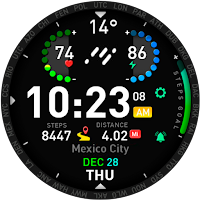
This is an amazing Watch Face.
For all Wear OS devices.
Buy the app and Install it on your Phone.
Open BREGUIR app
Tap on the "Install on Watch" button.
In your Watch, tap the "Install" button.
Then you can go to the app that manages your Watch device on your Phone.
Go to Watch Faces, then scroll down to "downloads", and tap over the BREGUIR app.
That is it!
If you need help with installation, please email: [email protected]
Remarks:
Always make sure your watch is paired to your phone when installing.
When it says "installing soon," please wait 3-4 minutes, then check your watch to see if the installation is complete.
Be sure you have all device permissions allowed.
Features:
Damian Digital Watch Face
Features:
- Digital time
- Heart rate
- Battery level
- 12/24 hour time format
- Day of the week / Day of the Month
- Weather
Breguir
For all Wear OS devices.
Buy the app and Install it on your Phone.
Open BREGUIR app
Tap on the "Install on Watch" button.
In your Watch, tap the "Install" button.
Then you can go to the app that manages your Watch device on your Phone.
Go to Watch Faces, then scroll down to "downloads", and tap over the BREGUIR app.
That is it!
If you need help with installation, please email: [email protected]
Remarks:
Always make sure your watch is paired to your phone when installing.
When it says "installing soon," please wait 3-4 minutes, then check your watch to see if the installation is complete.
Be sure you have all device permissions allowed.
Features:
Damian Digital Watch Face
Features:
- Digital time
- Heart rate
- Battery level
- 12/24 hour time format
- Day of the week / Day of the Month
- Weather
Breguir
What’s new
Version 1.0.0 · Updated June 8, 2024
Choose Breguir
Alternatives to Damian Wf
Looking for apps like Damian Wf? Here are 5 similar Android apps on Google Play.




| App | Rating | Price | Installs | Last updated | Compare |
|---|---|---|---|---|---|
| Damian Wf | – | $2.49 | 1+ | Jun 8, 2024 | |
| Beatrice Wf | – | 1.49 USD | 0+ | Dec 20, 2024 | Compare |
| Pistorious WF | – | 0.49 USD | 1+ | Aug 9, 2024 | Compare |
| Sinclair Watch Face | – | 2.49 USD | 10+ | Jun 15, 2024 | Compare |
| Abracsas WF | – | 0.49 USD | 50+ | Jul 1, 2026 | Compare |
| Breguir Watch Face Go | – | 1.99 USD | 10+ | Sep 23, 2024 | Compare |
Compare Damian Wf with the top alternatives: ratings, updates, ASO score and keyword gaps →