
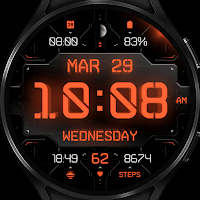
Cyber Carbon - watch face
Personalization
Cyber Carbon - High-tech digital interface with amazing customization options!
- Rating
- 4.2
- 14 ratings
- Downloads
- 1K+
- on Google Play
- Price
- $1.79
- No in-app purchases
- Updated
- Aug 5
- 2026
Screenshots


About Cyber Carbon - watch face
Enkei Design proudly presents our latest digital & customizable animated watch face, Cyber Carbon !
Subtle background animation can be turned off if you prefer a more static, battery-friendly look, while various elements like indicators, app shortcuts and colors can be customized to perfectly fit your personal preferences !
This app is made only for Wear OS devices.
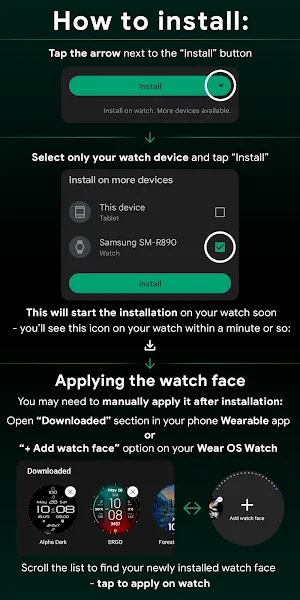
Select only your watch device from the "INSTALL" drop-down menu.
Alternatively, use our provided phone companion app to help you install the watch face directly on your watch.
NOTE:
- If it seems like you need to pay again on your watch, it’s just a visual continuity bug.
- Fully close and exit Play Store apps on your phone and watch, as well as the phone companion app, then try again.
Apply after installation. Find and apply the watch face from the "Downloads" category in the watch’s Wearable app on your phone, or from the "+ Add watch face" option on your watch.
For full functionality of all indicators enable all Sensors permissions after installation.
Cyber Carbon features:
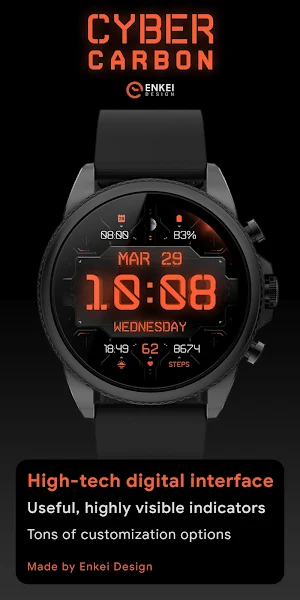
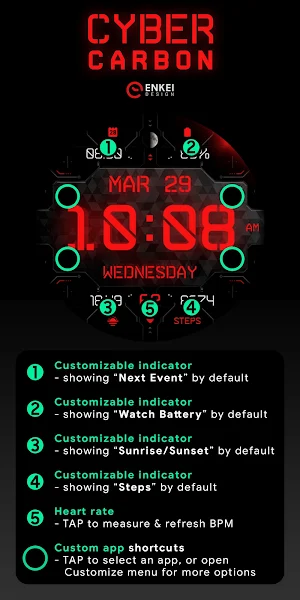
- Large digital clock at the center - supports both 12h and 24h mode (depending on your device's clock settings)
- Month, Date & Weekday indicators at the center (multi-language support)
- BPM indicator (works only while wearing the watch) at the bottom
- TAP to measure your heart rate and refresh the indicator
- Moon phase indicator at the top (shows current Moon phase, 1 out of 8)
- 4 Custom indicators 2 at the top and 2 at the bottom - showing Next Event , Watch Battery , Sunrise/Sunset , and Steps by default
- 4 Custom app shortcuts - "Arrow" icons around the central background
- TAP to set an app shortcut, or customize them through "Customize" menu
- Battery efficient AOD showing all indicators, averaging less then 5% active pixels
- Customizable elements and colors
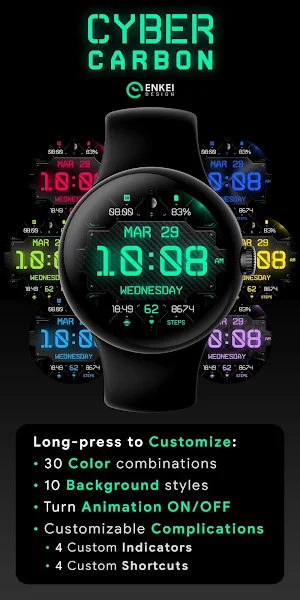
- Long-press the watch face to access "Customize" menu:
- Color - 30 different accent colors
- Background - 10 patterns for central background
- Animation ON/OFF - Show or hide the background animation
- Complication - Set up 4 Custom App shortcuts and 4 Customizable indicators
NOTE:
Please see the provided visuals for detailed info on all available features and app shortcuts!
This watch face is compatible with most Wear OS devices, but keep in mind that it will run best and smoothest on newer devices with latest Wear OS software versions.
All our watch faces are tested on Samsung Galaxy Watch 4 and 5 devices, where they are confirmed to work without any issues.
Test results of this particular watch face have consistently provided 2 days of battery life on Galaxy Watch 4 (46mm) with "Always-on display" turned on.
NOTE:
HRM is independent from other health & fitness applications - TAP the indicator to measure and refresh your heart rate, only while wearing the watch.
CONTACT:
[email protected]
E-mail us for any questions, issues or general feedback - we're here for you!
Customer satisfaction is our main priority, and we take every comment, suggestion and complaint very seriously, making sure to respond to each e-mail within 24 hours.
More from Enkei Design:
https://play.google.com/store/apps/dev?id=5744222018477253424
Visit our Website:
https://www.enkeidesignstudio.com
FOLLOW US on our social media sites:
https://www.facebook.com/enkei.design.studio
https://www.instagram.com/enkeidesign
Thank you for using our watch faces, have a great day!
Subtle background animation can be turned off if you prefer a more static, battery-friendly look, while various elements like indicators, app shortcuts and colors can be customized to perfectly fit your personal preferences !
This app is made only for Wear OS devices.
Select only your watch device from the "INSTALL" drop-down menu.
Alternatively, use our provided phone companion app to help you install the watch face directly on your watch.
NOTE:
- If it seems like you need to pay again on your watch, it’s just a visual continuity bug.
- Fully close and exit Play Store apps on your phone and watch, as well as the phone companion app, then try again.
Apply after installation. Find and apply the watch face from the "Downloads" category in the watch’s Wearable app on your phone, or from the "+ Add watch face" option on your watch.
For full functionality of all indicators enable all Sensors permissions after installation.
Cyber Carbon features:
- Large digital clock at the center - supports both 12h and 24h mode (depending on your device's clock settings)
- Month, Date & Weekday indicators at the center (multi-language support)
- BPM indicator (works only while wearing the watch) at the bottom
- TAP to measure your heart rate and refresh the indicator
- Moon phase indicator at the top (shows current Moon phase, 1 out of 8)
- 4 Custom indicators 2 at the top and 2 at the bottom - showing Next Event , Watch Battery , Sunrise/Sunset , and Steps by default
- 4 Custom app shortcuts - "Arrow" icons around the central background
- TAP to set an app shortcut, or customize them through "Customize" menu
- Battery efficient AOD showing all indicators, averaging less then 5% active pixels
- Customizable elements and colors
- Long-press the watch face to access "Customize" menu:
- Color - 30 different accent colors
- Background - 10 patterns for central background
- Animation ON/OFF - Show or hide the background animation
- Complication - Set up 4 Custom App shortcuts and 4 Customizable indicators
NOTE:
Please see the provided visuals for detailed info on all available features and app shortcuts!
This watch face is compatible with most Wear OS devices, but keep in mind that it will run best and smoothest on newer devices with latest Wear OS software versions.
All our watch faces are tested on Samsung Galaxy Watch 4 and 5 devices, where they are confirmed to work without any issues.
Test results of this particular watch face have consistently provided 2 days of battery life on Galaxy Watch 4 (46mm) with "Always-on display" turned on.
NOTE:
HRM is independent from other health & fitness applications - TAP the indicator to measure and refresh your heart rate, only while wearing the watch.
CONTACT:
[email protected]
E-mail us for any questions, issues or general feedback - we're here for you!
Customer satisfaction is our main priority, and we take every comment, suggestion and complaint very seriously, making sure to respond to each e-mail within 24 hours.
More from Enkei Design:
https://play.google.com/store/apps/dev?id=5744222018477253424
Visit our Website:
https://www.enkeidesignstudio.com
FOLLOW US on our social media sites:
https://www.facebook.com/enkei.design.studio
https://www.instagram.com/enkeidesign
Thank you for using our watch faces, have a great day!
What’s new
Updated August 5, 2026
Phone Companion App update 1.0.12 - Added Target API 36 as per Google's latest requirements
User reviews

Excellent face for my watch, The time is easy to read even outside in sunlight. The dim mode is still bright enough to be easily read indoors (unlike some other faces I have tried). I like the customizations available and the color choices. Highly recommended if you are looking for a digital watch face which can be ...

Great wf! Love the layout Very customizable many colors to choose from. Love that the seconds indicater always matches wf color! Lightly animated but not distracting but you can turn animation off if so desired. Looks great on my GW5pro Get it you won't be disappointed!
Alternatives to Cyber Carbon - watch face
Looking for apps like Cyber Carbon - watch face? Here are 6 similar Android apps on Google Play. The highest rated is ZION Blue - digital watch face (4.5/5), and 1 of the 6 are free to download.
-
ZION Blue - digital watch face 4.5
-
Henna Flower - watch face
-
Nebulus - watch face
-
Bear Accessory - watch face
-
Coffee Time - watch face
-
Flower Breeze - watch face
| App | Rating | Price | Installs | Last updated | Compare |
|---|---|---|---|---|---|
| Cyber Carbon - watch face | 4.2 / 5 | $1.79 | 1,000+ | Aug 5, 2026 | |
| ZION Blue - digital watch face | 4.5 / 5 | Free | 500,000+ | Aug 12, 2026 | Compare |
| Henna Flower - watch face | – | 0.99 USD | 1,000+ | – | Compare |
| Nebulus - watch face | – | 0.99 USD | 5,000+ | Aug 10, 2026 | Compare |
| Bear Accessory - watch face | – | 0.99 USD | 1,000+ | Aug 5, 2026 | Compare |
| Coffee Time - watch face | – | 0.99 USD | 500+ | Aug 5, 2026 | Compare |
| Flower Breeze - watch face | – | 0.99 USD | 5,000+ | Aug 7, 2026 | Compare |
Similar apps on Google Play
- ZION Blue - digital watch face
- Henna Flower - watch face
- Nebulus - watch face
- Bear Accessory - watch face
- Coffee Time - watch face
- Flower Breeze - watch face
- Marine Droid - watch face
- Cyberpunk Ambient - watch face
- Cyber Carbon - watch face
- Ingress Digital - watch face
- ZION Ultra - watch face
- Rugged Digital - watch face
- Earth HUD - digital watch face
- Cyber Agent digital watch face
- Cyber Cargo digital watch face
- INTEL HUD ICE - animated
- LUXUS - Digital watch face
- TOPO Digital - watch face
- OBSIDIAN Titanium - watch face
- Shine 360 - digital watch face
- The Apogee - watch face
- Cyberoid Ultra - watch face
- OBSIDIAN Gold Class watch face
- Focus 360 - digital watch face
- ROGUE Shadow Division
- Lucid Dark digital watch face
- Bond 3.0 - digital watch face
- The DISTRICT - watch face
- Christmas Magic - watch face
- The EXTRACT digital watch face
- Kronolog Alpha - watch face
- NEON Lunar - watch face
- The Reactor Ultimate watchface
- Jack o'Lantern - watch face
- Forest Ambient - watch face
- ERGO - digital watch face
- Sol 3 - animated watch face
- INTEL HUD animated watch face
- MiNiMA - analogue watch face
- TRIDON - analog watch face
- Alpha Dark digital watch face
- Shadow Division - watch face
- OBSIDIAN 2.1 analog watch face
- Modul Class digital watch face
- ZION - digital watch face
- ZION Analog - watch face
- DEUS - animated watch face