
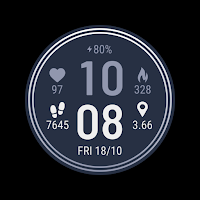
CELEST5634 Sport Watch
Personalization Contains ads
Modern digital design. 30 colors + 4 swappable data complications.
- Downloads
- 133+
- on Google Play
- Price
- $1.99
- No in-app purchases
- Updated
- Aug 5
- 2026
Screenshots


About CELEST5634 Sport Watch
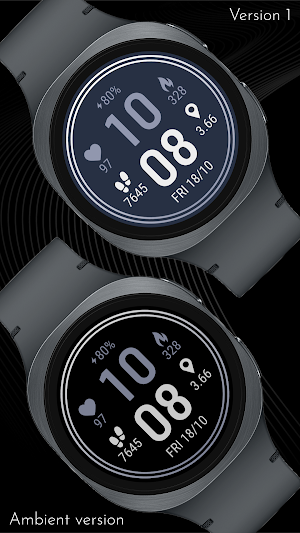
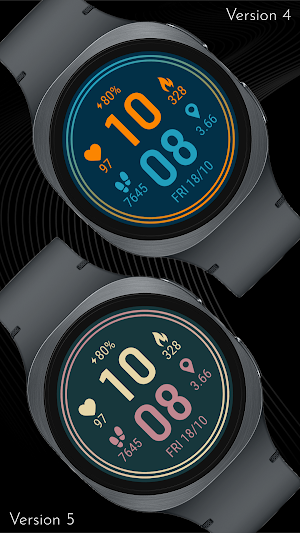
This watch face offers a clean, balanced layout designed for effortless readability. The bold digital time is centered between four key data points: heart rate, calories burned, step count, and distance. A dedicated battery indicator and a clear date display ensure you have all your essential daily information available at a single glance.
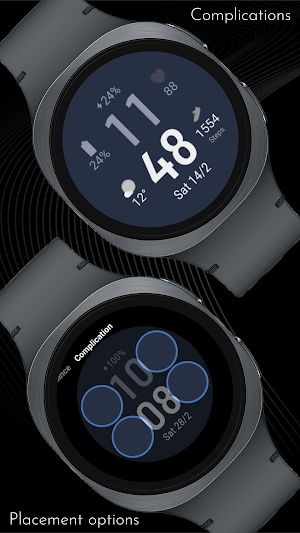
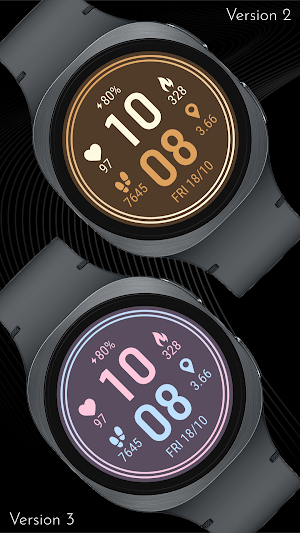
Customization is simple and versatile, featuring 30 color variations to suit your personal style. To make the interface truly yours, you can replace the default side data with 4 optional circular complications. This allows you to prioritize the information that matters most, from weather updates to upcoming calendar events, all within a sophisticated, multi-ring design.
Please note that the calorie and distance values are provided as estimations calculated based on your step count. This is because the watch face does not have direct access to internal fitness sensor data for these specific metrics, providing you with a helpful approximation of your daily activity instead.
🎨 PERSONALIZATION OPTIONS
· 30 color variations
· Hideable rings on the design
· Hideable default data (Heart rate, Calories, Steps, Distance)
· 4 optional circular complications
· EU/US date format
Please note that in order to correctly display custom complications, hide the default data with the provided customization options.
📱 COMPATIBILITY
✅ Works with Galaxy Watch, Pixel Watch, and all Wear OS 5+ devices
🔧 INSTALLATION HELP
Having trouble? We've got you covered:
- Use the dropdown menu next to "Install" on your phone to select your watch model or install directly from your watch's Play Store app
- Updating weather data may take time after installation but switching to another watch face and switching back or restarting both the watch and phone usually helps
- Check out our installation and troubleshooting guide: https://celest-watches.com/installation-troubleshooting/
- Contact us at [email protected] for quick support
🏪 DISCOVER MORE
Browse our full collection of premium Wear OS watch faces:
🔗 https://celest-watches.com
💰 Exclusive discounts available
📞 SUPPORT & COMMUNITY
📧 Support: [email protected]
📱 Follow @celestwatches on Instagram or sign up to our newsletter!
Customization is simple and versatile, featuring 30 color variations to suit your personal style. To make the interface truly yours, you can replace the default side data with 4 optional circular complications. This allows you to prioritize the information that matters most, from weather updates to upcoming calendar events, all within a sophisticated, multi-ring design.
Please note that the calorie and distance values are provided as estimations calculated based on your step count. This is because the watch face does not have direct access to internal fitness sensor data for these specific metrics, providing you with a helpful approximation of your daily activity instead.
🎨 PERSONALIZATION OPTIONS
· 30 color variations
· Hideable rings on the design
· Hideable default data (Heart rate, Calories, Steps, Distance)
· 4 optional circular complications
· EU/US date format
Please note that in order to correctly display custom complications, hide the default data with the provided customization options.
📱 COMPATIBILITY
✅ Works with Galaxy Watch, Pixel Watch, and all Wear OS 5+ devices
🔧 INSTALLATION HELP
Having trouble? We've got you covered:
- Use the dropdown menu next to "Install" on your phone to select your watch model or install directly from your watch's Play Store app
- Updating weather data may take time after installation but switching to another watch face and switching back or restarting both the watch and phone usually helps
- Check out our installation and troubleshooting guide: https://celest-watches.com/installation-troubleshooting/
- Contact us at [email protected] for quick support
🏪 DISCOVER MORE
Browse our full collection of premium Wear OS watch faces:
🔗 https://celest-watches.com
💰 Exclusive discounts available
📞 SUPPORT & COMMUNITY
📧 Support: [email protected]
📱 Follow @celestwatches on Instagram or sign up to our newsletter!
What’s new
Updated August 5, 2026
Updated to target Android 16 (API 36).
Alternatives to CELEST5634 Sport Watch
Looking for apps like CELEST5634 Sport Watch? Here are 6 similar Android apps on Google Play. The highest rated is IA97 Digital Watchface (4.1/5), and 2 of the 6 are free to download.
-
Pixel Track Plus Watch Face
-
CNRwatch053
-
ZRU04 Watch Face for Wear OS
-
Clear Digital Info
-
Minimal Pro
-
IA97 Digital Watchface 4.1
| App | Rating | Price | Installs | Last updated | Compare |
|---|---|---|---|---|---|
| CELEST5634 Sport Watch | – | $1.99 | 100+ | Aug 5, 2026 | |
| Pixel Track Plus Watch Face | – | 0.99 USD | 1,000+ | Aug 17, 2026 | Compare |
| CNRwatch053 | – | 0.99 USD | 10+ | Oct 30, 2024 | Compare |
| ZRU04 Watch Face for Wear OS | – | 0.49 USD | 10+ | – | Compare |
| Clear Digital Info | – | Free | 1+ | Mar 22, 2026 | Compare |
| Minimal Pro | – | 0.99 USD | 1+ | Sep 17, 2025 | Compare |
| IA97 Digital Watchface | 4.1 / 5 | Free | 50,000+ | Oct 14, 2025 | Compare |
Similar apps on Google Play
- Pixel Track Plus Watch Face
- CNRwatch053
- ZRU04 Watch Face for Wear OS
- Clear Digital Info
- Minimal Pro
- IA97 Digital Watchface
- PW78 Digi Easy Time Display
- ZRU13 Watch Face for Wear OS
- Silent Caption Watch Face
- SW2613 Digital Watch
- Geometric Rhythm Watch Face
- AD Spiral - Watch Face
- ML2U 93 Watch Face
- Night Time for Wear OS
- Key WF71 Digital Color Classic
- Color and Shape WearOS NTV575
- CELEST5658 Sport Watch
- Active Health
- ML2U 113 Watch Face
- minimalist 01
- BRN114 - lolo vertical
- Key WF33 Digital Watch Face
- GRBL Metal Core
- watch face circle
- watch face circle