
CELEST5583 Data Hub Watch
Personalization Contains ads
Data-rich digital watch face with weather, activity, and customizable look
- Downloads
- 492+
- on Google Play
- Price
- $1.99
- No in-app purchases
- Updated
- Aug 5
- 2026
Screenshots


About CELEST5583 Data Hub Watch
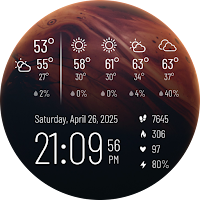
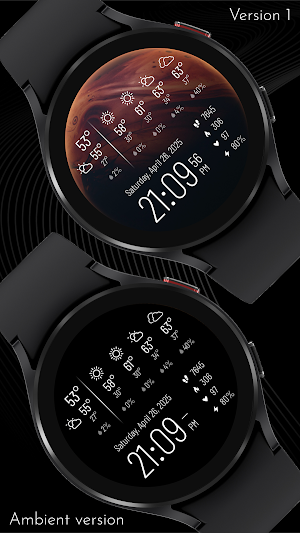
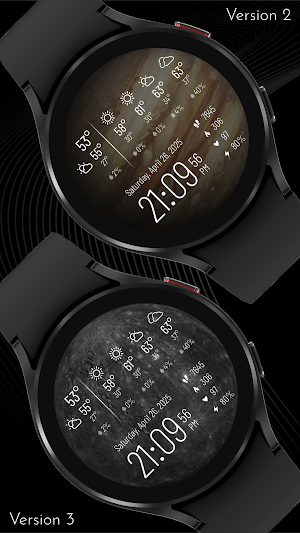
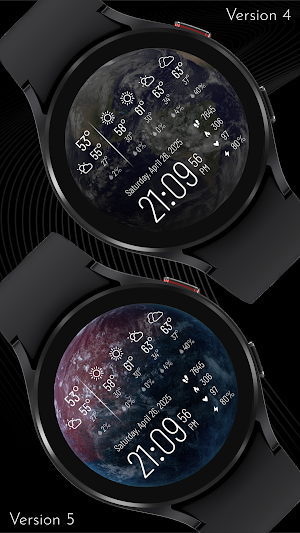
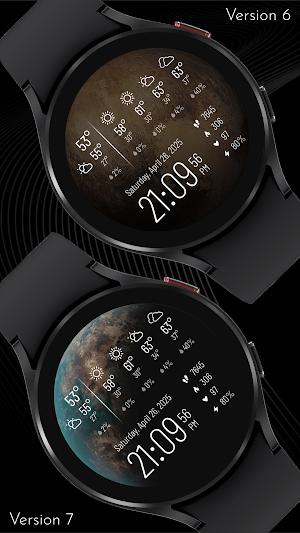
Stay informed at a glance with this comprehensive digital watch face designed for the modern user. Featuring an extensive data display, you'll have instant access to current weather conditions, along with a four-day forecast, including min/max temperature, precipitation chance, and weather icons. Beyond the weather, essential health and activity metrics like steps, (estimated) calories burned, heart rate, and battery percentage are always visible, ensuring you're always in the know. You can also set up 6 invisible shortcuts for quick access to your favorite apps or functions.
Personalize your watch face to perfectly match your style and mood. Choose from a stunning array of background images showcasing distant planets, bringing a touch of cosmic wonder to your wrist. If you prefer a simpler aesthetic, a pure black background option is also available. For those who desire even more customization, we offer nine alternate background colors and a remarkable 24 color options for the displayed data, allowing you to create a truly unique and tailored look.
⚡ KEY FEATURES
· Current weather and 4-day forecast
· Heart-rate, steps, estimated calories and battery
· 12/24-hour mode
· 6 invisible shortcuts
🎨 PERSONALIZATION OPTIONS
· 9 background image options depicting distant planets + a full black one
· 9 alternate background color options
· 24 color options for the data displayed
· 6 invisible shortcut positions
📱 COMPATIBILITY
✅ Wear OS 5+ required (for weather functions)
✅ Works with Galaxy Watch, Pixel Watch, and all Wear OS 5+ devices
🔧 INSTALLATION HELP
Having trouble? We've got you covered:
- Use the dropdown menu next to "Install" on your phone to select your watch model or install directly from your watch's Play Store app
- Updating weather data may take time after installation but switching to another watch face and switching back or restarting both the watch and phone usually helps
- Check out our installation and troubleshooting guide: https://celest-watches.com/installation-troubleshooting/
- Contact us at [email protected] for quick support
🏪 DISCOVER MORE
Browse our full collection of premium Wear OS watch faces:
🔗 https://celest-watches.com
💰 Exclusive discounts available
📞 SUPPORT & COMMUNITY
📧 Support: [email protected]
📱 Follow @celestwatches on Instagram or sign up to our newsletter!
Personalize your watch face to perfectly match your style and mood. Choose from a stunning array of background images showcasing distant planets, bringing a touch of cosmic wonder to your wrist. If you prefer a simpler aesthetic, a pure black background option is also available. For those who desire even more customization, we offer nine alternate background colors and a remarkable 24 color options for the displayed data, allowing you to create a truly unique and tailored look.
⚡ KEY FEATURES
· Current weather and 4-day forecast
· Heart-rate, steps, estimated calories and battery
· 12/24-hour mode
· 6 invisible shortcuts
🎨 PERSONALIZATION OPTIONS
· 9 background image options depicting distant planets + a full black one
· 9 alternate background color options
· 24 color options for the data displayed
· 6 invisible shortcut positions
📱 COMPATIBILITY
✅ Wear OS 5+ required (for weather functions)
✅ Works with Galaxy Watch, Pixel Watch, and all Wear OS 5+ devices
🔧 INSTALLATION HELP
Having trouble? We've got you covered:
- Use the dropdown menu next to "Install" on your phone to select your watch model or install directly from your watch's Play Store app
- Updating weather data may take time after installation but switching to another watch face and switching back or restarting both the watch and phone usually helps
- Check out our installation and troubleshooting guide: https://celest-watches.com/installation-troubleshooting/
- Contact us at [email protected] for quick support
🏪 DISCOVER MORE
Browse our full collection of premium Wear OS watch faces:
🔗 https://celest-watches.com
💰 Exclusive discounts available
📞 SUPPORT & COMMUNITY
📧 Support: [email protected]
📱 Follow @celestwatches on Instagram or sign up to our newsletter!
What’s new
Updated August 5, 2026
Updated to target Android 16 (API 36).
User reviews

Finally!!! A WF that shows you the weather clearly while still being very readable. Great customizations. For less than a cup of Joe! Great work to the Developers!! Looking forward to the future work
Alternatives to CELEST5583 Data Hub Watch
Looking for apps like CELEST5583 Data Hub Watch? Here are 6 similar Android apps on Google Play.
-
CELEST5587 Minimalist Watch
-
CELEST5586 Sport Watch
-
CELEST5585 Sport Watch
-
CELEST5584 Hybrid Watch
-
CELEST5582 Minimalist Watch
-
CELEST5581 Data Hub Watch
| App | Rating | Price | Installs | Last updated | Compare |
|---|---|---|---|---|---|
| CELEST5583 Data Hub Watch | – | $1.99 | 100+ | Aug 5, 2026 | |
| CELEST5587 Minimalist Watch | – | 0.49 USD | 100+ | Aug 5, 2026 | Compare |
| CELEST5586 Sport Watch | – | 0.49 USD | 500+ | Aug 5, 2026 | Compare |
| CELEST5585 Sport Watch | – | 1.99 USD | 500+ | – | Compare |
| CELEST5584 Hybrid Watch | – | 1.99 USD | 500+ | Aug 5, 2026 | Compare |
| CELEST5582 Minimalist Watch | – | 1.99 USD | 100+ | Aug 5, 2026 | Compare |
| CELEST5581 Data Hub Watch | – | 1.99 USD | 1,000+ | Aug 5, 2026 | Compare |