
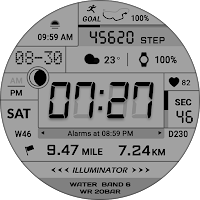
ACRO Cube Archive watchface
Personalization
This is a watch face that supports Wear OS devices
- Rating
- 5.0
- 41 ratings
- Downloads
- 1.8K+
- on Google Play
- Price
- $1.49
- No in-app purchases
- Updated
- Sep 9
- 2026
Screenshots
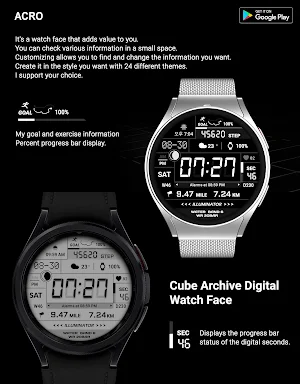


About ACRO Cube Archive watchface
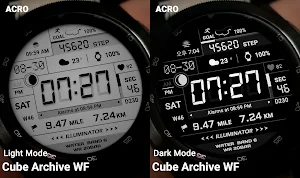
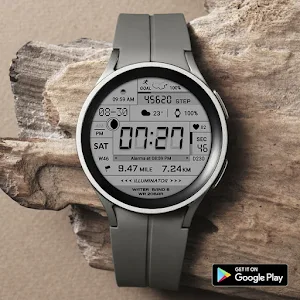
Digital Cube Archive watchface
This is a watch face that supports Wear OS devices.
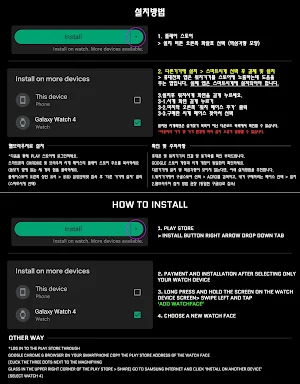
*How to install
Purchase and install the Play Store app on your smartphone (touch the right arrow to install on your watch device).
> Check the connection between the watch body and the phone.
*Installation using web browser
Copy the Play Store address of the watch face (Click the 3 dots next to the magnifying glass at the top right of the Play Store > Share)
Go to Samsung Internet and click 'Install on another device' > select watch device
- The watch face screen shot of the smartphone app may differ from the actual downloaded watch face screen shot.
- A consent to use the sensor is required to use all functions.
- Some features may not be available on all watches.
- If the Play Store app is not compatible, install it using the web browser on your PC/laptop in addition to the app on your phone.
This watch face supports Wear OS devices.
Mobile phone battery complication app
After installing the additional app from the link below to your watch and smartphone, set the complication.
Search for the 'Phone Battery Complication' app and install it. https://play.google.com/store/apps/details?id=com.weartools.phonebattcomp
All credits go to original app creator.
amoledwatchfaces - https://play.google.com/store/apps/dev?id=5591589606735981545
Find installed watchfaces
1. Press and hold the watch face > 2. Click the Decorate button > 3. Click the last right 'Add Watch Face' > Confirm the purchased watch face
*Installed watchfaces can be found in the Downloads list, not in the Favorites list.
Discover new watch faces in the ACRO Store
https://play.google.com/store/apps/dev?id=7728319687716467388
For inquiries about the app, please contact us by email below.
Mail: [email protected]
This is a watch face that supports Wear OS devices.
*How to install
Purchase and install the Play Store app on your smartphone (touch the right arrow to install on your watch device).
> Check the connection between the watch body and the phone.
*Installation using web browser
Copy the Play Store address of the watch face (Click the 3 dots next to the magnifying glass at the top right of the Play Store > Share)
Go to Samsung Internet and click 'Install on another device' > select watch device
- The watch face screen shot of the smartphone app may differ from the actual downloaded watch face screen shot.
- A consent to use the sensor is required to use all functions.
- Some features may not be available on all watches.
- If the Play Store app is not compatible, install it using the web browser on your PC/laptop in addition to the app on your phone.
This watch face supports Wear OS devices.
Mobile phone battery complication app
After installing the additional app from the link below to your watch and smartphone, set the complication.
Search for the 'Phone Battery Complication' app and install it. https://play.google.com/store/apps/details?id=com.weartools.phonebattcomp
All credits go to original app creator.
amoledwatchfaces - https://play.google.com/store/apps/dev?id=5591589606735981545
Find installed watchfaces
1. Press and hold the watch face > 2. Click the Decorate button > 3. Click the last right 'Add Watch Face' > Confirm the purchased watch face
*Installed watchfaces can be found in the Downloads list, not in the Favorites list.
Discover new watch faces in the ACRO Store
https://play.google.com/store/apps/dev?id=7728319687716467388
For inquiries about the app, please contact us by email below.
Mail: [email protected]
User reviews

Very very elegant.

Awesome watch face. Very easy to read and aesthetically pleasing. Looks amazing. The LCD lighting is very realistic.

Awesome watchface. I've been a fan of this developer since tizen days

Fantastic design! 10/10! 👏✌️
Alternatives to ACRO Cube Archive watchface
Looking for apps like ACRO Cube Archive watchface? Here are 6 similar Android apps on Google Play.
-
ACRO Digital Weather2 Watch
-
ACRO Digital Weather Watchface
-
ACRO Tion Sports Digital Watch
-
ACRO Tion simple Digital Watch
-
ACRO 3D Special Digital Watch
-
ACRO X one Digital Watchface
| App | Rating | Price | Installs | Last updated | Compare |
|---|---|---|---|---|---|
| ACRO Cube Archive watchface | 5.0 / 5 | $1.49 | 1,000+ | Sep 9, 2026 | |
| ACRO Digital Weather2 Watch | – | 1.99 USD | 1,000+ | Oct 20, 2026 | Compare |
| ACRO Digital Weather Watchface | – | 1.99 USD | 1,000+ | Sep 5, 2026 | Compare |
| ACRO Tion Sports Digital Watch | – | 1.49 USD | 500+ | – | Compare |
| ACRO Tion simple Digital Watch | – | 0.99 USD | 500+ | Sep 6, 2025 | Compare |
| ACRO 3D Special Digital Watch | – | 0.99 USD | 100+ | Jan 12, 2025 | Compare |
| ACRO X one Digital Watchface | – | 0.99 USD | 500+ | Oct 26, 2025 | Compare |
Similar apps on Google Play
- ACRO Digital Weather2 Watch
- ACRO Digital Weather Watchface
- ACRO Tion Sports Digital Watch
- ACRO Tion simple Digital Watch
- ACRO 3D Special Digital Watch
- ACRO X one Digital Watchface
- ACRO Christmas Winter Night
- ACRO SPACE2 Black Watchface
- ACRO Classic Gen2 Watchface
- ACRO Double Simple Watchface
- ACRO Cube2 Digital Watchface
- ACRO Cube Archive watchface
- ACRO Genix G100 digital watch
- ACRO Genix G102 Digital watch
- ACRO 31 luxury GL1872 Watch
- ACRO 30 Classic Minitrain
- ACRO 29 Classic wind TA12Watch
- ACRO 28 STORM DS70 Watchface
- ACRO 27 Simple Gold Watchface
- ACRO 26 Digital Info Watchface
- ACRO 25 Digi Day Night Watch
- ACRO Perfect BW Watchface
- ACRO Sport Run2 Watchface
- ACRO Simpleless A1 Watchface
- ACRO Space2 Simple Watchface
- Acro Space1 edtion Watchface
- Acro Genix DnA Digi Watchface
- ACRO Happy Christmas Watchface
- ACRO ACT G Watchface
- ACRO Genix Digi Rev watchface
- ACRO Genix Digital watchface
- ACRO Enegy Fit Rev watchface
- ACRO Hive One Watchface
- ACROWatch Classic Sion D700
- ACROWatch AQUA Night DK10
- ACRO Aqua Night AN47 Watchface
- ACRO Classic Sion X600 Watch
- ACRO Classic Sion T700
- ACRO Mini Point Sports Watch
- Acro Classic Wonder T50 Watch
- ACRO Energy Fit Kor Watchface
- ACRO Energy Fit Watchface
- ACRO Classic SPACE1 SIRIUS
- ACRO CLASSIC SION T800
- ACRO Night Work ES07 Watchface