
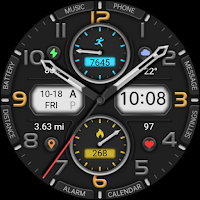
【Customize】Practical Pointer
Personalization
The Watch supports running on Wear OS
- Downloads
- 354+
- on Google Play
- Price
- $2.99
- No in-app purchases
- Updated
- Sep 13
- 2026
Screenshots


About 【Customize】Practical Pointer
The Watch supports running on Wear OS
🏠Other my works here:
https://play.google.com/store/apps/dev?id=9082617204511160070
Hope you leave a positive review for this watch!
【Buy one get one】Please send the following content to my email: [email protected]
[Order ID: GPA.××××-××××-××××-×××××
Name of the complimentary Watch:××]
I will send you free coupons within a week.
🎁Add Telegram group to obtain remaining coupons :
https://t.me/zkinwatch
⌚️Instagram :
https://www.instagram.com/zkinwatchfaces?igsh=OHNuOHExbGliYWtm
⌚️Facebook :
https://www.facebook.com/share/1YFxgRMiqf/
Function Introduction:
- Music
- Phone
- Message
- Settings
- Calendar
- Alarm
- Steps and Target Percentage Pointer
- Battery
- Custom Data
- Date
- Week
- AMPM
- Time
- Distance(KM/MI)
- Calorie and percentage pointers
- Heart rate
Customization: Multiple customization areas are available for selection
Compatible devices: Galaxy Watch 4/5/6/7/8 and other devices that support Wear OS
How do I install the watch face on WearOS ?
1. Install it from Google Play Wear Store on your watch
2. Install the companion app for fully customization (Android phone devices)
🏠Other my works here:
https://play.google.com/store/apps/dev?id=9082617204511160070
Hope you leave a positive review for this watch!
【Buy one get one】Please send the following content to my email: [email protected]
[Order ID: GPA.××××-××××-××××-×××××
Name of the complimentary Watch:××]
I will send you free coupons within a week.
🎁Add Telegram group to obtain remaining coupons :
https://t.me/zkinwatch
⌚️Instagram :
https://www.instagram.com/zkinwatchfaces?igsh=OHNuOHExbGliYWtm
⌚️Facebook :
https://www.facebook.com/share/1YFxgRMiqf/
Function Introduction:
- Music
- Phone
- Message
- Settings
- Calendar
- Alarm
- Steps and Target Percentage Pointer
- Battery
- Custom Data
- Date
- Week
- AMPM
- Time
- Distance(KM/MI)
- Calorie and percentage pointers
- Heart rate
Customization: Multiple customization areas are available for selection
Compatible devices: Galaxy Watch 4/5/6/7/8 and other devices that support Wear OS
How do I install the watch face on WearOS ?
1. Install it from Google Play Wear Store on your watch
2. Install the companion app for fully customization (Android phone devices)
What’s new
Updated September 13, 2026
Update: Support for higher versions More watch faces: https://zkinwatchfaces.com/
Alternatives to 【Customize】Practical Pointer
Looking for apps like 【Customize】Practical Pointer? Here are 6 similar Android apps on Google Play. The highest rated is Ink Patterned Quartz (4.5/5), and 1 of the 6 are free to download.
-
Ink Patterned Quartz 4.5
-
【Analog】Noctilucent Map
-
【Retro】Gradient Dark Metal
-
【Digital】Blues Retro
-
【Custom】Colorful Linear
-
【Digital】Time Transmission
| App | Rating | Price | Installs | Last updated | Compare |
|---|---|---|---|---|---|
| 【Customize】Practical Pointer | – | $2.99 | 100+ | Sep 13, 2026 | |
| Ink Patterned Quartz | 4.5 / 5 | Free | 50,000+ | Feb 25, 2025 | Compare |
| 【Analog】Noctilucent Map | – | 2.99 USD | 100+ | Oct 14, 2026 | Compare |
| 【Retro】Gradient Dark Metal | – | 2.99 USD | 100+ | Sep 13, 2026 | Compare |
| 【Digital】Blues Retro | – | 0.99 USD | 100+ | Sep 13, 2026 | Compare |
| 【Custom】Colorful Linear | – | 0.99 USD | 500+ | Oct 14, 2026 | Compare |
| 【Digital】Time Transmission | – | 2.99 USD | 100+ | Oct 14, 2026 | Compare |