

Warranty Sage: Receipt Vault
Productivity
Warranty tracker and receipt keeper with expiry reminders. All on your phone.
- Downloads
- 2+
- on Google Play
- Price
- Free
- No in-app purchases
- Updated
- Sep 11
- 2026 · v0.2.2
Screenshots


About Warranty Sage: Receipt Vault
Warranty Sage keeps your receipts and warranties on the phone you bought them with. Add an item at the till, set how long the warranty runs, and get a reminder before it ends. No account, no cloud to sign into, no subscription on files that are already yours.
ADD AN ITEM ONCE
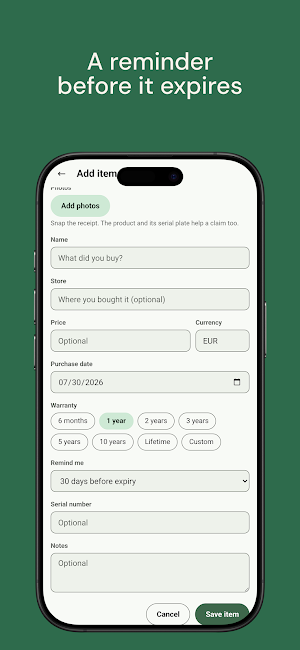
Take a photo of the receipt and the product. Enter the name, store, price, and purchase date. Choose a warranty length: 6 months, 1, 2, 3, 5, or 10 years, lifetime, or a custom number of months. Add a serial number and a note when it helps a later claim.
REMINDERS
Each item gets one reminder, 30 days before the warranty ends. Set it to 7, 30, or 90 days on any item. Lifetime items stay quiet.
CLAIM PDF
Export an item as a clean PDF with its details and photos, ready to hand to a shop or an insurer. Export the whole vault as one PDF when you need a home inventory.
THE VAULT
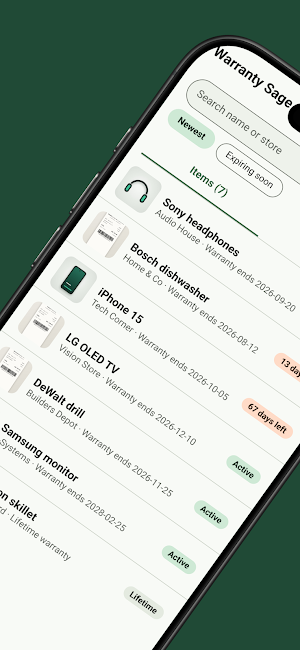
Search by name or store. Sort by what runs out first. Each item shows whether it is active, expiring, or expired, and expired items move to an Archive on their own.
WHAT STAYS ON THE PHONE
Everything. Receipts, prices, and serial numbers do not leave the device. With backup switched off, Warranty Sage makes no network calls at all. There is no account to lose, and we run no server that can read your vault.
OPTIONAL GOOGLE DRIVE BACKUP
Switch on backup and a copy goes to a "Warranty Sage Backups" folder in your own Google Drive. The app only sees files it created there. It stays off until you turn it on, and you can disconnect whenever you want.
BACKUP AND RESTORE
Export one file with your data and photos, and keep it wherever suits you. A restore checks every file before it replaces anything, so a broken copy cannot wipe your vault.
DARK MODE
Follow the system theme, or set light or dark yourself.
PRICE
Warranty Sage is free. No ads, no ad code, no subscription, and no cap on how many items you keep. The internet permission is there for the optional Google Drive backup and nothing else. With backup off, nothing leaves the phone.
Warranty Sage is part of the Sage line of small, private tools.
What’s new
Version 0.2.2 · Updated September 11, 2026
First release of Warranty Sage. - Add items with photos, price, purchase date and warranty length - A reminder before each warranty ends (7, 30 or 90 days) - Calendar view of expiries, plus .ics export to your calendar app - Search, expiring-first sort and automatic archive - Claim PDF for one item or the whole vault - Back up and restore the vault as one file - Optional free cloud backup and sync with a Google sign-in - Scan a receipt to prefill date, total and serial - Light and dark themes
Alternatives to Warranty Sage: Receipt Vault
Looking for apps like Warranty Sage: Receipt Vault? Here are 6 similar Android apps on Google Play. All of them are free to download.
-
Concrete Calculator: Bags+Cost
-
Concrete Mix Ratio Calculator
-
APK Inspector: AAB Analyzer
-
Handyman Calculator
-
Split Sage: Split Expenses
-
PDF Plain and Simple
| App | Rating | Price | Installs | Last updated | Compare |
|---|---|---|---|---|---|
| Warranty Sage: Receipt Vault | – | Free | 1+ | Sep 11, 2026 | |
| Concrete Calculator: Bags+Cost | – | Free | 1+ | Oct 1, 2026 | Compare |
| Concrete Mix Ratio Calculator | – | Free | 5+ | Sep 11, 2026 | Compare |
| APK Inspector: AAB Analyzer | – | Free | 100+ | – | Compare |
| Handyman Calculator | – | Free | 100+ | – | Compare |
| Split Sage: Split Expenses | – | Free | 1+ | – | Compare |
| PDF Plain and Simple | – | Free | 100+ | – | Compare |