

Dual Cam: Front and Back Video
Photography In-app purchases
Dual Camera Video Recorder. Record from front and back camera at the same time.
- Rating
- 4.2
- 428 ratings
- Downloads
- 65.7K+
- on Google Play
- Price
- Free
- In-app purchases
- Updated
- Aug 4
- 2026 · v2.0.0
Screenshots


About Dual Cam: Front and Back Video
DualCam – Front & Back Camera Video Recorder
Record from your front and back camera at the same time with DualCam!
Capture every moment from both sides of your story — your reaction and your view — in a single video. Whether you’re a vlogger, traveler, interviewer, or content creator, DualCam lets you film like a pro using both cameras simultaneously.
Capture Both Sides of Every Moment. Why choose between the selfie camera and the rear camera when you can use both? DualCam unlocks the full power of your smartphone camera so you never miss a detail.
Perfect for:
• Vlogging & YouTube videos
• Reaction videos
• Interviews & podcasts
• Travel videos
• Tutorials & how-to content
• Live events & concerts
• Sports and action recording
• Video diaries
Show your face and your world at the same time!
Features and Effects
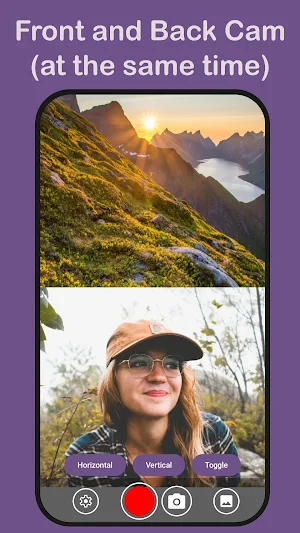
Split-Screen:
Split screen camera showing front and back views side-by-side. Great for reaction videos.
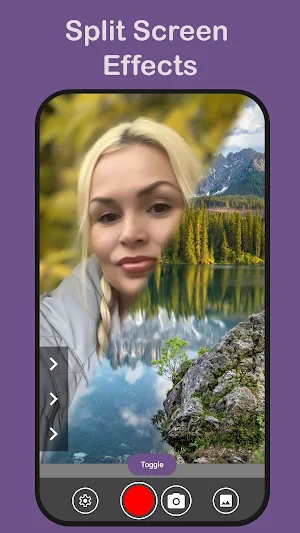
Split Screen PRO:
Split-Screen PRO mode lets you combine both cameras your way with horizontal, vertical, or diagonal layouts. With extra controls for blending and resizing. Making the perfect vlogging camera app.
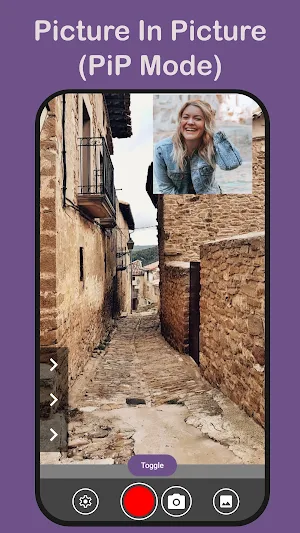
Picture In Picture (PiP):
Selfie camera overlay video. Making DualCam the perfect vlogging camera app.
Picture In Picture (Pip) PRO:
Overlay one camera feed on top of the other. Move and resize the PiP window to fit your style.
Transitions:
Fade or swipe gradually between front and rear cameras while recording.
Transitions PRO:
More advanced transitions between multiple cameras; e.g. swipe, fade and glitch transitions.
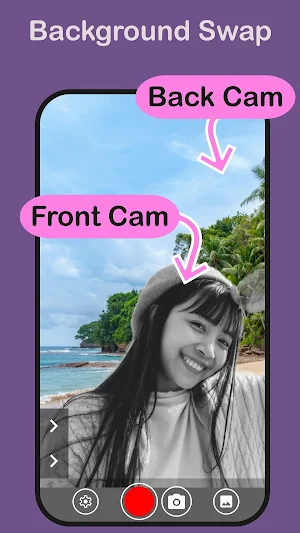
Background Swap:
Using advanced AI segmentation, swap the background of your selfie camera with the background from your rear facing camera.
Background Swap PRO:
Live video background changer. Change the background in real time for the perfect reaction video maker with face cam.
Blender:
Double exposure, video blender effect. Blends both the front and rear camera to create a double exposure video.
Blender PRO:
Additional professional video blend modes, to combine two live videos (from front and back camera) into a single blended video.
Made for Creators
DualCam is designed for modern content creators who want more dynamic videos. Record reaction videos, commentary, tutorials, and behind-the-scenes clips without extra equipment.
No need for two phones or complicated editing — DualCam does it all in one app.
Use DualCam for:
• Travel memories
• Family moments
• Event recording
• School projects
• Journalism
• Fitness training videos
• Coaching and feedback
Simple & User-Friendly
DualCam features a clean and intuitive interface so anyone can start recording in seconds. No professional skills required.
1. Open the app
2. Choose your layout or effect
3. Tap record
Capture both sides of your story. It’s that easy!
Download DualCam Today!
Start creating unique dual-camera videos and stand out on social media. Capture reactions, memories, and moments from both perspectives — all at once.
Install DualCam now and tell your story from every angle!
Record from your front and back camera at the same time with DualCam!
Capture every moment from both sides of your story — your reaction and your view — in a single video. Whether you’re a vlogger, traveler, interviewer, or content creator, DualCam lets you film like a pro using both cameras simultaneously.
Capture Both Sides of Every Moment. Why choose between the selfie camera and the rear camera when you can use both? DualCam unlocks the full power of your smartphone camera so you never miss a detail.
Perfect for:
• Vlogging & YouTube videos
• Reaction videos
• Interviews & podcasts
• Travel videos
• Tutorials & how-to content
• Live events & concerts
• Sports and action recording
• Video diaries
Show your face and your world at the same time!
Features and Effects
Split-Screen:
Split screen camera showing front and back views side-by-side. Great for reaction videos.
Split Screen PRO:
Split-Screen PRO mode lets you combine both cameras your way with horizontal, vertical, or diagonal layouts. With extra controls for blending and resizing. Making the perfect vlogging camera app.
Picture In Picture (PiP):
Selfie camera overlay video. Making DualCam the perfect vlogging camera app.
Picture In Picture (Pip) PRO:
Overlay one camera feed on top of the other. Move and resize the PiP window to fit your style.
Transitions:
Fade or swipe gradually between front and rear cameras while recording.
Transitions PRO:
More advanced transitions between multiple cameras; e.g. swipe, fade and glitch transitions.
Background Swap:
Using advanced AI segmentation, swap the background of your selfie camera with the background from your rear facing camera.
Background Swap PRO:
Live video background changer. Change the background in real time for the perfect reaction video maker with face cam.
Blender:
Double exposure, video blender effect. Blends both the front and rear camera to create a double exposure video.
Blender PRO:
Additional professional video blend modes, to combine two live videos (from front and back camera) into a single blended video.
Made for Creators
DualCam is designed for modern content creators who want more dynamic videos. Record reaction videos, commentary, tutorials, and behind-the-scenes clips without extra equipment.
No need for two phones or complicated editing — DualCam does it all in one app.
Use DualCam for:
• Travel memories
• Family moments
• Event recording
• School projects
• Journalism
• Fitness training videos
• Coaching and feedback
Simple & User-Friendly
DualCam features a clean and intuitive interface so anyone can start recording in seconds. No professional skills required.
1. Open the app
2. Choose your layout or effect
3. Tap record
Capture both sides of your story. It’s that easy!
Download DualCam Today!
Start creating unique dual-camera videos and stand out on social media. Capture reactions, memories, and moments from both perspectives — all at once.
Install DualCam now and tell your story from every angle!
What’s new
Version 2.0.0 · Updated August 4, 2026
Performance improvements and bug fixes
User reviews

good app
Alternatives to Dual Cam: Front and Back Video
Looking for apps like Dual Cam: Front and Back Video? Here are 5 similar Android apps on Google Play. The highest rated is Green Screen Effects Camera (4.9/5), and all 5 are free to download.
-
Funny Face Filters Live Camera 4.1
-
Green Screen Effects Camera 4.9
-
Falling Filter: Loop Me Prank
-
Vintage Camera 4.6
-
SelfieArt: Photo To Art 4.5
| App | Rating | Price | Installs | Last updated | Compare |
|---|---|---|---|---|---|
| Dual Cam: Front and Back Video | 4.2 / 5 | Free | 50,000+ | Aug 4, 2026 | |
| Funny Face Filters Live Camera | 4.1 / 5 | Free | 10,000,000+ | Feb 16, 2026 | Compare |
| Green Screen Effects Camera | 4.9 / 5 | Free | 10,000+ | May 8, 2026 | Compare |
| Falling Filter: Loop Me Prank | – | Free | 10,000+ | Mar 4, 2026 | Compare |
| Vintage Camera | 4.6 / 5 | Free | 50,000+ | – | Compare |
| SelfieArt: Photo To Art | 4.5 / 5 | Free | 50,000+ | Jan 23, 2025 | Compare |