

Volt Volume
Games_apps Tools Contains ads
Professional audio volume booster with bass enhancement technology.
- Downloads
- 100+
- on Google Play
- Price
- Free
- No in-app purchases
- Updated
- Feb 27
- 2026 · v1.0.1
Screenshots
About Volt Volume
Volt Volume - Audio Volume Booster
Volt Volume is a professional audio enhancement application that allows you to boost your device's volume beyond the standard system limits. Designed for users who need louder audio output, this app provides precise volume control with advanced audio processing technology.
KEY FEATURES
Volume Boost Levels
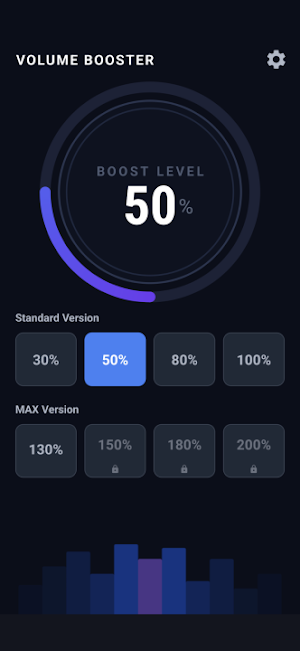
- Standard mode: 30%, 50%, 80%, 100% volume enhancement
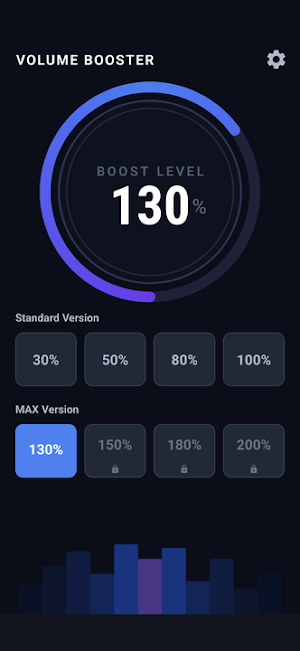
- MAX mode: 130%, 150%, 180%, 200% volume boost (unlock required)
- Real-time audio adjustment with smooth transitions
- Visual gauge display showing current boost level
Audio Enhancement Technology
- Bass boost processing for enhanced low-frequency response
- Loudness enhancement for improved audio clarity
- Equalizer support for balanced sound output
- Professional-grade audio effects engine
User-Friendly Interface
- Intuitive circular gauge for volume visualization
- Quick-select preset levels for instant adjustment
- Clean, modern dark theme design
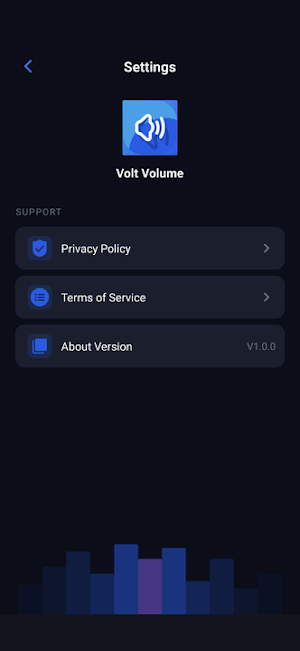
- Easy-to-navigate settings panel
Safety Features
- Gradual volume increase to prevent audio distortion
- System volume integration for seamless control
- Audio effect optimization for device protection
- Persistent settings across app sessions
USAGE SCENARIOS
This volume booster is ideal for:
- Watching videos with low audio levels
- Listening to music in noisy environments
- Enhancing speaker output for presentations
- Improving audio clarity for media playback
- Boosting volume for entertainment content
TECHNICAL SPECIFICATIONS
- Supports Android audio system integration
- Uses LoudnessEnhancer API for volume boost
- Implements BassBoost for low-frequency enhancement
- Includes Equalizer for audio balance
- Requires MODIFY_AUDIO_SETTINGS permission
IMPORTANT NOTES
- This app modifies system audio settings to increase volume
- Prolonged use at maximum levels may affect speaker performance
- Users should start with lower boost levels and adjust gradually
- The app does not record or transmit any audio data
- All audio processing happens locally on your device
PRIVACY AND PERMISSIONS
Volt Volume requires minimal permissions:
- Audio settings modification: To adjust volume and apply audio effects
- No internet connection required for core functionality
- No personal data collection or tracking
- No advertisements in premium features
GETTING STARTED
1. Launch the app and select your desired boost level
2. Choose from Standard presets (30%-100%) for moderate enhancement
3. Unlock MAX levels (130%-200%) for maximum volume boost
4. Adjust settings as needed for optimal audio experience
5. The app remembers your preferences for future use
COMPATIBILITY
- Designed for Android devices with standard audio hardware
- Optimized for phones and tablets
- Supports edge-to-edge display on modern devices
- Works with built-in speakers and wired headphones
- Compatible with Bluetooth audio devices
SUPPORT
For questions or technical support, please use the in-app settings menu to access our privacy policy and terms of service.
Note: Audio enhancement effectiveness may vary depending on device hardware capabilities and current system volume settings
Volt Volume is a professional audio enhancement application that allows you to boost your device's volume beyond the standard system limits. Designed for users who need louder audio output, this app provides precise volume control with advanced audio processing technology.
KEY FEATURES
Volume Boost Levels
- Standard mode: 30%, 50%, 80%, 100% volume enhancement
- MAX mode: 130%, 150%, 180%, 200% volume boost (unlock required)
- Real-time audio adjustment with smooth transitions
- Visual gauge display showing current boost level
Audio Enhancement Technology
- Bass boost processing for enhanced low-frequency response
- Loudness enhancement for improved audio clarity
- Equalizer support for balanced sound output
- Professional-grade audio effects engine
User-Friendly Interface
- Intuitive circular gauge for volume visualization
- Quick-select preset levels for instant adjustment
- Clean, modern dark theme design
- Easy-to-navigate settings panel
Safety Features
- Gradual volume increase to prevent audio distortion
- System volume integration for seamless control
- Audio effect optimization for device protection
- Persistent settings across app sessions
USAGE SCENARIOS
This volume booster is ideal for:
- Watching videos with low audio levels
- Listening to music in noisy environments
- Enhancing speaker output for presentations
- Improving audio clarity for media playback
- Boosting volume for entertainment content
TECHNICAL SPECIFICATIONS
- Supports Android audio system integration
- Uses LoudnessEnhancer API for volume boost
- Implements BassBoost for low-frequency enhancement
- Includes Equalizer for audio balance
- Requires MODIFY_AUDIO_SETTINGS permission
IMPORTANT NOTES
- This app modifies system audio settings to increase volume
- Prolonged use at maximum levels may affect speaker performance
- Users should start with lower boost levels and adjust gradually
- The app does not record or transmit any audio data
- All audio processing happens locally on your device
PRIVACY AND PERMISSIONS
Volt Volume requires minimal permissions:
- Audio settings modification: To adjust volume and apply audio effects
- No internet connection required for core functionality
- No personal data collection or tracking
- No advertisements in premium features
GETTING STARTED
1. Launch the app and select your desired boost level
2. Choose from Standard presets (30%-100%) for moderate enhancement
3. Unlock MAX levels (130%-200%) for maximum volume boost
4. Adjust settings as needed for optimal audio experience
5. The app remembers your preferences for future use
COMPATIBILITY
- Designed for Android devices with standard audio hardware
- Optimized for phones and tablets
- Supports edge-to-edge display on modern devices
- Works with built-in speakers and wired headphones
- Compatible with Bluetooth audio devices
SUPPORT
For questions or technical support, please use the in-app settings menu to access our privacy policy and terms of service.
Note: Audio enhancement effectiveness may vary depending on device hardware capabilities and current system volume settings
Alternatives to Volt Volume
Looking for apps like Volt Volume? Here are 6 similar Android apps on Google Play. The highest rated is Poweramp Equalizer (4.4/5), and all 6 are free to download.
-
Poweramp Equalizer 4.4
-
Boom: Bass Booster & Equalizer 4.0
-
WallStream 3.7
-
Sword And Scale 3.8
-
Rewind: Music Discovery 3.6
-
MyMixtapez: Playlists 24/7 4.2
| App | Rating | Price | Installs | Last updated | Compare |
|---|---|---|---|---|---|
| Volt Volume | – | Free | 100+ | Feb 27, 2026 | |
| Poweramp Equalizer | 4.4 / 5 | Free | 5,000,000+ | Aug 6, 2026 | Compare |
| Boom: Bass Booster & Equalizer | 4.0 / 5 | Free | 5,000,000+ | Aug 31, 2026 | Compare |
| WallStream | 3.7 / 5 | Free | 5,000+ | Jul 27, 2025 | Compare |
| Sword And Scale | 3.8 / 5 | Free | 50,000+ | Oct 2, 2026 | Compare |
| Rewind: Music Discovery | 3.6 / 5 | Free | 50,000+ | Jun 15, 2026 | Compare |
| MyMixtapez: Playlists 24/7 | 4.2 / 5 | Free | 10,000,000+ | Sep 30, 2026 | Compare |
Compare Volt Volume with the top alternatives: ratings, updates, ASO score and keyword gaps →