
Voice Lock
WIFI - Hotspot Sharing Community & Security Tools Tools Contains ads
Lock and unlock your device with just your voice. Its voice lock !
- Downloads
- 100+
- on Google Play
- Price
- Free
- No in-app purchases
- Updated
- Mar 15
- 2023 · v1.0
Screenshots

About Voice Lock
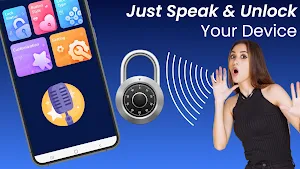
🔐 Voice Lock Command: Lock and Unlock is the perfect app for anyone who wants to quickly and easily lock and unlock their device with just their voice. This app utilizes the latest in voice recognition technology to provide a convenient and secure way to access your device.
Here's how to use the app:
1️⃣ Step 1 : Download and install Voice Command: Lock and Unlock from the Google Play Store.
2️⃣ Step 2 : Open the app and enable the necessary permissions.
3️⃣ Step 3 : Set up your preferred Voice Lock by selecting a phrase that you'll use to lock and unlock your device.
4️⃣ Step 4 : Once you've set up your voice command, you can use it to lock and unlock your device without ever having to touch your screen.
This app is incredibly useful for anyone who wants to keep their device secure while also being able to access it quickly and easily. With just your voice, you can lock your device when you're not using it and unlock it when you need to use it again.
Additional Features:
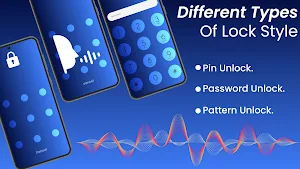
🤩 PIN Lock: In addition to Voice Locks, you can also use a PIN to lock and unlock your device.
🤩 Current Time Lock: You can set your device to automatically lock at specific times of the day, such as when you're sleeping or at work.
🤩 Pattern Lock: You can also use a pattern to lock and unlock your device.
🤩 Lock Screen Wallpaper: You can choose from a variety of lock screen wallpapers to personalize your device even further.
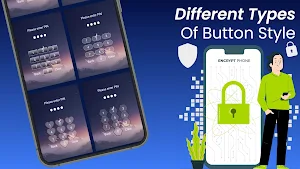
🤩 Button Style: You can customize the style of the lock button to match your personal preferences.
🤩 Fake Icon: You can enable a fake icon for Voice Command: Lock and Unlock, making it appear as if it's a different app entirely. This adds an extra layer of security to your device.
With these additional features, Voice Command: Lock and Unlock is the ultimate app for anyone who wants complete control over their device's security. You can choose the locking method that works best for you and customize the app to suit your preferences.
Why choose this app:
*Easy to use: Voice Lock : Lock and Unlock is simple to set up and use, making it a great choice for anyone who wants a hassle-free way to lock and unlock their device.
*Secure: Our app uses the latest in voice recognition technology to ensure that only you can access your device.
*Saves time: With just your voice, you can quickly and easily lock and unlock your device, saving you time and effort.
Disclaimer:
Please note that Voice Command: Lock and Unlock may not work on all devices or in all situations. We cannot guarantee that the app will work perfectly in every scenario.
If you find Voice Command: Lock and Unlock helpful, please consider leaving us a 5-star review on the Google Play Store. Your feedback helps us improve our app and provide better features to our users.
Here's how to use the app:
1️⃣ Step 1 : Download and install Voice Command: Lock and Unlock from the Google Play Store.
2️⃣ Step 2 : Open the app and enable the necessary permissions.
3️⃣ Step 3 : Set up your preferred Voice Lock by selecting a phrase that you'll use to lock and unlock your device.
4️⃣ Step 4 : Once you've set up your voice command, you can use it to lock and unlock your device without ever having to touch your screen.
This app is incredibly useful for anyone who wants to keep their device secure while also being able to access it quickly and easily. With just your voice, you can lock your device when you're not using it and unlock it when you need to use it again.
Additional Features:
🤩 PIN Lock: In addition to Voice Locks, you can also use a PIN to lock and unlock your device.
🤩 Current Time Lock: You can set your device to automatically lock at specific times of the day, such as when you're sleeping or at work.
🤩 Pattern Lock: You can also use a pattern to lock and unlock your device.
🤩 Lock Screen Wallpaper: You can choose from a variety of lock screen wallpapers to personalize your device even further.
🤩 Button Style: You can customize the style of the lock button to match your personal preferences.
🤩 Fake Icon: You can enable a fake icon for Voice Command: Lock and Unlock, making it appear as if it's a different app entirely. This adds an extra layer of security to your device.
With these additional features, Voice Command: Lock and Unlock is the ultimate app for anyone who wants complete control over their device's security. You can choose the locking method that works best for you and customize the app to suit your preferences.
Why choose this app:
*Easy to use: Voice Lock : Lock and Unlock is simple to set up and use, making it a great choice for anyone who wants a hassle-free way to lock and unlock their device.
*Secure: Our app uses the latest in voice recognition technology to ensure that only you can access your device.
*Saves time: With just your voice, you can quickly and easily lock and unlock your device, saving you time and effort.
Disclaimer:
Please note that Voice Command: Lock and Unlock may not work on all devices or in all situations. We cannot guarantee that the app will work perfectly in every scenario.
If you find Voice Command: Lock and Unlock helpful, please consider leaving us a 5-star review on the Google Play Store. Your feedback helps us improve our app and provide better features to our users.
Alternatives to Voice Lock
Looking for apps like Voice Lock? Here are 4 similar Android apps on Google Play. The highest rated is Wifi Unlocker : Wifi Password (4.4/5), and all 4 are free to download.
-
Wifi Unlocker : Wifi Password 4.4
-
Chat AI - Ask me anything
-
Pic.Editor : Edit Photo Online
-
Applock : Personal Security
| App | Rating | Price | Installs | Last updated | Compare |
|---|---|---|---|---|---|
| Voice Lock | – | Free | 100+ | Mar 15, 2023 | |
| Wifi Unlocker : Wifi Password | 4.4 / 5 | Free | 10,000+ | Jul 11, 2023 | Compare |
| Chat AI - Ask me anything | – | Free | 100+ | Jul 16, 2023 | Compare |
| Pic.Editor : Edit Photo Online | – | Free | 100+ | – | Compare |
| Applock : Personal Security | – | Free | 1,000+ | Mar 16, 2026 | Compare |
Compare Voice Lock with the top alternatives: ratings, updates, ASO score and keyword gaps →