

Scanter: PDF Scanner & Docs
Productivity In-app purchases
Scan documents to PDF, extract text with OCR, sign, edit, and share in seconds.
- Downloads
- 14+
- on Google Play
- Price
- Free
- In-app purchases
- Updated
- Jun 29
- 2026 · v1.1.2
Screenshots

About Scanter: PDF Scanner & Docs
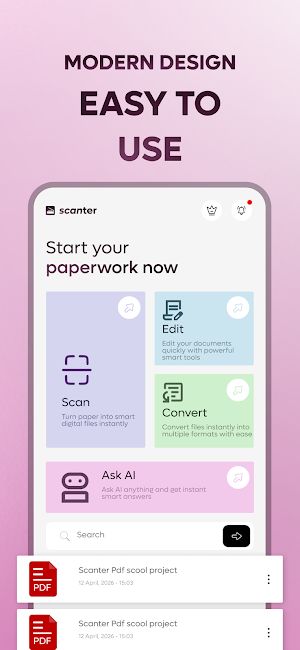
Scanter is a fast, lightweight PDF scanner and document toolkit. Turn paper into polished PDFs, extract text with OCR, sign agreements, and share files from your phone — all in seconds.
Whether you're digitizing study notes, sending contracts, or organizing receipts, Scanter keeps the workflow simple and the results sharp.
KEY FEATURES
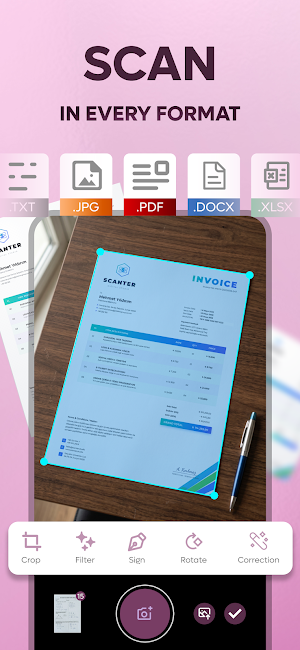
• Automatic edge detection and perspective correction
• Batch scanning for multi-page documents
• Smart filters: color, grayscale, black & white, magic enhance
• OCR text recognition — make scans searchable and editable
• Export to PDF or JPG instantly
• Works offline, with on-device processing
SCAN ANYTHING
• Contracts, forms, and agreements
• Receipts, invoices, and expense reports
• ID cards, passports, and business cards
• Handwritten notes, whiteboards, and books
• Tax documents and study materials
PDF TOOLS
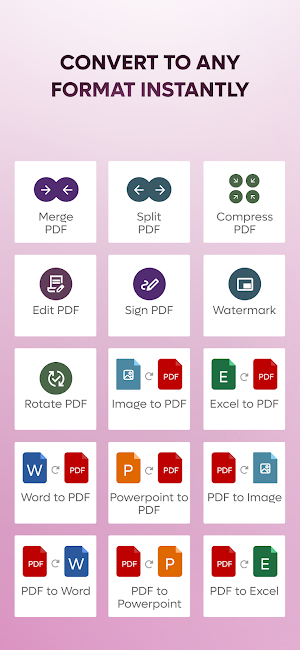
• Merge multiple scans into one PDF
• Split, reorder, and delete pages
• Compress PDFs to reduce file size
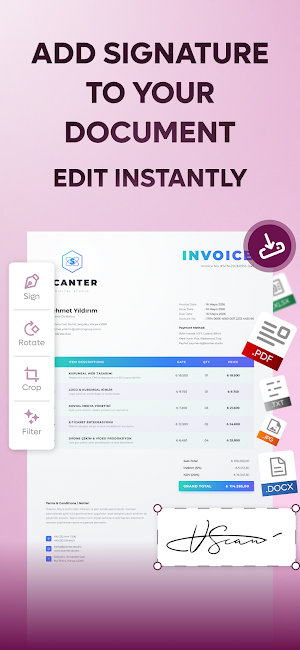
• Sign documents with signatures, initials, and text
• Rotate, crop, and adjust pages
• Protect sensitive documents with a password
ORGANIZE
• Custom folders and tags
• Search across file names and scanned text
• Auto-naming templates
• Favorites for frequently used files
SHARE EVERYWHERE
Send via email, Messages, WhatsApp, Drive, Dropbox, OneDrive, and more. Print directly or save to your gallery.
PRIVACY FIRST
Documents are processed on-device. Lock the app with biometrics or a passcode for extra security. We never sell your data.
MULTILINGUAL
Available in 28 languages including English, Spanish, French, German, Italian, Portuguese, Russian, Japanese, Korean, Chinese, Arabic, Hindi, and Turkish.
Download Scanter and turn every document into a clean, searchable PDF
PREMIUM SUBSCRIPTION & PAYMENT INFORMATION
Scanter offers auto-renewing premium subscription plans that provide seamless access to all advanced features.
Premium subscription options include monthly $4.99 and yearly $34.99 plans. These plans provide unlimited premium access throughout the subscription period. Eligible users may be offered a free trial; thereafter, an active premium subscription is required for uninterrupted access. Prices may vary by country or region and are clearly displayed within the app prior to purchase.
Terms of Use (EULA): https://scanterapp.com/terms-tr.html
Privacy Policy: https://scanterapp.com/privacy-tr.html
Whether you're digitizing study notes, sending contracts, or organizing receipts, Scanter keeps the workflow simple and the results sharp.
KEY FEATURES
• Automatic edge detection and perspective correction
• Batch scanning for multi-page documents
• Smart filters: color, grayscale, black & white, magic enhance
• OCR text recognition — make scans searchable and editable
• Export to PDF or JPG instantly
• Works offline, with on-device processing
SCAN ANYTHING
• Contracts, forms, and agreements
• Receipts, invoices, and expense reports
• ID cards, passports, and business cards
• Handwritten notes, whiteboards, and books
• Tax documents and study materials
PDF TOOLS
• Merge multiple scans into one PDF
• Split, reorder, and delete pages
• Compress PDFs to reduce file size
• Sign documents with signatures, initials, and text
• Rotate, crop, and adjust pages
• Protect sensitive documents with a password
ORGANIZE
• Custom folders and tags
• Search across file names and scanned text
• Auto-naming templates
• Favorites for frequently used files
SHARE EVERYWHERE
Send via email, Messages, WhatsApp, Drive, Dropbox, OneDrive, and more. Print directly or save to your gallery.
PRIVACY FIRST
Documents are processed on-device. Lock the app with biometrics or a passcode for extra security. We never sell your data.
MULTILINGUAL
Available in 28 languages including English, Spanish, French, German, Italian, Portuguese, Russian, Japanese, Korean, Chinese, Arabic, Hindi, and Turkish.
Download Scanter and turn every document into a clean, searchable PDF
PREMIUM SUBSCRIPTION & PAYMENT INFORMATION
Scanter offers auto-renewing premium subscription plans that provide seamless access to all advanced features.
Premium subscription options include monthly $4.99 and yearly $34.99 plans. These plans provide unlimited premium access throughout the subscription period. Eligible users may be offered a free trial; thereafter, an active premium subscription is required for uninterrupted access. Prices may vary by country or region and are clearly displayed within the app prior to purchase.
Terms of Use (EULA): https://scanterapp.com/terms-tr.html
Privacy Policy: https://scanterapp.com/privacy-tr.html
What’s new
Version 1.1.2 · Updated June 29, 2026
Bug fixes and performance improvements.
Alternatives to Scanter: PDF Scanner & Docs
Looking for apps like Scanter: PDF Scanner & Docs? Here are 6 similar Android apps on Google Play. All of them are free to download.
-
Muzai: AI Song & Music Maker
-
DermatoAI: Skin Care Scanner
-
Text to PDF - TXT Converter
-
Capydoku: Capybara Star Battle
-
Clear Sober: Sobriety Counter
-
Habitrick - Habit Tracker
| App | Rating | Price | Installs | Last updated | Compare |
|---|---|---|---|---|---|
| Scanter: PDF Scanner & Docs | – | Free | 10+ | Jun 29, 2026 | |
| Muzai: AI Song & Music Maker | – | Free | 500+ | Sep 30, 2026 | Compare |
| DermatoAI: Skin Care Scanner | – | Free | 10+ | – | Compare |
| Text to PDF - TXT Converter | – | Free | 10+ | Oct 14, 2026 | Compare |
| Capydoku: Capybara Star Battle | – | Free | 50+ | Aug 11, 2026 | Compare |
| Clear Sober: Sobriety Counter | – | Free | 100+ | – | Compare |
| Habitrick - Habit Tracker | – | Free | 10+ | – | Compare |