

Croma
Tools Contains ads
Build beautiful color palettes — pick, fine-tune, check contrast, export to CSS
- Downloads
- 163+
- on Google Play
- Price
- Free
- No in-app purchases
- Updated
- Aug 15
- 2026 · v1.0.1
Screenshots


About Croma
Chroma is a fast, focused color picker and palette builder for designers, developers, illustrators, and anyone who works with color. Built with care, designed for clarity, and shaped
around the way real creative people actually pick and combine colors.
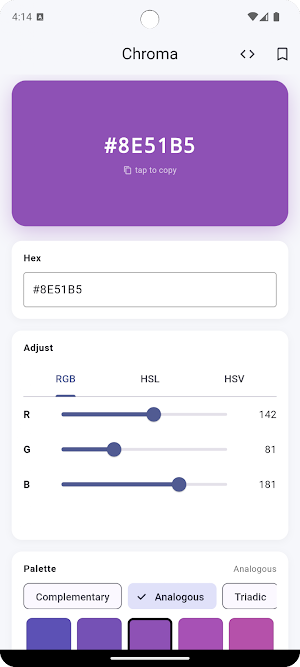
✦ FIVE PALETTE MODES
Generate palettes that actually look good:
• Complementary — your color plus its opposite for high-contrast pairings
• Analogous — neighboring hues on the color wheel for soft, cohesive sets
• Triadic — three evenly-spaced colors for vibrant, balanced palettes
• Tints & Shades — lighter and darker steps from your base color
• Monochromatic — same hue, varied saturation and lightness, for elegant single-color systems
Switching modes is instant. Try a few until the palette clicks.
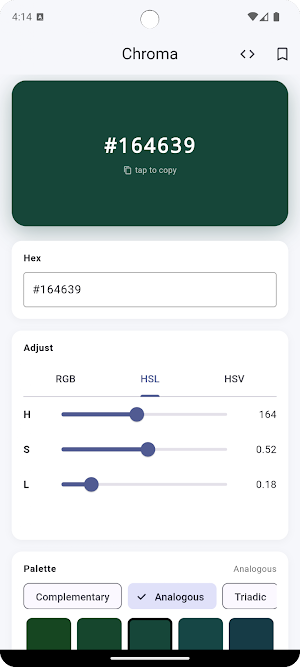
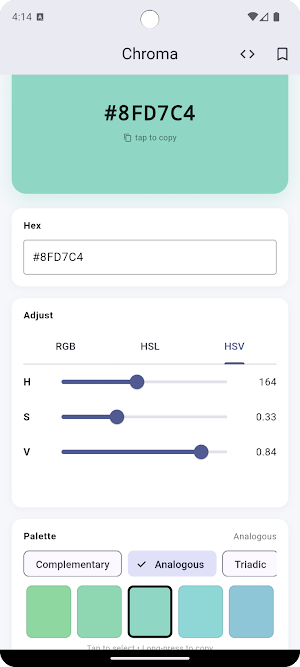
✦ THREE WAYS TO ADJUST
Switch between three slider models depending on how you think about color:
• RGB — Red, Green, Blue (0–255 each), the developer's choice
• HSL — Hue, Saturation, Lightness, intuitive for "make it lighter" or "shift the hue"
• HSV — Hue, Saturation, Value, common in design tools like Photoshop and Sketch
around the way real creative people actually pick and combine colors.
✦ FIVE PALETTE MODES
Generate palettes that actually look good:
• Complementary — your color plus its opposite for high-contrast pairings
• Analogous — neighboring hues on the color wheel for soft, cohesive sets
• Triadic — three evenly-spaced colors for vibrant, balanced palettes
• Tints & Shades — lighter and darker steps from your base color
• Monochromatic — same hue, varied saturation and lightness, for elegant single-color systems
Switching modes is instant. Try a few until the palette clicks.
✦ THREE WAYS TO ADJUST
Switch between three slider models depending on how you think about color:
• RGB — Red, Green, Blue (0–255 each), the developer's choice
• HSL — Hue, Saturation, Lightness, intuitive for "make it lighter" or "shift the hue"
• HSV — Hue, Saturation, Value, common in design tools like Photoshop and Sketch
What’s new
Version 1.0.1 · Updated August 15, 2026
SDK 26 Update
Alternatives to Croma
Looking for apps like Croma? Here are 5 similar Android apps on Google Play. All of them are free to download.
| App | Rating | Price | Installs | Last updated | Compare |
|---|---|---|---|---|---|
| Croma | – | Free | 100+ | Aug 15, 2026 | |
| Recur: Subscription Tracker | – | Free | 5+ | – | Compare |
| Build Tally | – | Free | 1+ | Aug 15, 2026 | Compare |
| Days Until | – | Free | 1+ | Aug 15, 2026 | Compare |
| Focus | – | Free | 10+ | Jul 25, 2026 | Compare |
| QR Code Studio | – | Free | 5+ | Jun 28, 2026 | Compare |
Compare Croma with the top alternatives: ratings, updates, ASO score and keyword gaps →