

ClipSave: Video Downloader
Property Vidow Studio Downloaders Video Players & Editors Contains ads
Save public videos in HD and enjoy them offline whenever you want.
- Downloads
- 28+
- on Google Play
- Price
- Free
- No in-app purchases
- Updated
- Sep 9
- 2026 · v1.3.8
Screenshots


About ClipSave: Video Downloader
Found a public video you’d like to keep for later? VideoSave makes saving and watching videos offline simple.
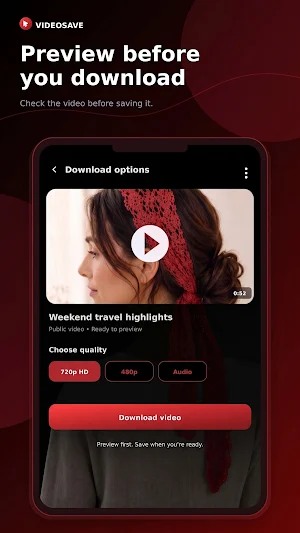
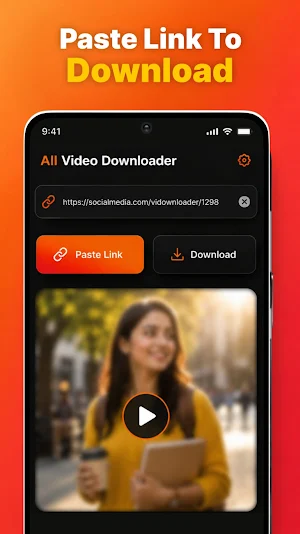
Just paste or share a supported video link. VideoSave will find the available download options, let you preview the video, and help you choose the quality that works best for you. Once downloaded, your videos are ready to watch whenever you want—even without an internet connection.
Simple from start to finish
There’s no complicated setup and no confusing browser. Paste the link, check the video, choose a quality, and tap Download. You can follow the progress in real time and continue using your phone while the video downloads in the background.
Everything in one place
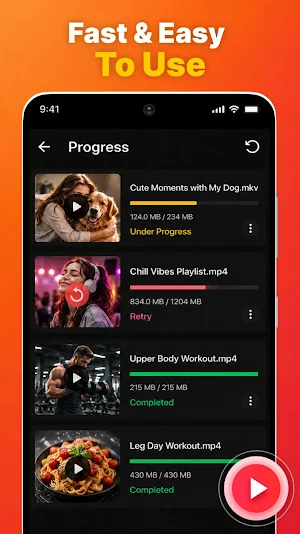
Your active and previous downloads are kept together in a clean, easy-to-use Downloads screen. See what’s currently downloading, open completed videos, retry failed items, share saved videos, or remove anything you no longer need.
What you can do with VideoSave:
• Paste or share supported public video links
• Preview a video before downloading it
• Choose from the available video qualities
• Download videos in the background
• See download progress, speed, file size, and estimated time
• Keep track of active and previous downloads
• Retry a failed download with a refreshed link
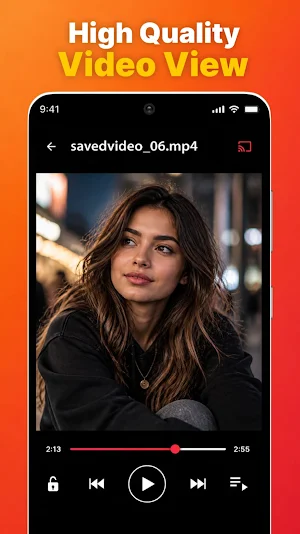
• Watch saved videos with the built-in offline player
• Share downloaded videos with other apps
• Save videos directly to your device gallery
• Use Wi-Fi-only mode to avoid mobile data usage
• Get optional notifications when a download finishes
• Choose between light, dark, and system themes
Watch when it suits you
Whether you’re preparing for a trip, saving something useful for later, or simply want to watch without using mobile data again, VideoSave keeps your saved videos close at hand.
No social-media login required
VideoSave works with publicly accessible links from supported sources. You never need to provide your social-media password or give the app access to a private account.
Please download responsibly
Only save videos that you own or have permission to download. Always respect copyright, privacy, creator rights, and the rules of the original platform.
Private, removed, restricted, protected, or unsupported videos may not be available. Download availability can also change when third-party websites update their services.
VideoSave is an independent utility and is not affiliated with, sponsored by, or endorsed by any social-media platform.
Just paste or share a supported video link. VideoSave will find the available download options, let you preview the video, and help you choose the quality that works best for you. Once downloaded, your videos are ready to watch whenever you want—even without an internet connection.
Simple from start to finish
There’s no complicated setup and no confusing browser. Paste the link, check the video, choose a quality, and tap Download. You can follow the progress in real time and continue using your phone while the video downloads in the background.
Everything in one place
Your active and previous downloads are kept together in a clean, easy-to-use Downloads screen. See what’s currently downloading, open completed videos, retry failed items, share saved videos, or remove anything you no longer need.
What you can do with VideoSave:
• Paste or share supported public video links
• Preview a video before downloading it
• Choose from the available video qualities
• Download videos in the background
• See download progress, speed, file size, and estimated time
• Keep track of active and previous downloads
• Retry a failed download with a refreshed link
• Watch saved videos with the built-in offline player
• Share downloaded videos with other apps
• Save videos directly to your device gallery
• Use Wi-Fi-only mode to avoid mobile data usage
• Get optional notifications when a download finishes
• Choose between light, dark, and system themes
Watch when it suits you
Whether you’re preparing for a trip, saving something useful for later, or simply want to watch without using mobile data again, VideoSave keeps your saved videos close at hand.
No social-media login required
VideoSave works with publicly accessible links from supported sources. You never need to provide your social-media password or give the app access to a private account.
Please download responsibly
Only save videos that you own or have permission to download. Always respect copyright, privacy, creator rights, and the rules of the original platform.
Private, removed, restricted, protected, or unsupported videos may not be available. Download availability can also change when third-party websites update their services.
VideoSave is an independent utility and is not affiliated with, sponsored by, or endorsed by any social-media platform.
What’s new
Version 1.3.8 · Updated September 9, 2026
Bug are fixed and ads are reduced inVideo Downloader
User reviews

best app
Alternatives to ClipSave: Video Downloader
Looking for apps like ClipSave: Video Downloader? Here are 6 similar Android apps on Google Play. The highest rated is Video Player for Android (4.6/5), and all 6 are free to download.
-
WallStream 3.7
-
Focus Video - Video Compressor 4.2
-
Web Browser - Fast & Privacy 4.1
-
GoCut - Effect Video Editor 4.5
-
Video Player for Android 4.6
-
Download Twitter Videos - GIF 4.6

| App | Rating | Price | Installs | Last updated | Compare |
|---|---|---|---|---|---|
| ClipSave: Video Downloader | – | Free | 10+ | Sep 9, 2026 | |
| WallStream | 3.7 / 5 | Free | 10,000+ | Jul 27, 2025 | Compare |
| Focus Video - Video Compressor | 4.2 / 5 | Free | 50,000+ | Apr 15, 2026 | Compare |
| Web Browser - Fast & Privacy | 4.1 / 5 | Free | 10,000,000+ | Aug 15, 2025 | Compare |
| GoCut - Effect Video Editor | 4.5 / 5 | Free | 10,000,000+ | Mar 14, 2024 | Compare |
| Video Player for Android | 4.6 / 5 | Free | 10,000,000+ | – | Compare |
| Download Twitter Videos - GIF | 4.6 / 5 | Free | 10,000,000+ | Jul 30, 2026 | Compare |

Similar apps on Google Play
- WallStream
- Focus Video - Video Compressor
- Web Browser - Fast & Privacy
- GoCut - Effect Video Editor
- Video Player for Android
- Download Twitter Videos - GIF
- Screen Recorder - Vidma Record
- Story Saver - Video Downloader
- Santa Browser : Fast & Safe
- PlayerPro Music Player
- Cross DJ - Music Mixer App
- Video player
- MessengerX App
- Expatrio - Study in Germany
- Publer: Social Media Tools
- Video to MP3 - Video to Audio
- Lark Video Player
- Video & Music Downloader
- Likewise: Entertainment Picks
- Veeps: Watch Live Music
- Music Player - MP3 Player
- Celebrity Cruises
- Seekly
- Save Status - Download Status
- Veffex: Video effects, filters
- Video Converter Pro
- Music Worx: Play Like a DJ
- Music Player HD+ Equalizer
- Unlimited MP3 Music Downloader
- Video Downloader - Story Saver
- Pi Music Player: Offline Music
- Internxt, Secure Cloud Storage
- PlayerPro Music Player (Pro)
- YouCam Video: AI Video Editor
- All Video Downloader Master
- ParkWhiz -- Parking App
- XClub
- YESOUL FITNESS
- Dr. Dish Player
- Video Editor VideoShowLite
- BeatSync: Photo & Music Videos
- Avast Secure Browser
- Vimeo
- Voi – e-scooter & e-bike hire
- Viome