
AR Drawing : Trace to Sketch
Art & Design Contains ads
Use your phone to trace and sketch with AR Drawing App! Draw, Paint and Sketch.
- Rating
- 4.1
- 7 ratings
- Downloads
- 1K+
- on Google Play
- Price
- Free
- No in-app purchases
- Updated
- Nov 9
- 2023 · v1.3
Screenshots
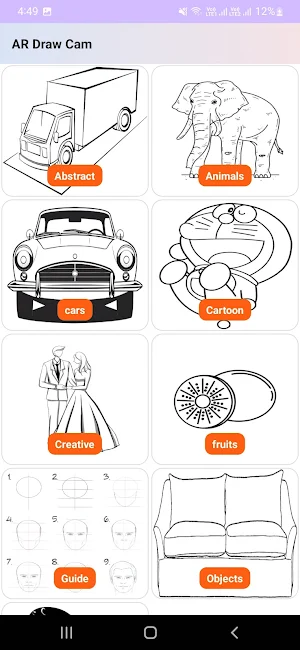


About AR Drawing : Trace to Sketch
Just trace a projected picture on paper and color it! learn to draw effectively in easy way!
AR Drawing : Trace to Sketch is for you if, you want to improve your drawing skills, express yourself through art, impress friends and family with stunning artwork, collaborate with peers, relieve stress, or become a Pro.
We have merged AR and AI together to speed up your learning experience and make it more entertaining.
By using your phone camera you can easily trace and draw any picture on paper and paint it in innovative way.
• How does it works?
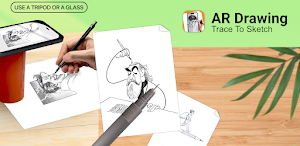
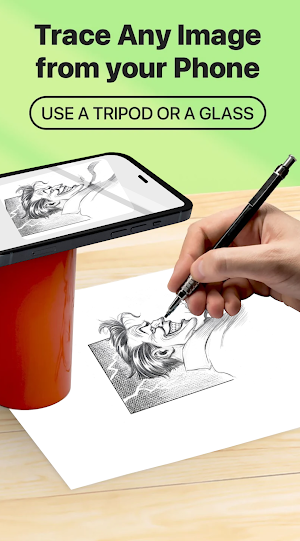
Select an image from the gallery or capture an image with a camera then just apply the filter. After that, you will see that image on the camera screen with transparency & you have to put drawing paper or book anything on which you want to trace and draw. Your image will not appear on paper but a transparent image with camera so that you can trace it on paper.
Draw on paper by looking at the phone with a transparent image.
Select any image and convert it to a tracing image.
KEY FEATURES OF AR DRAWING
• Best way to learn the sketch using your smart device
• Trace any image using the camera
• Allow choosing a picture from the gallery or taking one directly from the camera
• Open the camera, select any image, and begin tracing it
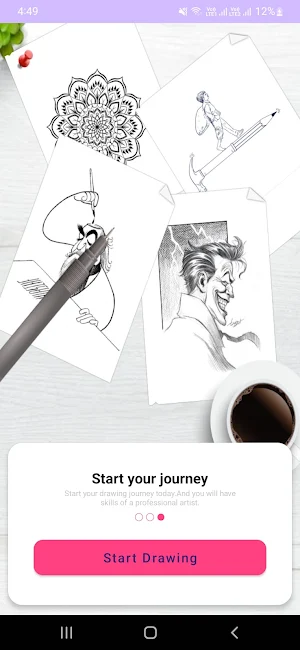
• various tracing templates, including those with animals, cars, nature, food, etc.
• Flash light supported
• A simple way to start learning drawing using your phone camera to draw
• Save your drawing in the gallery
• Best way to Make a perfect sketch and paint it
• Share the result on social media
• Make a sketch and paint it
• AI Drawing to make a sketch and paint it
AR Drawing : Trace to Sketch :- An innovative mobile app that helps you learn to draw and allows to create stunning drawings and paintings using augmented reality technology. You can draw anything you want on any surface.
Download AR Drawing : Trace to Sketch now and learn to draw like never before.
Required Permission
READ_EXTERNAL_STORAGE - Show a list of images from the device and allow a user to select images for tracing and drawing.
CAMERA - To Show trace image on camera and draw it on paper. also, it is used for capturing and drawing on paper using AI Drawing.
📧 Need Help? Have Questions?
We value your feedback!
Please contact us at [email protected]
AR Drawing : Trace to Sketch is for you if, you want to improve your drawing skills, express yourself through art, impress friends and family with stunning artwork, collaborate with peers, relieve stress, or become a Pro.
We have merged AR and AI together to speed up your learning experience and make it more entertaining.
By using your phone camera you can easily trace and draw any picture on paper and paint it in innovative way.
• How does it works?
Select an image from the gallery or capture an image with a camera then just apply the filter. After that, you will see that image on the camera screen with transparency & you have to put drawing paper or book anything on which you want to trace and draw. Your image will not appear on paper but a transparent image with camera so that you can trace it on paper.
Draw on paper by looking at the phone with a transparent image.
Select any image and convert it to a tracing image.
KEY FEATURES OF AR DRAWING
• Best way to learn the sketch using your smart device
• Trace any image using the camera
• Allow choosing a picture from the gallery or taking one directly from the camera
• Open the camera, select any image, and begin tracing it
• various tracing templates, including those with animals, cars, nature, food, etc.
• Flash light supported
• A simple way to start learning drawing using your phone camera to draw
• Save your drawing in the gallery
• Best way to Make a perfect sketch and paint it
• Share the result on social media
• Make a sketch and paint it
• AI Drawing to make a sketch and paint it
AR Drawing : Trace to Sketch :- An innovative mobile app that helps you learn to draw and allows to create stunning drawings and paintings using augmented reality technology. You can draw anything you want on any surface.
Download AR Drawing : Trace to Sketch now and learn to draw like never before.
Required Permission
READ_EXTERNAL_STORAGE - Show a list of images from the device and allow a user to select images for tracing and drawing.
CAMERA - To Show trace image on camera and draw it on paper. also, it is used for capturing and drawing on paper using AI Drawing.
📧 Need Help? Have Questions?
We value your feedback!
Please contact us at [email protected]
What’s new
Version 1.3 · Updated November 9, 2023
Just trace a projected picture on paper and color it! Learn how to draw in 3 days! • Use your phone camera to draw • Lots of tracing templates: Animals, Cars, Nature, Food, Anime etc. • Built-in flashlight
User reviews

AI drawing app.. Best thing is small size of app. Great drawing tool

Great drawing app

Great drawing and painting app

Best Drawing App
Alternatives to AR Drawing : Trace to Sketch
Looking for apps like AR Drawing : Trace to Sketch? Here are 3 similar Android apps on Google Play. All of them are free to download.

| App | Rating | Price | Installs | Last updated | Compare |
|---|---|---|---|---|---|
| AR Drawing : Trace to Sketch | 4.1 / 5 | Free | 1,000+ | Nov 9, 2023 | |
| Color Sort : Water SortPuz | – | Free | 10,000+ | Sep 13, 2023 | Compare |
| Block Blaster - Block Puzzle | – | Free | 100+ | Oct 29, 2023 | Compare |
| Zap Share- File Sharing App | – | Free | 10,000+ | Oct 15, 2020 | Compare |