

Universal Undo: Recover Text
Productivity In-app purchases
Recover typed text and restore lost drafts. Private Ctrl+Z for Android.
- Downloads
- 432+
- on Google Play
- Price
- Free
- In-app purchases
- Updated
- Sep 26
- 2026 · v1.1.18
Screenshots


About Universal Undo: Recover Text
Accidentally deleted a long message, cleared a note, or lost text in a form?
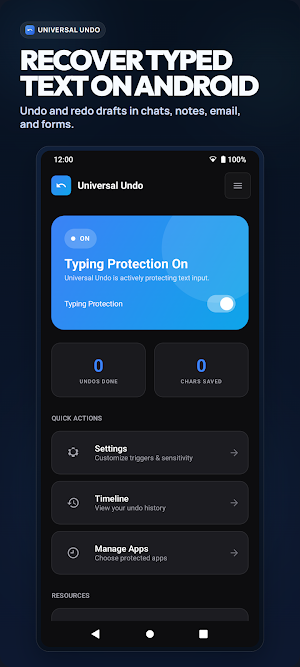
Universal Undo helps you recover typed text, restore lost drafts, and undo typing mistakes on Android before you have to start over.
Think of it as a private Ctrl+Z for Android. It works with the text you are actively typing in chats, notes, email, and forms, so you can undo typing mistakes and recover cleared form text without switching to a different keyboard.
What Universal Undo helps you recover:
• Chat drafts and replies
• Note drafts and journal entries
• Email drafts
• Form text and longer typed paragraphs
Why people install Universal Undo:
• Get typed text back after an accidental delete
• Restore lost drafts without starting from zero
• Recover cleared form text before retyping everything
• Keep using your usual apps instead of changing keyboards
Privacy and control:
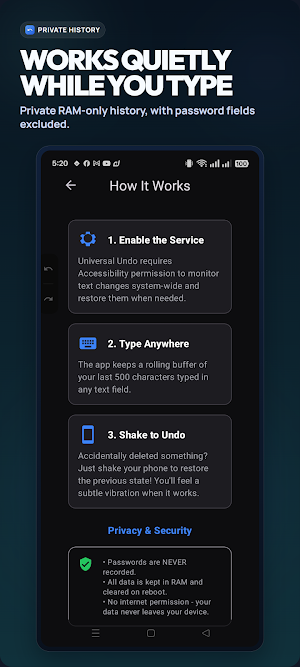
• Text recovery stays on your device
• Password and sensitive fields are excluded
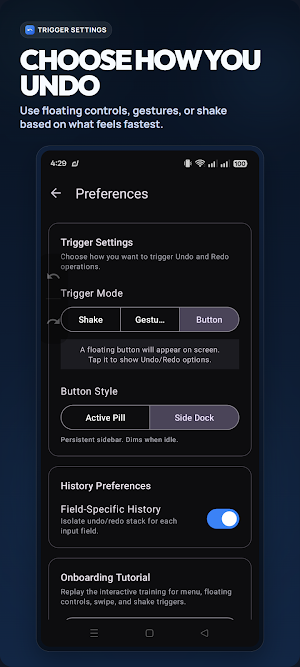
• You can ignore apps anytime with Manage Apps
• You stay in control of Accessibility and overlay permissions
Accessibility Service disclosure for Play listing:
• Universal Undo uses Android's AccessibilityService API to detect text changes in focused input fields while you type
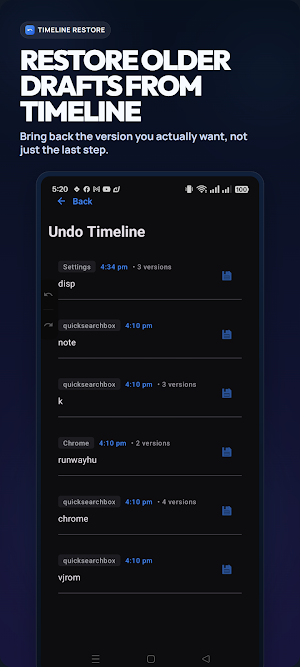
• This lets the app save recent on-device text states for undo, redo, and Timeline restore
• Password and other sensitive fields are excluded
• You choose whether to enable the service, and you can turn it off again in Android settings
• The app does not restore deleted server-side messages or media
Good to know:
• Works best for text you are actively typing in supported apps
• Some app and keyboard behavior can vary by device
• Universal Undo is for recovering typed text, not for restoring deleted server-side messages or media
When words disappear by accident, get your text back faster with Universal Undo.
Universal Undo helps you recover typed text, restore lost drafts, and undo typing mistakes on Android before you have to start over.
Think of it as a private Ctrl+Z for Android. It works with the text you are actively typing in chats, notes, email, and forms, so you can undo typing mistakes and recover cleared form text without switching to a different keyboard.
What Universal Undo helps you recover:
• Chat drafts and replies
• Note drafts and journal entries
• Email drafts
• Form text and longer typed paragraphs
Why people install Universal Undo:
• Get typed text back after an accidental delete
• Restore lost drafts without starting from zero
• Recover cleared form text before retyping everything
• Keep using your usual apps instead of changing keyboards
Privacy and control:
• Text recovery stays on your device
• Password and sensitive fields are excluded
• You can ignore apps anytime with Manage Apps
• You stay in control of Accessibility and overlay permissions
Accessibility Service disclosure for Play listing:
• Universal Undo uses Android's AccessibilityService API to detect text changes in focused input fields while you type
• This lets the app save recent on-device text states for undo, redo, and Timeline restore
• Password and other sensitive fields are excluded
• You choose whether to enable the service, and you can turn it off again in Android settings
• The app does not restore deleted server-side messages or media
Good to know:
• Works best for text you are actively typing in supported apps
• Some app and keyboard behavior can vary by device
• Universal Undo is for recovering typed text, not for restoring deleted server-side messages or media
When words disappear by accident, get your text back faster with Universal Undo.
What’s new
Version 1.1.18 · Updated September 26, 2026
New in this update More control over your text. - Switch and choose languages. - Restore deleted text, then search and keep more with Pro. - Keep drafts and pinned snippets after restarts. Built from your requests. Thanks for shaping Universal Undo.
User reviews

This app is super good and it helps to recover deleted texts. I highly recommend it as one of the best text recovering apps and its developer deserves an award. Thanks!

i always disliked retyping my text. fortunately it turns out I just needed this app for Ctrl + Z. Works for most apps I care about.
Alternatives to Universal Undo: Recover Text
Looking for apps like Universal Undo: Recover Text? Here are 4 similar Android apps on Google Play. The highest rated is Rocket Mortgage (4.7/5), and all 4 are free to download.
-
First Foundation Bank Mobile 4.4
-
WaiverForever - Online Waiver 4.5
-
Rocket Mortgage 4.7
-
Vantix Law 4.7
| App | Rating | Price | Installs | Last updated | Compare |
|---|---|---|---|---|---|
| Universal Undo: Recover Text | – | Free | 100+ | Sep 26, 2026 | |
| First Foundation Bank Mobile | 4.4 / 5 | Free | 1,000+ | Dec 20, 2021 | Compare |
| WaiverForever - Online Waiver | 4.5 / 5 | Free | 10,000+ | – | Compare |
| Rocket Mortgage | 4.7 / 5 | Free | 1,000,000+ | Oct 5, 2026 | Compare |
| Vantix Law | 4.7 / 5 | Free | 5,000+ | Oct 1, 2026 | Compare |