Edgify: Edge Gesture & Control
Edge gestures & swipe control - customize edge actions on your screen
About Edgify: Edge Gesture & Control
Edgify: Edge Gestures, Control brings powerful gesture control right to the edges of your screen. With edge gestures, gesture navigation, and edge swipe actions, you can streamline your phone usage and access apps or features faster than ever.
🔧 Core Features of Edgify: Edge Gestures Control
Edge Gestures & Swipe Control
Perform edge swipe, edge tap, double tap, long press, or swipe diagonally along the screen edge to trigger custom actions or shortcuts.
Gesture Control / Gesture Launcher
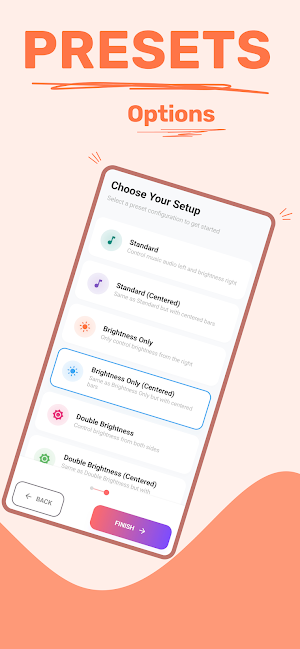
Create your own gesture shortcuts: launch apps, toggle settings, back, home, recent — all via gestures.
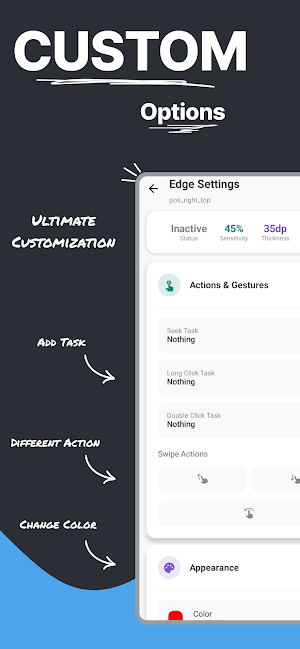
Customizable Edge Actions
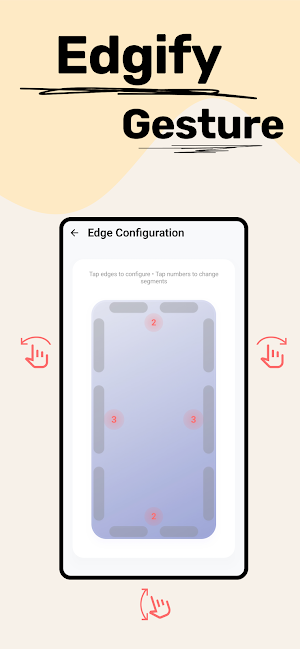
Assign different edge gestures for each side (left, right, top). Choose actions like open app, open panel, control brightness, music, or toggle Wi-Fi.
Edge Swipe / Edge Touch Zones
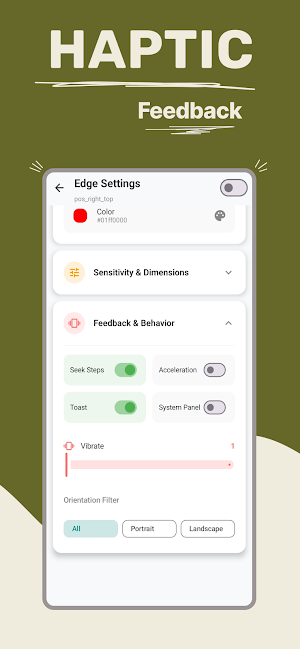
Adjust the sensitivity, width, and position of the edge zones. Safe zones prevent interference with system navigation.
Gesture Navigation Support
Integrates well with Android’s native gesture navigation systems, avoiding conflict with back / home gestures.
Smooth & Lightweight
Designed for low resource usage, minimal battery drain, and high performance — making edge gestures feel seamless.
💡 Why Edgify is Better
Most apps offer only limited edge gesture functionality. Edgify is a full gesture control suite with flexible edge swipe, custom gesture shortcuts, and advanced control features.
More gesture types than standard edges — single tap, double tap, long press, swipe, diagonal swipe.
More control: assign actions, shortcuts or toggles to any gesture.
Fine-tuned edge zones: avoid accidental triggers while giving you maximum flexibility.
Compatibility across a wide range of devices and Android versions.
📲 Use Cases & Examples
Swipe from the right edge to open your favorite app
Double tap on left edge to toggle flashlight or camera
Long press edge to pull down quick settings or notifications
Swipe diagonally for back / home / recent shortcuts
Use edge gestures for music control, volume, brightness
Use gesture shortcuts for toggles (Wi-Fi, Bluetooth, dark mode, etc.)
✅ Compatibility & Integration
Works with all modern Android phones, from low-end to flagship
Compatible with gesture navigation so system gestures are preserved
Fully adjustable edge swipe zones, even on curved or notched displays
Safe mode to prevent interference or misfires
🌟 Get Started with Edgify Now
Install Edgify: Edge Gestures, Control today and unlock a new way to interact with your phone:
Edge swipe gestures
Gesture control & shortcuts
Edge actions for apps & toggles
Customizable zones, full gesture navigation integration
Make your phone more efficient, faster, and completely in your control. Download now and experience intuitive gesture control on the edge of your screen!
Edgify: Edge Gesture & Control details
Edgify: Edge Gesture & Control is a free Personalization app for Android with 1,000+ installs on Google Play and a 5.0/5 average rating from 1 rating. It was released on September 29, 2025 and last updated on April 4, 2026. It requires Android 8.0 or later.
- Category
- Personalization
- Rating
- 5.0 / 5 (1 rating)
- Installs
- 1,000+
- Price
- Free
- In-app purchases
- No
- Ads
- No ads
- Current version
- 1.0.3
- Requires Android
- 8.0
- Content rating
- Everyone
- Released
- September 29, 2025
- Last updated
- April 4, 2026
What’s new in Edgify: Edge Gesture & Control
Stability improvements and under-the-hood optimizations for a smoother experience.
Version 1.0.3 · Updated April 4, 2026
Similar Apps
Spy Ear: Recorder, Hearing Aid
Personal hearing aid & sound enhancer with recorder and noise reduction
Edgify: Edge Gesture & Control
Edge gestures & swipe control - customize edge actions on your screen

HearingAid: Booster & Recorder
Sound amplifier & hearing aid app. Boost volume, record audio and hear clearly
Volume Panel: Custom Styles
Replace volume buttons with stylish panels. Dark mode, gestures & premium themes
Always on Display Edge Light
Always-On Display clocks, edge lighting and music visualizers for AMOLED screens


