
Keyhold Connect for Minecraft
Tr33Tech Tools In-app purchases
Ad-free Minecraft Bedrock server connector for PS5, Xbox and LAN play.
- Downloads
- 80+
- on Google Play
- Price
- Free
- In-app purchases
- Updated
- Aug 9
- 2026 · v1.0.0-release
Screenshots
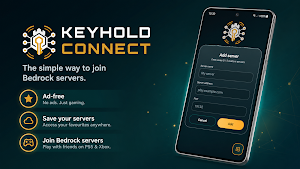
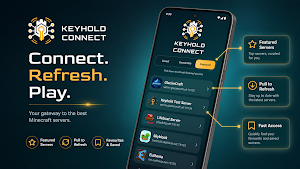
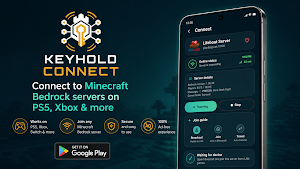
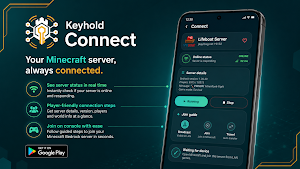
About Keyhold Connect for Minecraft
Start the app on your Android device, choose the server you want, then look for Keyhold Connect in the LAN games list on Minecraft Bedrock. Join it, and Keyhold Connect will hand you over to the selected server.
No ads. No clutter. No account needed. Click and Connect.
Keyhold Connect is built for players who just want a cleaner way to get their console connected to Bedrock servers without messing around every time.
Features:
• Works with Minecraft Bedrock LAN discovery
• Designed for consoles including PS5 and Xbox
• Save your favourite servers
• Browse Featured servers
• See basic server status before joining
• Simple start and stop controls
• Ad-free experience
The free version lets you save up to 5 custom servers. Keyhold Connect Plus is available as a one-time upgrade if you want unlimited saved servers.
Keyhold Connect does not host Minecraft servers. It helps your Bedrock client connect to the server you choose.
Nintendo Switch is currently not supported.
Keyhold Connect is not affiliated with, endorsed by, or sponsored by Mojang, Microsoft, Xbox, PlayStation, Sony, or Minecraft.
What’s new
Version 1.0.0-release · Updated August 9, 2026
Keyhold Connect 1.0 is here! • Connect consoles to custom Minecraft Bedrock servers • Save, favourite and Quick Connect to servers • Share and import servers using QR codes • Add server shortcuts to your Home screen • Use the Quick Connect widget to start and stop sessions • Browse featured servers and connection history • Built-in connection diagnostics and session controls • Keyhold Connect Plus unlocks unlimited saved servers • No ads
Alternatives to Keyhold Connect for Minecraft
Looking for apps like Keyhold Connect for Minecraft? Here are 6 similar Android apps on Google Play. The highest rated is Wallbox (4.4/5), and all 6 are free to download.
| App | Rating | Price | Installs | Last updated | Compare |
|---|---|---|---|---|---|
| Keyhold Connect for Minecraft | – | Free | 50+ | Aug 9, 2026 | |
| NebulaBuds | 4.4 / 5 | Free | 500,000+ | – | Compare |
| SolaXCloud | 2.9 / 5 | Free | 1,000,000+ | Sep 21, 2026 | Compare |
| Linksys | 3.3 / 5 | Free | 5,000,000+ | Nov 13, 2025 | Compare |
| Sentry Pro for Tesla | 4.4 / 5 | Free | 10,000+ | Sep 26, 2026 | Compare |
| Smart Connect | 4.1 / 5 | Free | 100,000,000+ | Sep 10, 2026 | Compare |
| Wallbox | 4.4 / 5 | Free | 500,000+ | Oct 26, 2026 | Compare |
Similar apps on Google Play
- NebulaBuds
- SolaXCloud
- Linksys
- Sentry Pro for Tesla
- Smart Connect
- Wallbox
- Mantis Laser Academy
- DJI Store - Try Virtual Flight
- One Emulator for Game Consoles
- Remote Mouse
- RealVNC Viewer: Remote Desktop
- eero wifi system
- WiFi Mouse Pro
- DeskIn Remote Desktop
- Litchi for DJI Drones
- DREO
- Sensi
- Bikii Cloud Game
- Eneba – Marketplace for Gamers
- D.Franklin
- TeamViewer Remote Control
- MasterDex - Complete Pokedex
- UserLAnd - Linux on Android
- Nintendo Switch Parental Cont…