

Ma POS Storefront Sales App
Business In-app purchases Contains ads
Easy to Use, View Sales, Instant Deployment!
- Rating
- 4.6
- 11 ratings
- Downloads
- 3.7K+
- on Google Play
- Price
- Free
- In-app purchases
- Updated
- Sep 12
- 2026 · v2.4.0
Screenshots


About Ma POS Storefront Sales App
Ma POS is a small Point-of-Sale (POS) application designed to be user-friendly, convenient, fast, and comprehensive, covering all essential functions for small businesses. Key highlights of Ma POS include:
Main Features:
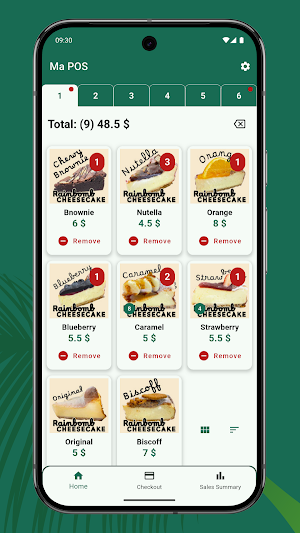
-Sales Screen: Displays products in a table format. Tap to add quantity, calculate prices instantly, with direct access buttons to the checkout and sales summary screens.
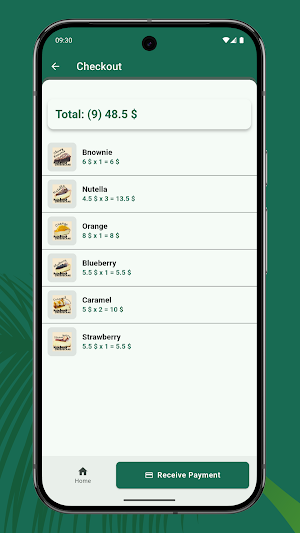
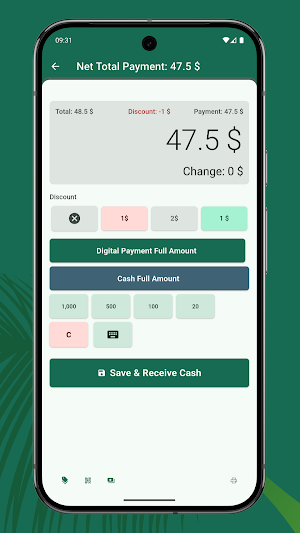
-Checkout Screen: Shows selected items, along with payment system, change calculation, and various discount options.
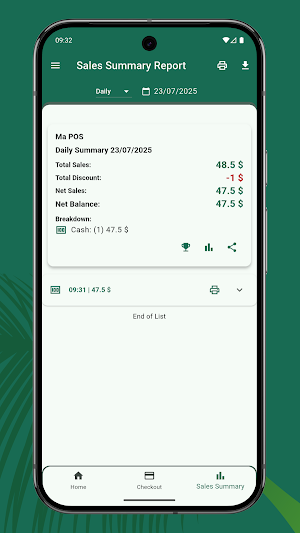
-Sales & Reports: View total sales daily, monthly, and yearly. Includes bill cancellation system and data display separated by payment method.
-CSV Export: Export reports and receipts, including sales, stock, expenses, and various summaries.
-Stock Management: Add/delete products, view stock history, stock reports, and automatic stock deduction upon sale.
-Expenses & Income/Change: Categorize, record, with reports and automatic balance calculation.
-Receipts: Print receipts via Bluetooth/LAN printers. Supports store logos, multiple languages, discounts, and detailed item lists.
-Product Management: Products categorized, enable/disable display, search system, product tabs, various display formats.
-Language System: Supports multiple languages such as Thai, English, Chinese, Spanish, Hindi, etc., with text translation system.
-Data Backup: Backup/restore with backup data management system.
-Display Toggle Buttons: Flexible control over the display of various sections on the checkout screen.
-Number Display Settings: Such as rounding, currency symbol position, converting numbers to text, etc.
-Product Tab Configuration: Adjust number of product tabs, enable/disable tab usage, define tab order on the sales screen.
-Advanced Stock System: Calculates remaining balance using the formula: Beginning Balance + Inflow - Outflow - Sales. Also supports non-stockable items.
Diverse Reports:
-Sales Reports (Daily/Monthly/Yearly)
-Expense/Income Reports
-Sales Reports by Product/Category
-Payment Reports by Channel
-Stock Reports
Ma POS sounds like a very promising POS application, especially with its emphasis on ease of use and immediate deployment, which are crucial for small businesses!
Main Features:
-Sales Screen: Displays products in a table format. Tap to add quantity, calculate prices instantly, with direct access buttons to the checkout and sales summary screens.
-Checkout Screen: Shows selected items, along with payment system, change calculation, and various discount options.
-Sales & Reports: View total sales daily, monthly, and yearly. Includes bill cancellation system and data display separated by payment method.
-CSV Export: Export reports and receipts, including sales, stock, expenses, and various summaries.
-Stock Management: Add/delete products, view stock history, stock reports, and automatic stock deduction upon sale.
-Expenses & Income/Change: Categorize, record, with reports and automatic balance calculation.
-Receipts: Print receipts via Bluetooth/LAN printers. Supports store logos, multiple languages, discounts, and detailed item lists.
-Product Management: Products categorized, enable/disable display, search system, product tabs, various display formats.
-Language System: Supports multiple languages such as Thai, English, Chinese, Spanish, Hindi, etc., with text translation system.
-Data Backup: Backup/restore with backup data management system.
-Display Toggle Buttons: Flexible control over the display of various sections on the checkout screen.
-Number Display Settings: Such as rounding, currency symbol position, converting numbers to text, etc.
-Product Tab Configuration: Adjust number of product tabs, enable/disable tab usage, define tab order on the sales screen.
-Advanced Stock System: Calculates remaining balance using the formula: Beginning Balance + Inflow - Outflow - Sales. Also supports non-stockable items.
Diverse Reports:
-Sales Reports (Daily/Monthly/Yearly)
-Expense/Income Reports
-Sales Reports by Product/Category
-Payment Reports by Channel
-Stock Reports
Ma POS sounds like a very promising POS application, especially with its emphasis on ease of use and immediate deployment, which are crucial for small businesses!
What’s new
Version 2.4.0 · Updated September 12, 2026
- Added a Change Fund recording feature. - Added the ability to set product images based on product names. - Added Screensaver mode. - Added optional paid features for custom-priced products and weighed products.
Alternatives to Ma POS Storefront Sales App
Looking for apps like Ma POS Storefront Sales App? Here are 2 similar Android apps on Google Play. All of them are free to download.


| App | Rating | Price | Installs | Last updated | Compare |
|---|---|---|---|---|---|
| Ma POS Storefront Sales App | 4.6 / 5 | Free | 1,000+ | Sep 12, 2026 | |
| MaPOS Lite - Simple POS | – | Free | 10+ | Sep 12, 2026 | Compare |
| Money Counting | – | Free | 1,000+ | Sep 13, 2026 | Compare |