
Control Panel Touch Center
Personalization Contains ads
Smart panel to access & customize tools, apps, and phone settings fast.
- Downloads
- 10K+
- on Google Play
- Price
- Free
- No in-app purchases
- Updated
- Jul 1
- 2025
Screenshots


About Control Panel Touch Center
Take full control of your Android device with Control Panel Touch Center App – a fast, simple, and powerful tool to access your favorite features with just one swipe. This control center panel brings a modern look and fluid functionality to your phone.
Key Features:
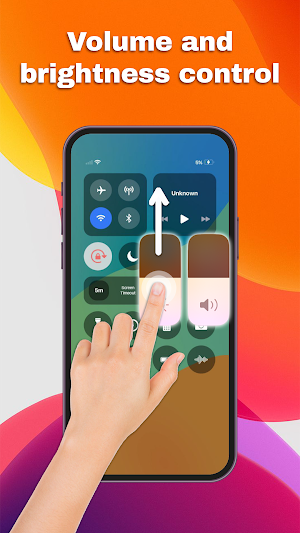
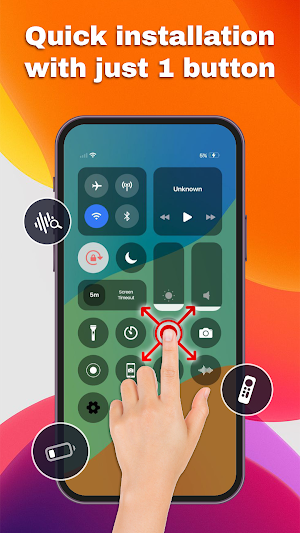
🔊 Sound & Brightness Control: Adjust volume and screen brightness instantly using smart sliders.
🌙 Dark Mode Toggle: Switch between light and dark mode effortlessly to match your style.
📶 Wi-Fi & Bluetooth Management: Connect to networks or accessories with one tap.
✈️ Airplane Mode: Disable all wireless functions for convenience and safety.
🔕 Do Not Disturb Mode: Silence calls, messages, and notifications with ease.
🔒 Screen Rotation Lock: Lock your orientation to avoid unwanted screen flips.
💡 Flashlight: Instantly turn on your flashlight in one click when needed.
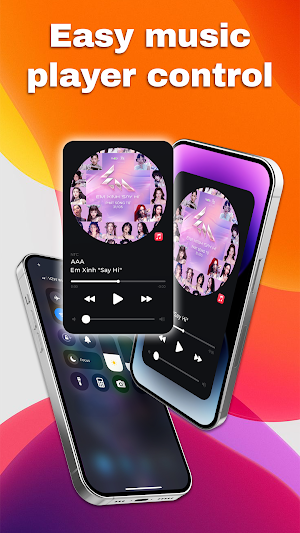
🎵 Music Control: Play, pause, or skip tracks directly from the control panel.
Customization & Design:
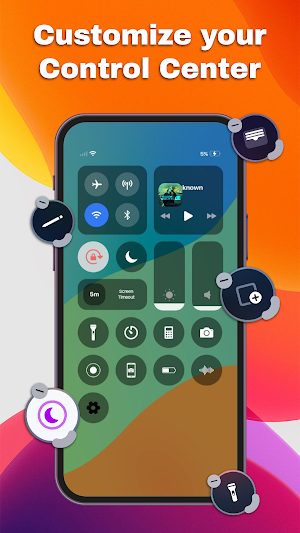
- Personalize your control panel layout: Choose toggle order, icon size, button shape & background color.
- Change font, transparency, and layout to create the perfect control center for your needs.
Control Panel Touch Center Experience:
📱 Enjoy a sleek, modern-style control center on your device. Swipe from any edge to open or close the panel seamlessly. Includes a built-in notification center to keep you informed without unlocking your screen.
🛠️ Ideal for users who want fast access, smart tools, and a beautifully designed custom control panel. Whether you're enhancing your device's look or simply need quicker access to settings — this app has you covered.
📥 Download Control Panel Touch Center now and redefine the way you use your phone!
This app uses Accessibility Service which requires you to enable to show Control Panel Touch Center view on your device screen. Moreover, this app use Accessibility Service features for volume adjustment, music control and removing system dialogs to guarantee user experience. Furthermore, this app does not collect or share any user information related to Accessibility Service permission to secure your privacy and safety.
Key Features:
🔊 Sound & Brightness Control: Adjust volume and screen brightness instantly using smart sliders.
🌙 Dark Mode Toggle: Switch between light and dark mode effortlessly to match your style.
📶 Wi-Fi & Bluetooth Management: Connect to networks or accessories with one tap.
✈️ Airplane Mode: Disable all wireless functions for convenience and safety.
🔕 Do Not Disturb Mode: Silence calls, messages, and notifications with ease.
🔒 Screen Rotation Lock: Lock your orientation to avoid unwanted screen flips.
💡 Flashlight: Instantly turn on your flashlight in one click when needed.
🎵 Music Control: Play, pause, or skip tracks directly from the control panel.
Customization & Design:
- Personalize your control panel layout: Choose toggle order, icon size, button shape & background color.
- Change font, transparency, and layout to create the perfect control center for your needs.
Control Panel Touch Center Experience:
📱 Enjoy a sleek, modern-style control center on your device. Swipe from any edge to open or close the panel seamlessly. Includes a built-in notification center to keep you informed without unlocking your screen.
🛠️ Ideal for users who want fast access, smart tools, and a beautifully designed custom control panel. Whether you're enhancing your device's look or simply need quicker access to settings — this app has you covered.
📥 Download Control Panel Touch Center now and redefine the way you use your phone!
This app uses Accessibility Service which requires you to enable to show Control Panel Touch Center view on your device screen. Moreover, this app use Accessibility Service features for volume adjustment, music control and removing system dialogs to guarantee user experience. Furthermore, this app does not collect or share any user information related to Accessibility Service permission to secure your privacy and safety.
What’s new
Updated July 1, 2025
fix bugs
Alternatives to Control Panel Touch Center
Looking for apps like Control Panel Touch Center? Here are 6 similar Android apps on Google Play. All of them are free to download.
-
Mods & Maps for Minecraft
-
Money Tracker: Personal Budget
-
QR Code: Scanner & Maker
-
Swift Currency Converter Rates
-
Fake Call: Prank Play
-
Simple Loan Calculator
| App | Rating | Price | Installs | Last updated | Compare |
|---|---|---|---|---|---|
| Control Panel Touch Center | – | Free | 10,000+ | Jul 1, 2025 | |
| Mods & Maps for Minecraft | – | Free | 100,000+ | May 27, 2025 | Compare |
| Money Tracker: Personal Budget | – | Free | 100,000+ | Jun 18, 2025 | Compare |
| QR Code: Scanner & Maker | – | Free | 100,000+ | Jun 4, 2025 | Compare |
| Swift Currency Converter Rates | – | Free | 100,000+ | Sep 29, 2025 | Compare |
| Fake Call: Prank Play | – | Free | 100,000+ | Jul 10, 2025 | Compare |
| Simple Loan Calculator | – | Free | 50,000+ | Sep 4, 2025 | Compare |