
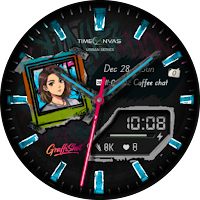
GraffiShot - Photo Watch Face
Personalization
Graffiti themed watch face with custom photos, stickers & editable complications
- Downloads
- 101+
- on Google Play
- Price
- $0.99
- No in-app purchases
- Updated
- Jan 16
- 2026
Screenshots


About GraffiShot - Photo Watch Face
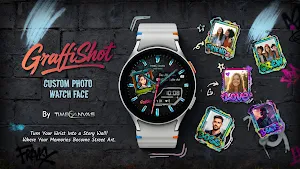
Graffiti themed custom Photo Watch Face with fun, customizable photo stickers. Turn your wrist into a personal graffiti wall—add your photos, style it your way, and make every moment yours.
⚠️ IMPORTANT: Please read the instructions carefully –
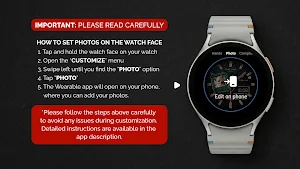
🛠 How to add photos to the watch face:
1. To add or change a photo, tap and hold the watch face, then tap Customize.
2. Swipe left until you see the Photo option and tap on it.
3. This will open the Wearable app on your phone, where you can select and add a photo.
4. For best results, use square photos.
5. In some cases, due to a temporary Wear app issue, the Photo option may not load immediately.
6. If this happens, please try again.
7. If it still doesn’t load, this is a Wear app glitch and not an issue with the watch face itself.
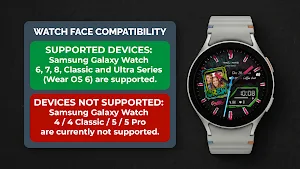
Compatibility - Powered by the latest Watch Face Format (WFF), this watch face is optimized for Wear OS devices running Wear OS 6 or later (API Level 36+).
Best compatible with and tested on Samsung Galaxy Watch models running Wear OS 6.0 or newer.
⭐ KEY FEATURES
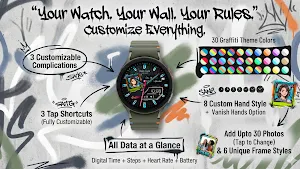
⦁ Add up to 30 Photos (tap to change instantly)
⦁ 6 Graffiti Photo Frames
⦁ 3 Customizable Complications
⦁ 3 Custom Tap Shortcuts
⦁ Digital Time + Steps + Heart Rate + Battery
⦁ 8 Changeable Hand Styles with hide hands option
⦁ 5 Color styles for Second Hand with hide option
⦁ 30 Graffiti Color Themes
🪢 CONNECT WITH US
Support & Feedback
Your experience matters. Reach out with questions or suggestions:
✉️ Email: [email protected]
📝 Share your thoughts—leave a review on the Play Store.
🔎 Discover more designs from our collection.
🧡 Join the Journey
Stay updated on new releases and upcoming previews:
👥 Facebook: facebook.com/timecanvaswatchfaces
⚠️ IMPORTANT: Please read the instructions carefully –
🛠 How to add photos to the watch face:
1. To add or change a photo, tap and hold the watch face, then tap Customize.
2. Swipe left until you see the Photo option and tap on it.
3. This will open the Wearable app on your phone, where you can select and add a photo.
4. For best results, use square photos.
5. In some cases, due to a temporary Wear app issue, the Photo option may not load immediately.
6. If this happens, please try again.
7. If it still doesn’t load, this is a Wear app glitch and not an issue with the watch face itself.
Compatibility - Powered by the latest Watch Face Format (WFF), this watch face is optimized for Wear OS devices running Wear OS 6 or later (API Level 36+).
Best compatible with and tested on Samsung Galaxy Watch models running Wear OS 6.0 or newer.
⭐ KEY FEATURES
⦁ Add up to 30 Photos (tap to change instantly)
⦁ 6 Graffiti Photo Frames
⦁ 3 Customizable Complications
⦁ 3 Custom Tap Shortcuts
⦁ Digital Time + Steps + Heart Rate + Battery
⦁ 8 Changeable Hand Styles with hide hands option
⦁ 5 Color styles for Second Hand with hide option
⦁ 30 Graffiti Color Themes
🪢 CONNECT WITH US
Support & Feedback
Your experience matters. Reach out with questions or suggestions:
✉️ Email: [email protected]
📝 Share your thoughts—leave a review on the Play Store.
🔎 Discover more designs from our collection.
🧡 Join the Journey
Stay updated on new releases and upcoming previews:
👥 Facebook: facebook.com/timecanvaswatchfaces
User reviews

thank you for your amazing work 😁

love the photo window , the picture is bigger than the small photo that Samsung uses for photo complications.

I updated my watch to wear OS 6 before purchasing but didn't work then, now I got another update and the watch is working, Great watch face, giving 5 stars
Alternatives to GraffiShot - Photo Watch Face
Looking for apps like GraffiShot - Photo Watch Face? Here are 6 similar Android apps on Google Play. 3 of the 6 are free to download.
-
Minimal Ebon Hybrid Watch Face
-
NeoDive : Diver Watch Face
-
Stella : Hybrid Watch Face
-
Noctis Luxury Watch Face
-
Noel Night Luxury Watch Face
-
Graffiti-X: Hybrid Watch Face
| App | Rating | Price | Installs | Last updated | Compare |
|---|---|---|---|---|---|
| GraffiShot - Photo Watch Face | – | $0.99 | 100+ | Jan 16, 2026 | |
| Minimal Ebon Hybrid Watch Face | – | Free | 10,000+ | Oct 27, 2025 | Compare |
| NeoDive : Diver Watch Face | – | Free | 5,000+ | Oct 6, 2026 | Compare |
| Stella : Hybrid Watch Face | – | Free | 1,000+ | Oct 6, 2026 | Compare |
| Noctis Luxury Watch Face | – | 1.99 USD | 50+ | – | Compare |
| Noel Night Luxury Watch Face | – | 1.99 USD | 100+ | Oct 6, 2026 | Compare |
| Graffiti-X: Hybrid Watch Face | – | 1.99 USD | 100+ | Oct 5, 2026 | Compare |