
Typing Sound: Keyboard Sounds
Personalization In-app purchases Contains ads
Keyboard sounds & typing sound effects: mechanical, typewriter, sci-fi keys.
- Downloads
- 13.1K+
- on Google Play
- Price
- Free
- In-app purchases
- Updated
- Oct 24
- 2026 · v1.5.0
Screenshots
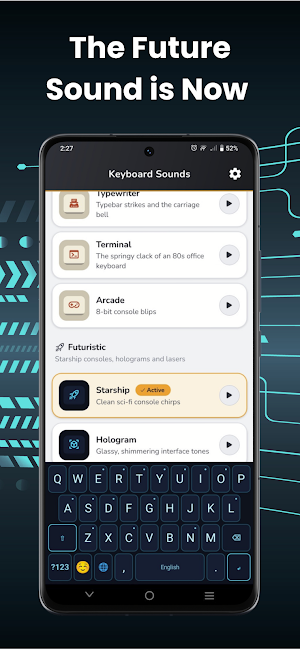
About Typing Sound: Keyboard Sounds
Turn every key press into a sound you can feel. Keyboard Sounds is a full
keyboard for Android that plays a real typing sound as you type — in messages,
notes, email, search, every app on your phone.
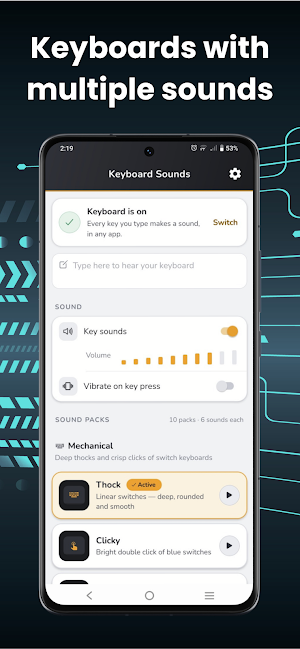
Ten sound packs. Sixty key sounds. Three worlds to type in.
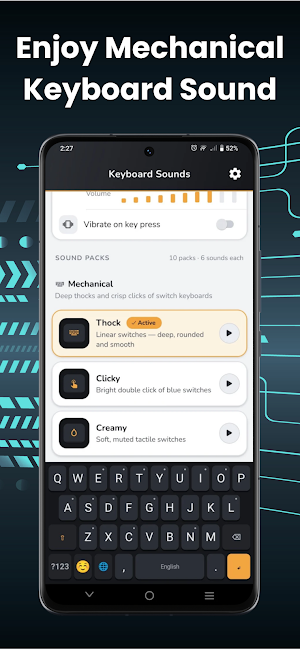
⌨️ MECHANICAL KEYBOARD SOUNDS
• Thock — deep, rounded linear switches
• Clicky — the bright double click of blue switches
• Creamy — soft, muted tactile switches
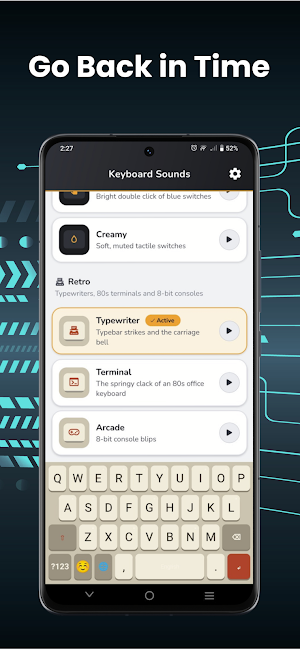
🕰️ RETRO TYPING SOUNDS
• Typewriter — typebar strikes, with the carriage bell on Enter
• Terminal — the springy clack of an 80s office keyboard
• Arcade — 8-bit console blips
🚀 FUTURISTIC KEY SOUNDS
• Starship — clean sci-fi console chirps
• Hologram — glassy, shimmering interface tones
• Laser — fast laser zaps on every key
• Glitch — cyberpunk digital stutters
WHAT YOU GET
• 60 key sounds: three takes for letter keys, plus space, enter and backspace,
so fast typing never sounds looped
• Every press shifts slightly in pitch — your keyboard sounds played, not repeated
• Volume control, from a whisper to a full mechanical keyboard
• Vibration on key press, on or off
• Emoji keyboard with categories and your recently used emoji
• English, 한국어 and العربية layouts, switched with the globe key
• Long-press a key for accents: á é í ó ú ñ ç ş ć ł ż ğ
• A keyboard skin that matches your sound: dark mechanical, warm retro, neon sci-fi
SATISFYING TYPING, EVERYWHERE
Keyboard sound effects follow you into every app — chats, captions, search bars,
long emails. ASMR typing sounds for writing at night, mechanical keyboard sounds
for the office desk feeling, retro typewriter sounds for note taking, futuristic
key sounds for gaming chat.
BUILT TO BE A GOOD KEYBOARD
Shift, caps lock, automatic capitals, numbers and symbols, a repeating backspace,
and an Enter key that becomes Send, Search or Go when an app asks for it. Sounds
play offline — nothing is downloaded while you type, and the keyboard never
collects what you write.
SET UP IN TWO TAPS
1. Turn on Keyboard Sounds in your phone's keyboard settings
2. Choose it as your keyboard, then start typing
Pick your sound, tap the space bar, and hear every word you type.
Install Typing Sound: Keyboard Sounds and make typing feel good again.
keyboard for Android that plays a real typing sound as you type — in messages,
notes, email, search, every app on your phone.
Ten sound packs. Sixty key sounds. Three worlds to type in.
⌨️ MECHANICAL KEYBOARD SOUNDS
• Thock — deep, rounded linear switches
• Clicky — the bright double click of blue switches
• Creamy — soft, muted tactile switches
🕰️ RETRO TYPING SOUNDS
• Typewriter — typebar strikes, with the carriage bell on Enter
• Terminal — the springy clack of an 80s office keyboard
• Arcade — 8-bit console blips
🚀 FUTURISTIC KEY SOUNDS
• Starship — clean sci-fi console chirps
• Hologram — glassy, shimmering interface tones
• Laser — fast laser zaps on every key
• Glitch — cyberpunk digital stutters
WHAT YOU GET
• 60 key sounds: three takes for letter keys, plus space, enter and backspace,
so fast typing never sounds looped
• Every press shifts slightly in pitch — your keyboard sounds played, not repeated
• Volume control, from a whisper to a full mechanical keyboard
• Vibration on key press, on or off
• Emoji keyboard with categories and your recently used emoji
• English, 한국어 and العربية layouts, switched with the globe key
• Long-press a key for accents: á é í ó ú ñ ç ş ć ł ż ğ
• A keyboard skin that matches your sound: dark mechanical, warm retro, neon sci-fi
SATISFYING TYPING, EVERYWHERE
Keyboard sound effects follow you into every app — chats, captions, search bars,
long emails. ASMR typing sounds for writing at night, mechanical keyboard sounds
for the office desk feeling, retro typewriter sounds for note taking, futuristic
key sounds for gaming chat.
BUILT TO BE A GOOD KEYBOARD
Shift, caps lock, automatic capitals, numbers and symbols, a repeating backspace,
and an Enter key that becomes Send, Search or Go when an app asks for it. Sounds
play offline — nothing is downloaded while you type, and the keyboard never
collects what you write.
SET UP IN TWO TAPS
1. Turn on Keyboard Sounds in your phone's keyboard settings
2. Choose it as your keyboard, then start typing
Pick your sound, tap the space bar, and hear every word you type.
Install Typing Sound: Keyboard Sounds and make typing feel good again.
What’s new
Version 1.5.0 · Updated October 24, 2026
- Added new packages. - Added new features. - Bug fixes.
Alternatives to Typing Sound: Keyboard Sounds
Looking for apps like Typing Sound: Keyboard Sounds? Here are 6 similar Android apps on Google Play. All of them are free to download.
-
Iridia: Eye Color Analyzer
-
Perfume Identifier: Scanner
-
Mood Player AI
-
Cigar App: Identifier & Value
-
Makeup Scanner: Ingredients
-
Car Identifier & Value
| App | Rating | Price | Installs | Last updated | Compare |
|---|---|---|---|---|---|
| Typing Sound: Keyboard Sounds | – | Free | 10,000+ | Oct 24, 2026 | |
| Iridia: Eye Color Analyzer | – | Free | 100+ | Oct 30, 2026 | Compare |
| Perfume Identifier: Scanner | – | Free | 100+ | Aug 15, 2026 | Compare |
| Mood Player AI | – | Free | 100+ | Oct 17, 2026 | Compare |
| Cigar App: Identifier & Value | – | Free | 100+ | Oct 8, 2026 | Compare |
| Makeup Scanner: Ingredients | – | Free | 50+ | Aug 11, 2026 | Compare |
| Car Identifier & Value | – | Free | 100+ | Aug 30, 2026 | Compare |