
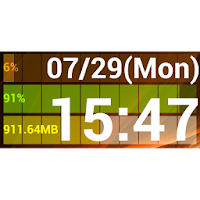
Clock Monitor
tHM Soft Personalization Contains ads
Date in the widget, time, you can display information such as CPU utilization.
- Downloads
- 5K+
- on Google Play
- Price
- Free
- No in-app purchases
- Updated
- Feb 21
- 2014 · v1.3
Screenshots


About Clock Monitor
Clock monitor widget, you can view the date, time, information such as CPU utilization to the home screen.
The digital clock widget, CPU usage, battery level, will be plus a display of the memory space.
feature
• The following information can be displayed in the widget.
And date (You can select more than one display format)
And time (you can select multiple display format)
· CPU Utilization
• Battery is exhausted
Memory space
• In the rich setting item, you can customize your favorite (set to tap the widget screen appears).
Widget of display size, can be changed (Android 3.1 or higher). The widget was installed to the home screen (long press) Long tap to please change size.
· Character to be displayed, the color scheme, font size, font type, various character decoration is freely set.
• The date, time, format to be displayed, is also possible to specify the display position.
· CPU usage, battery level, memory free space, graph display is also available. Color scheme of the change is also possible. In addition, it is also possible to change the color scheme if it exceeds a specified level.
And drawing processing, so we absolutely necessary, it is a low-load (friendly to the battery).
• In Android 3.1 or higher, if the funny display size, please try to go several times the size of change. If it still is funny display size, please to go the re-calculation of the widget size by the setting screen.
The digital clock widget, CPU usage, battery level, will be plus a display of the memory space.
feature
• The following information can be displayed in the widget.
And date (You can select more than one display format)
And time (you can select multiple display format)
· CPU Utilization
• Battery is exhausted
Memory space
• In the rich setting item, you can customize your favorite (set to tap the widget screen appears).
Widget of display size, can be changed (Android 3.1 or higher). The widget was installed to the home screen (long press) Long tap to please change size.
· Character to be displayed, the color scheme, font size, font type, various character decoration is freely set.
• The date, time, format to be displayed, is also possible to specify the display position.
· CPU usage, battery level, memory free space, graph display is also available. Color scheme of the change is also possible. In addition, it is also possible to change the color scheme if it exceeds a specified level.
And drawing processing, so we absolutely necessary, it is a low-load (friendly to the battery).
• In Android 3.1 or higher, if the funny display size, please try to go several times the size of change. If it still is funny display size, please to go the re-calculation of the widget size by the setting screen.
User reviews

Very good and useful application
Alternatives to Clock Monitor
Looking for apps like Clock Monitor? Here are 3 similar Android apps on Google Play. The highest rated is Castro Premium - system info (4.6/5), and 2 of the 3 are free to download.


| App | Rating | Price | Installs | Last updated | Compare |
|---|---|---|---|---|---|
| Clock Monitor | – | Free | 5,000+ | Feb 21, 2014 | |
| All Settings - Settings app | 4.3 / 5 | Free | 100,000+ | Aug 15, 2026 | Compare |
| Battery Widget % Level Plus | 4.2 / 5 | Free | 10,000,000+ | Sep 25, 2026 | Compare |
| Castro Premium - system info | 4.6 / 5 | 1.99 USD | 10,000+ | Sep 28, 2026 | Compare |
Compare Clock Monitor with the top alternatives: ratings, updates, ASO score and keyword gaps →