
Screenshot Text Editor
Powered by: EMG Photography In-app purchases Contains ads
Edit, replace & redact text in screenshots. AI-powered. Save to gallery.
- Downloads
- 500+
- on Google Play
- Price
- Free
- In-app purchases
- Updated
- Apr 13
- 2026 · v1.04
Screenshots

About Screenshot Text Editor
Turn any screenshot into a polished, privacy-safe image in seconds.
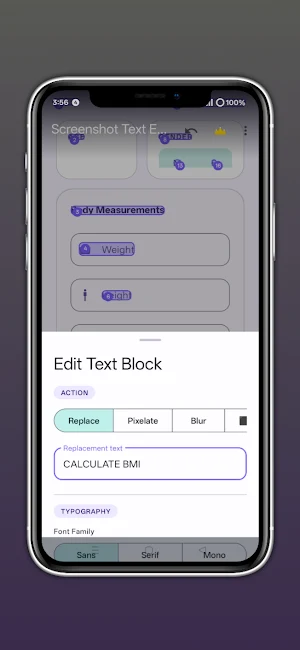
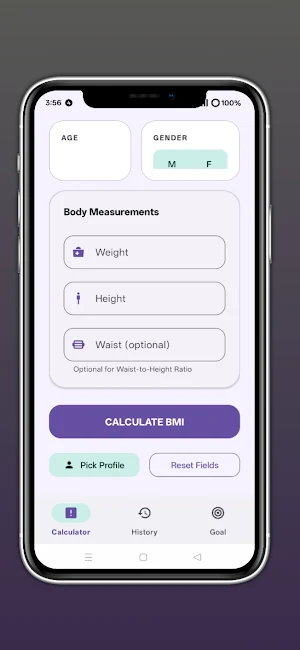
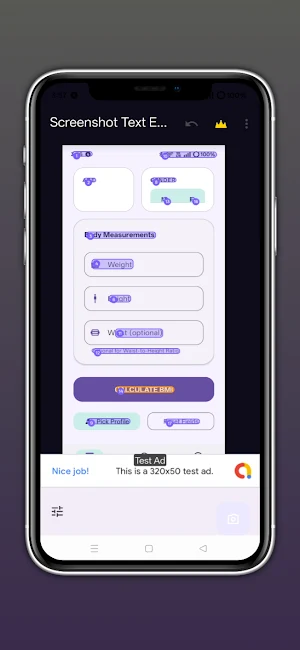
Screenshot Text Editor uses on-device AI to instantly detect every word in your screenshot — then lets you tap any text block to edit, replace, or redact it with professional styling. No uploads. No accounts. Everything stays on your phone.
━━━ CORE FEATURES ━━━
📸 SMART TEXT DETECTION
Powered by Google ML Kit, the app reads your screenshot on-device and highlights every block of text. Works on photos, UI screenshots, documents, receipts, and more — entirely offline.
✏️ TAP-TO-EDIT
Tap any highlighted text region to instantly replace it with your own words. Change the font, size, colour, alignment, and style to match the original as closely as you like.
🔒 POWERFUL REDACTION
Need to hide sensitive info? Choose from four redaction modes:
• Black bar — solid cover, GDPR-safe
• White out — clean erase
• Pixel blur — classic privacy effect
• Mosaic / pixelate — stylish block censor
🎨 RICH TEXT STYLING
• Default, Serif, and Monospace font families
• Bold & Italic formatting
• 11 text colour presets + Auto (colour-matched to background)
• Background fill colour with 9 presets
• Text size from Auto to 60 sp
• Opacity control from 0 to 100 %
• Left / Center / Right text alignment
🗂️ EDIT HISTORY
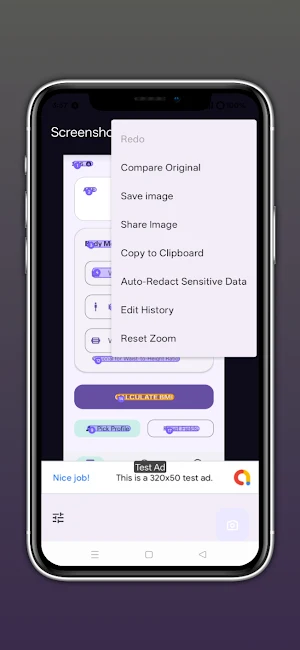
Every change is tracked. Undo and redo any edit with one tap. Browse your full edit history in a visual panel and jump back to any state instantly.
🔍 COMPARE VIEW
Hold the Compare button to see a side-by-side before/after view of your original and edited image at any time.
🔎 AUTO REDACT
Automatically detect and redact common sensitive patterns — phone numbers, email addresses, and more — with a single tap.
✂️ MANUAL SELECTION
Draw your own selection rectangle on the image to edit any area, even if no text was detected there.
💾 FLEXIBLE EXPORT
Save your finished image to the Gallery as lossless PNG or JPEG with adjustable quality. Share directly to any app, or copy to clipboard.
━━━ PREMIUM — REMOVE ADS (one-time purchase) ━━━
Upgrade once, enjoy forever:
★ Remove all banner, interstitial, and native ads permanently
★ No subscription — just a single one-time payment
★ Support independent development
━━━ PRIVACY FIRST ━━━
We believe your images are yours alone:
✔ All OCR processing is 100 % on-device — no image ever leaves your phone
✔ No account required
✔ No cloud storage
✔ No tracking of your edits or images
✔ Internet permission is used only for ads (free version) and billing
━━━ TECHNICAL DETAILS ━━━
• Minimum Android: 7.0 (API 24)
• Target Android: 15 (API 35)
• On-device OCR: Google ML Kit Text Recognition 16.0.1
• Ads: Google AdMob (free version only)
• Billing: Google Play Billing 8.3.0
━━━ PERMISSIONS EXPLAINED ━━━
📂 Storage / Media — to load screenshots and save edited images to your Gallery
🌐 Internet — for ads (free version) and Play Billing; never used to upload your images
Screenshot Text Editor uses on-device AI to instantly detect every word in your screenshot — then lets you tap any text block to edit, replace, or redact it with professional styling. No uploads. No accounts. Everything stays on your phone.
━━━ CORE FEATURES ━━━
📸 SMART TEXT DETECTION
Powered by Google ML Kit, the app reads your screenshot on-device and highlights every block of text. Works on photos, UI screenshots, documents, receipts, and more — entirely offline.
✏️ TAP-TO-EDIT
Tap any highlighted text region to instantly replace it with your own words. Change the font, size, colour, alignment, and style to match the original as closely as you like.
🔒 POWERFUL REDACTION
Need to hide sensitive info? Choose from four redaction modes:
• Black bar — solid cover, GDPR-safe
• White out — clean erase
• Pixel blur — classic privacy effect
• Mosaic / pixelate — stylish block censor
🎨 RICH TEXT STYLING
• Default, Serif, and Monospace font families
• Bold & Italic formatting
• 11 text colour presets + Auto (colour-matched to background)
• Background fill colour with 9 presets
• Text size from Auto to 60 sp
• Opacity control from 0 to 100 %
• Left / Center / Right text alignment
🗂️ EDIT HISTORY
Every change is tracked. Undo and redo any edit with one tap. Browse your full edit history in a visual panel and jump back to any state instantly.
🔍 COMPARE VIEW
Hold the Compare button to see a side-by-side before/after view of your original and edited image at any time.
🔎 AUTO REDACT
Automatically detect and redact common sensitive patterns — phone numbers, email addresses, and more — with a single tap.
✂️ MANUAL SELECTION
Draw your own selection rectangle on the image to edit any area, even if no text was detected there.
💾 FLEXIBLE EXPORT
Save your finished image to the Gallery as lossless PNG or JPEG with adjustable quality. Share directly to any app, or copy to clipboard.
━━━ PREMIUM — REMOVE ADS (one-time purchase) ━━━
Upgrade once, enjoy forever:
★ Remove all banner, interstitial, and native ads permanently
★ No subscription — just a single one-time payment
★ Support independent development
━━━ PRIVACY FIRST ━━━
We believe your images are yours alone:
✔ All OCR processing is 100 % on-device — no image ever leaves your phone
✔ No account required
✔ No cloud storage
✔ No tracking of your edits or images
✔ Internet permission is used only for ads (free version) and billing
━━━ TECHNICAL DETAILS ━━━
• Minimum Android: 7.0 (API 24)
• Target Android: 15 (API 35)
• On-device OCR: Google ML Kit Text Recognition 16.0.1
• Ads: Google AdMob (free version only)
• Billing: Google Play Billing 8.3.0
━━━ PERMISSIONS EXPLAINED ━━━
📂 Storage / Media — to load screenshots and save edited images to your Gallery
🌐 Internet — for ads (free version) and Play Billing; never used to upload your images
Alternatives to Screenshot Text Editor
Looking for apps like Screenshot Text Editor? Here are 6 similar Android apps on Google Play. All of them are free to download.
-
Privacy screen Filter/Guard
-
STL 3D File Viewer
-
SRT File Maker
-
Privacy Screen Display
-
Font Maker: Handwriting to ttf
-
SQL Editor and Viewer
| App | Rating | Price | Installs | Last updated | Compare |
|---|---|---|---|---|---|
| Screenshot Text Editor | – | Free | 500+ | Apr 13, 2026 | |
| Privacy screen Filter/Guard | – | Free | 5,000+ | Mar 10, 2026 | Compare |
| STL 3D File Viewer | – | Free | 1,000+ | Apr 9, 2026 | Compare |
| SRT File Maker | – | Free | 1,000+ | Mar 20, 2026 | Compare |
| Privacy Screen Display | – | Free | 100+ | Mar 30, 2026 | Compare |
| Font Maker: Handwriting to ttf | – | Free | 100+ | Apr 9, 2026 | Compare |
| SQL Editor and Viewer | – | Free | 100+ | Apr 9, 2026 | Compare |
Similar apps on Google Play
- Privacy screen Filter/Guard
- STL 3D File Viewer
- SRT File Maker
- Privacy Screen Display
- Font Maker: Handwriting to ttf
- SQL Editor and Viewer
- Ged File Viewer
- Delete Duplicate Photos
- CBR to PDF Converter
- CHM Viewer/Reader
- MySign Signature Maker
- MD File Editor/Viewer
- Battery Health Controller
- HTML Code Editor
- Bluetooth Speaker Mic
- PSD File Viewer
- Eye Comfort Shield
- Glove Size Finder & Measure
- INDD Viewer
- TeX Editor
- Family Tree Creator/Builder
- Screenshot Blocker
- AI File Viewer
- Fb2 to Pdf Converter
- EPS File Opener/Viewer
- M4B to MP3 Converter
- Screenshot Organizer
- MHTML to PDF Converter
- Love Letter for Her
- Unmess: Task Manager & Planner
- Bird Feeder Visitor Log
- App Usage - ScreenTime Tracker
- World Clock
- Altimeter Gps
- Stain Removal Guide – Offline
- Pro Aspect Ratio Calculator
- Photo to Sticker Maker
- Broken Display Prank
- Recommendation Letter Maker
- Alt Text Generator AI Caption
- Photo Translator: OCR & Text
- Flowchart Maker – Diagram
- OCR Scanner – Text Recognizer
- Passport Photo & ID creator
- News Photo Editor
- Cover Letter PDF Creator
- PixelText – Screenshot Editor
- Archive Extractor
- Invoice Builder - PDF Creator
- Share Files to Tv
- Europass CV & Resume Builder
- DjVu Reader Pro
- BUSSID Skin Maker
- PPT to PDF Converter
- RTF to PDF Converter
- CHM to PDF Converter
- Skencil Reader
- WPS to Pdf Converter
- Acc and ac3 to mp3
- FB2 Reader: Classic Ebook Pro
- ComicRead: CBR CBZ Viewer
- Heic Image Converter
- Convert m4a to mp3 audio
- SheetFlow:View xlsx,xls file
- Doc Docx to Pdf Converter
- Json Creator and Editor
- RTF Reader and Viewer
- Convert Tiff to Pdf
- Scan and Pdf Converter
- DICOM File Viewer
- MKVPlayer
- OGG Audio Converter
- Mht and mhtml editor/Viewer
- Tnef and dat Viewer
- Viewer for Bin File
- XML Parser open edit validate
- Cast for Android tv and box
- Installer for XAPK
- BlueMesh:Bluetooth Chat & Text
- QR Organizer and Manager
- Take Private Screenshots
- Pdf Lover
- Flash for video call in dark
- Bike Service Record
- WiFi Dead Spot Finder