
Offline notepad
MyTechTools Tools
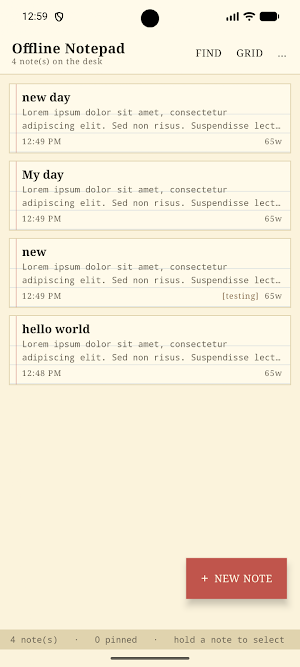
A retro yellow legal pad. Fully offline: no account, no ads, no internet.
- Downloads
- 626+
- on Google Play
- Price
- Free
- No in-app purchases
- Updated
- Aug 3
- 2026 · v1.0
Screenshots
About Offline notepad
It asks for no permissions. It has no internet access, no account, no sync, no analytics and no ads. Your notes live in a database on your device and nowhere else.
WRITING
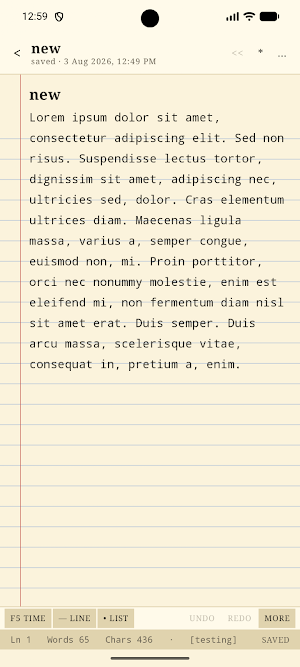
- Autosave — there is no Save button to forget. The note is written half a second after you stop typing.
- Undo and redo, 60 steps deep.
- Text tools: stamp the date and time (the old F5 trick), insert a divider or a bullet, UPPER CASE, lower case, tidy up stray blank lines.
- Live word, character and line count.
- Leave the title blank and the first line becomes the title.
- Empty notes throw themselves away when you leave.
ORGANISING
- Pin the notes that matter to the top.
- Folders with live counts — create, rename, delete, or make one on the spot while filing a note.
- Archive to get a note out of sight without losing it.
- A trash that holds deleted notes for 30 days, with restore and a deliberate "empty the trash".
- Duplicate any note.
- Long-press to select several notes and archive, move or delete them together.
- Search titles and bodies with the matches highlighted in context.
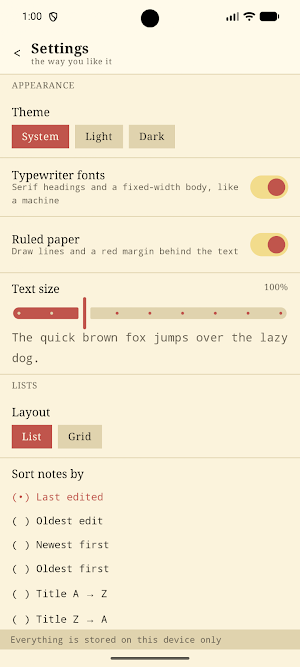
- Sort by last edited, oldest edit, newest, oldest, or title A→Z / Z→A.
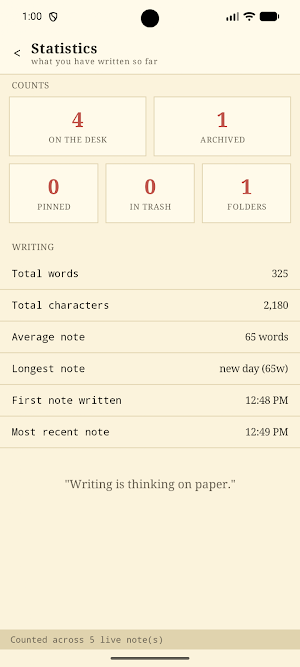
- A statistics page: notes on the desk, archived, pinned, trashed, folders, total words and characters, average length, longest note, and when you wrote your first and latest note.
TEXT IN AND OUT
- Share any note to another app.
- Export everything to a single plain .txt file, saved wherever you choose.
- Import a .txt file back in.
- Share text from any other app straight into a new note.
MAKE IT YOURS
- Light, dark or follow-system paper.
- Ruled paper and red margin on or off.
- Typewriter fonts on or off.
- Text size from 75% to 175%.
- List or grid layout.
- Ask-before-deleting, if you like a safety net.
What’s new
Version 1.0 · Updated August 3, 2026
• Initial public release. • Create and edit notes completely offline. • Organize notes with folders, pinning, archive, and trash. • Fast search and sorting. • Import and export plain text (.txt) files. • Light and dark themes. • Retro legal pad writing experience. • Performance improvements and bug fixes.
Alternatives to Offline notepad
Looking for apps like Offline notepad? Here are 6 similar Android apps on Google Play. The highest rated is Notepad for HTML (3.4/5), and all 6 are free to download.
-
Notepad for HTML 3.4
-
Well - Water Reminder
-
Koto Japanese Keyboard
-
feet inch calculator
-
Lekhani Marathi Keyboard
-
Mockup Studio
| App | Rating | Price | Installs | Last updated | Compare |
|---|---|---|---|---|---|
| Offline notepad | – | Free | 500+ | Aug 3, 2026 | |
| Notepad for HTML | 3.4 / 5 | Free | 100,000+ | Apr 12, 2026 | Compare |
| Well - Water Reminder | – | Free | 0+ | – | Compare |
| Koto Japanese Keyboard | – | Free | 10+ | – | Compare |
| feet inch calculator | – | Free | 10+ | – | Compare |
| Lekhani Marathi Keyboard | – | Free | 50+ | Sep 8, 2026 | Compare |
| Mockup Studio | – | Free | 10+ | Sep 7, 2026 | Compare |
Compare Offline notepad with the top alternatives: ratings, updates, ASO score and keyword gaps →
Similar apps on Google Play
- Notepad for HTML
- Well - Water Reminder
- Koto Japanese Keyboard
- feet inch calculator
- Lekhani Marathi Keyboard
- Mockup Studio
- Internet Speed Meter
- Basic Notepad
- One Tap Jump
- Sign on Pdf
- Simple Resume Maker
- Brick Brake
- Virtual Piano
- Memo pad
- Gravity Maze
- Notepad Simple
- Guitar Tuner
- Flip Clock Timer
- Color Picker
- Birthday reminder
- Ruler scale
- Photo Overlays
- Notepad for Typing Practice
- Plain Notepad
- Text Repeater
- Birthday Calculator
- Simple Calculator
- Student Id card maker
- Floating Clock
- List Maker
- Teleprompter for video
- Plant Identifier
- Dog Whistle
- Unit Converter
- ai business ideas
- Metadata remover
- couple compatibility test
- Typing Speed Test
- Blur Face
- Check Angle
- Notepad For Coding
- weight loss tracker
- Ai Hashtag Generator
- Notepad plus plus
- Fokuss
- Water Intake Tracker
- Resumate
- Screen Recorder Plus
- Sketch Notes
- UUID Generator
- TickIt - Checklist Notepad
- Focus Session Timer
- NoJunk– No Junk Food Challenge
- Drink Water Reminder
- bmi checker
- Clipboard Manager
- Smoking Quit Tracker
- XML Viewer
- Age Calculator - Date Of Birth
- yaml viewer
- Network Speed in Status Bar
- Marathi Calendar 2026
- Screen ruler
- exam countdown
- Love Horoscope
- Sticky Notes Widget
- Cat Scanner
- Age Calculator
- cgpa to percentage converter
- Voice Recorder Lite
- Random Number Generator
- Business Name Generator
- Dog Scanner
- Study Timer
- Love Counter Widget
- JSON Viewer
- WFH - work from home jobs
- Happy Diwali Photo Frame
- Image compressor mb to kb
- Quick Notes
- Word Counter
- Love Tester - Love Calculator
- OnePM – Product Manager Career
- Split Screen Shortcut
- Winter Arc
- Telecue-teleprompter for video
- Color Notepad
- Focused - Pomodoro Timer
- Akshar - Marathi Keyboard
- Paintify
- Monk Mode
- Notemate Notepad
- CVify - Resume Builder
- Photo caption generator
- love calculator by name
- MathGPT ai - Math Solver
- Wedding Hashtag Generator
- EzRank - Keyword Research Tool
- ResumeWord - ATS Score Checker
- Dog Breed Identifier
- TripCity - AI Trip Planner
- SpendMate
- Ez TicTacToe
- Ez Todo
- PMPro - Product Manager Guide
- QR Scanner lite
- Car Wallpaper HD
- Ram Navami Wishes
- Happy Holi Wishes
- Dog All Names
- Celsius to fahrenheit
- Mahadev Wallpapers
- Marathi Ukhane
- Cat Wallpaper
- Marathi Quotes
- bmi calculator 2024
- Remoting
- MyTechTools
- TorchMate
- Pink Notepad
- Shivjayanti Wallpaper
- Ram Mandir Ayodhya Wallpaper
- LoveMeter Pro
- FirstTechJob
- cgpa to percentage converter
- nope notepad