

Koto Japanese Keyboard
MyTechTools Tools Contains ads
Japanese keyboard with Kana flick, Romaji typing, Kanji conversion & themes.
- Downloads
- 131+
- on Google Play
- Price
- Free
- No in-app purchases
- Updated
- Sep 9
- 2026 · v1.0
Screenshots
About Koto Japanese Keyboard
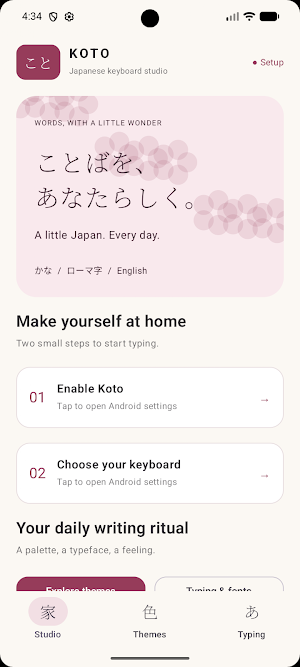
Koto Japanese Keyboard gives you multiple ways to type Japanese, including Kana flick input, Romaji typing, Hiragana, Katakana, English, and offline Kanji conversion.
Whether you're learning Japanese, chatting with friends, writing notes, or typing every day, Koto provides a simple and comfortable Japanese typing experience.
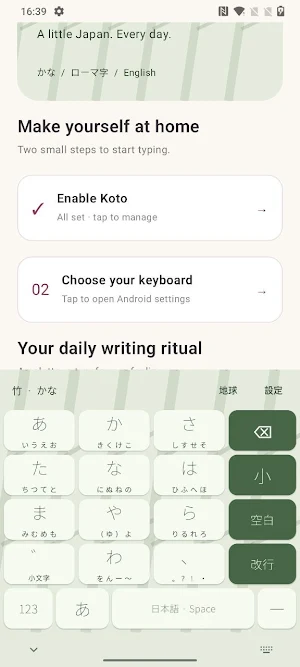
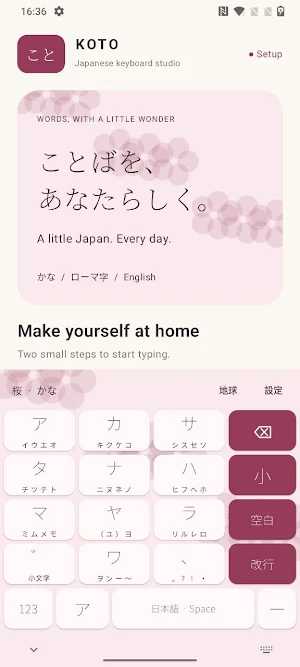
JAPANESE KANA FLICK KEYBOARD
Type naturally using a Japanese-style Kana flick keyboard.
• Tap for あ
• Flick left, up, right, or down for い・う・え・お
• See Kana alternatives directly on each key
• Use ゛ for voiced and semi-voiced Kana
• Use 小 to quickly type small Kana such as ゃ, ゅ, ょ and っ
ROMAJI JAPANESE KEYBOARD
Prefer QWERTY typing? Use the built-in Romaji keyboard to convert Roman letters into Japanese.
Examples:
• nihongo → にほんご
• kya → きゃ
• shi → し
• tsu → つ
• doubled consonants → っ
• nn / n' → ん
Switch easily between Hiragana, Katakana and English while typing.
OFFLINE KANJI CONVERSION
Convert Japanese readings into Kanji without relying on online conversion.
Koto includes a large bundled Japanese dictionary with hundreds of thousands of readings and word candidates.
• Up to 16 Kanji candidates
• Horizontally scrolling candidate bar
• Fast word-by-word conversion
• Dictionary processing happens locally on your device
Type Japanese even when your connection is unavailable.
HIRAGANA, KATAKANA & ENGLISH
Quickly switch between:
• Hiragana keyboard
• Katakana keyboard
• English QWERTY keyboard
• Numbers
• Japanese punctuation
• Emoji and symbols
Everything you need for everyday Japanese typing is available from one keyboard.
CUSTOMIZE YOUR JAPANESE KEYBOARD
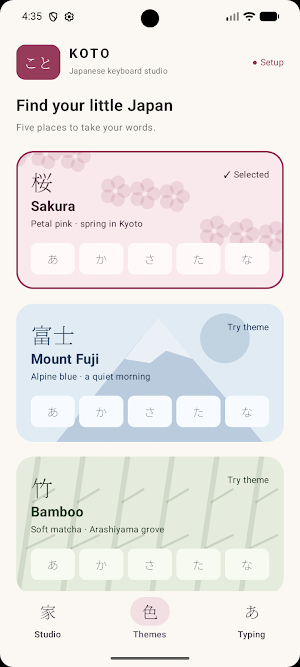
Make your keyboard match your style with beautiful Japanese-inspired themes.
Choose from:
• Sakura
• Mount Fuji
• Bamboo
• Indigo
• Kyoto Dusk
What’s new
Version 1.0 · Updated September 9, 2026
Initial release of Koto Japanese Keyboard. • Kana flick keyboard for fast Japanese typing • Romaji to Hiragana input • Offline Kanji conversion with multiple candidates • Hiragana, Katakana and English input modes • Japanese-inspired themes including Sakura, Mount Fuji, Bamboo, Indigo and Kyoto Dusk • Multiple Japanese fonts and keyboard customization • Adjustable key height, animations and haptic feedback • Offline Japanese typing with no saved typing history
Alternatives to Koto Japanese Keyboard
Looking for apps like Koto Japanese Keyboard? Here are 6 similar Android apps on Google Play. The highest rated is Notepad for HTML (3.4/5), and all 6 are free to download.
-
Notepad for HTML 3.4
-
Well - Water Reminder
-
feet inch calculator
-
Lekhani Marathi Keyboard
-
Mockup Studio
-
Offline notepad
| App | Rating | Price | Installs | Last updated | Compare |
|---|---|---|---|---|---|
| Koto Japanese Keyboard | – | Free | 100+ | Sep 9, 2026 | |
| Notepad for HTML | 3.4 / 5 | Free | 100,000+ | Apr 12, 2026 | Compare |
| Well - Water Reminder | – | Free | 10+ | Sep 10, 2026 | Compare |
| feet inch calculator | – | Free | 100+ | Sep 8, 2026 | Compare |
| Lekhani Marathi Keyboard | – | Free | 50+ | Sep 8, 2026 | Compare |
| Mockup Studio | – | Free | 10+ | Sep 7, 2026 | Compare |
| Offline notepad | – | Free | 500+ | Aug 3, 2026 | Compare |
Similar apps on Google Play
- Notepad for HTML
- Well - Water Reminder
- feet inch calculator
- Lekhani Marathi Keyboard
- Mockup Studio
- Offline notepad
- Internet Speed Meter
- Basic Notepad
- One Tap Jump
- Sign on Pdf
- Simple Resume Maker
- Brick Brake
- Virtual Piano
- Memo pad
- Gravity Maze
- Notepad Simple
- Guitar Tuner
- Flip Clock Timer
- Color Picker
- Birthday reminder
- Ruler scale
- Photo Overlays
- Notepad for Typing Practice
- Plain Notepad
- Text Repeater
- Birthday Calculator
- Simple Calculator
- Student Id card maker
- Floating Clock
- List Maker
- Teleprompter for video
- Plant Identifier
- Dog Whistle
- Unit Converter
- ai business ideas
- Metadata remover
- couple compatibility test
- Typing Speed Test
- Blur Face
- Check Angle
- Notepad For Coding
- weight loss tracker
- Ai Hashtag Generator
- Notepad plus plus
- Fokuss
- Water Intake Tracker
- Resumate
- Screen Recorder Plus
- Sketch Notes
- UUID Generator
- TickIt - Checklist Notepad
- Focus Session Timer
- NoJunk– No Junk Food Challenge
- Drink Water Reminder
- bmi checker
- Clipboard Manager
- Smoking Quit Tracker
- XML Viewer
- Age Calculator - Date Of Birth
- yaml viewer
- Network Speed in Status Bar
- Marathi Calendar 2026
- Screen ruler
- exam countdown
- Love Horoscope
- Sticky Notes Widget
- Cat Scanner
- Age Calculator
- cgpa to percentage converter
- Voice Recorder Lite
- Random Number Generator
- Business Name Generator
- Dog Scanner
- Study Timer
- Love Counter Widget
- JSON Viewer
- WFH - work from home jobs
- Happy Diwali Photo Frame
- Image compressor mb to kb
- Quick Notes
- Word Counter
- Love Tester - Love Calculator
- OnePM – Product Manager Career
- Split Screen Shortcut
- Winter Arc
- Telecue-teleprompter for video
- Color Notepad
- Focused - Pomodoro Timer
- Akshar - Marathi Keyboard
- Paintify
- Monk Mode
- Notemate Notepad
- CVify - Resume Builder
- Photo caption generator
- love calculator by name
- MathGPT ai - Math Solver
- Wedding Hashtag Generator
- EzRank - Keyword Research Tool
- ResumeWord - ATS Score Checker
- Dog Breed Identifier
- TripCity - AI Trip Planner
- SpendMate
- Ez TicTacToe
- Ez Todo
- PMPro - Product Manager Guide
- QR Scanner lite
- Car Wallpaper HD
- Ram Navami Wishes
- Happy Holi Wishes
- Dog All Names
- Celsius to fahrenheit
- Mahadev Wallpapers
- Marathi Ukhane
- Cat Wallpaper
- Marathi Quotes
- bmi calculator 2024
- Remoting
- MyTechTools
- TorchMate
- Pink Notepad
- Shivjayanti Wallpaper
- Ram Mandir Ayodhya Wallpaper
- LoveMeter Pro
- FirstTechJob
- cgpa to percentage converter
- nope notepad