
Smart Remote For Vizio TV
Tools In-app purchases Contains ads
Remote, touchpad, keypad and app shortcuts for compatible Vizio smart TVs.
- Downloads
- 100+
- on Google Play
- Price
- Free
- In-app purchases
- Updated
- Aug 20
- 2026 · v1.0.0
Screenshots
About Smart Remote For Vizio TV
Control your compatible Vizio Smart TV from your Android phone with Smart Remote For Vizio TV.
Connect your phone and TV to the same Wi-Fi network, select an available device, approve the pairing request when prompted, and use your phone as a convenient TV remote.
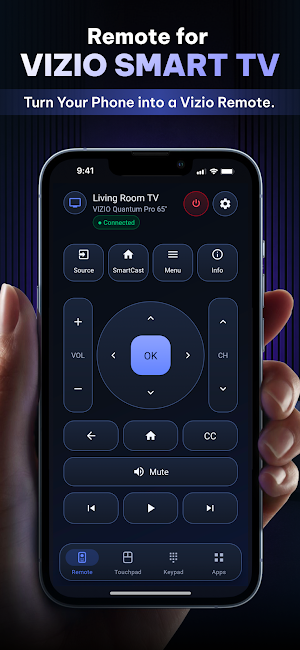
REMOTE CONTROL
Access familiar controls for everyday viewing:
• Power controls on supported TV models
• Volume up, volume down, and mute
• Channel up and channel down
• Directional navigation and OK/select
• Source, home, menu, information, and closed captions
• Play, pause, previous, and next controls
Available buttons and commands may vary by TV model and software version.
EASY TV CONNECTION
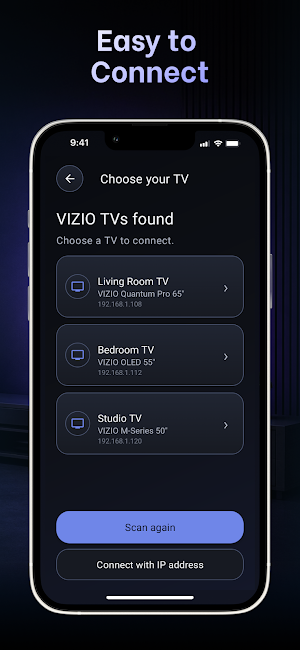
The app can search for compatible TVs connected to the same local network. Select your TV from the device list to begin pairing.
If your TV is not detected automatically, you can enter its local IP address when this option is supported.
Some TV models may require the original remote or physical TV buttons to approve the first pairing request.
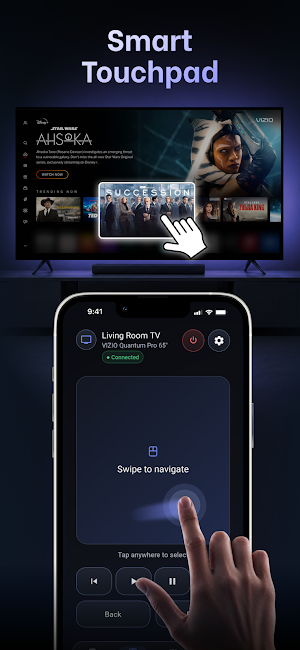
SMART TOUCHPAD
Swipe, scroll, and tap to navigate supported menus and content. Touchpad behavior may vary depending on the TV screen or app currently in use.
KEYPAD INPUT
Use the built-in keypad to enter channel numbers and interact with supported input fields. Keypad input may not be available in every TV menu or third-party app.
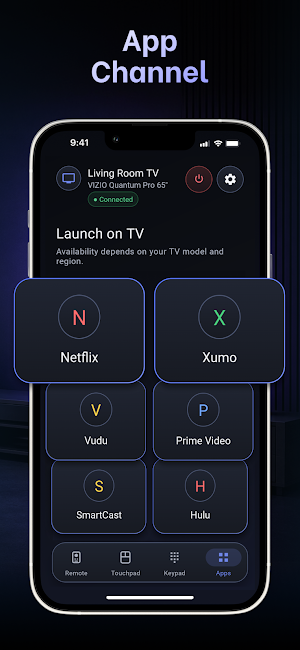
APP SHORTCUTS
Open available TV apps and channels from your phone when supported by the connected TV.
Available shortcuts depend on the TV model, region, installed services, and software version. The app does not provide, host, or stream third-party content.
HOW TO CONNECT
1. Turn on your TV.
2. Connect your Android phone and TV to the same Wi-Fi network.
3. Open Smart Remote For Vizio TV.
4. Choose a detected TV or enter its local IP address.
5. Approve the pairing request on the TV when prompted.
6. Use the available remote, touchpad, keypad, and app controls.
COMPATIBILITY AND LIMITATIONS
Smart Remote For Vizio TV is designed for selected Vizio Smart TV models that support control over a local network.
The app may not support every TV model. Connection, power controls, touchpad, keypad, and app shortcuts depend on the TV model, software version, phone, and Wi-Fi network.
Power-on control may be unavailable when the TV is fully disconnected from Wi-Fi or does not support network wake-up.
INDEPENDENT THIRD-PARTY APP
Smart Remote For Vizio TV is an independent third-party utility. It is not affiliated with, authorized by, endorsed by, or sponsored by Vizio or any television manufacturer.
Vizio and any other product names or trademarks are the property of their respective owners.
Connect your phone and TV to the same Wi-Fi network, select an available device, approve the pairing request when prompted, and use your phone as a convenient TV remote.
REMOTE CONTROL
Access familiar controls for everyday viewing:
• Power controls on supported TV models
• Volume up, volume down, and mute
• Channel up and channel down
• Directional navigation and OK/select
• Source, home, menu, information, and closed captions
• Play, pause, previous, and next controls
Available buttons and commands may vary by TV model and software version.
EASY TV CONNECTION
The app can search for compatible TVs connected to the same local network. Select your TV from the device list to begin pairing.
If your TV is not detected automatically, you can enter its local IP address when this option is supported.
Some TV models may require the original remote or physical TV buttons to approve the first pairing request.
SMART TOUCHPAD
Swipe, scroll, and tap to navigate supported menus and content. Touchpad behavior may vary depending on the TV screen or app currently in use.
KEYPAD INPUT
Use the built-in keypad to enter channel numbers and interact with supported input fields. Keypad input may not be available in every TV menu or third-party app.
APP SHORTCUTS
Open available TV apps and channels from your phone when supported by the connected TV.
Available shortcuts depend on the TV model, region, installed services, and software version. The app does not provide, host, or stream third-party content.
HOW TO CONNECT
1. Turn on your TV.
2. Connect your Android phone and TV to the same Wi-Fi network.
3. Open Smart Remote For Vizio TV.
4. Choose a detected TV or enter its local IP address.
5. Approve the pairing request on the TV when prompted.
6. Use the available remote, touchpad, keypad, and app controls.
COMPATIBILITY AND LIMITATIONS
Smart Remote For Vizio TV is designed for selected Vizio Smart TV models that support control over a local network.
The app may not support every TV model. Connection, power controls, touchpad, keypad, and app shortcuts depend on the TV model, software version, phone, and Wi-Fi network.
Power-on control may be unavailable when the TV is fully disconnected from Wi-Fi or does not support network wake-up.
INDEPENDENT THIRD-PARTY APP
Smart Remote For Vizio TV is an independent third-party utility. It is not affiliated with, authorized by, endorsed by, or sponsored by Vizio or any television manufacturer.
Vizio and any other product names or trademarks are the property of their respective owners.
What’s new
Version 1.0.0 · Updated August 20, 2026
- Improve app performance for smoother user experience.
Alternatives to Smart Remote For Vizio TV
Looking for apps like Smart Remote For Vizio TV? Here are 6 similar Android apps on Google Play. The highest rated is Credit Card: Wallet and NFC (4.6/5), and all 6 are free to download.
-
Night Map Sky: Star Gazer View
-
Remote for Coocaa - Coolita TV
-
Remote for Sky Q TV
-
Remote for Apple TV
-
OBD2: Torque FixD Car Scanner 4.3
-
Credit Card: Wallet and NFC 4.6
| App | Rating | Price | Installs | Last updated | Compare |
|---|---|---|---|---|---|
| Smart Remote For Vizio TV | – | Free | 100+ | Aug 20, 2026 | |
| Night Map Sky: Star Gazer View | – | Free | 1,000+ | May 25, 2026 | Compare |
| Remote for Coocaa - Coolita TV | – | Free | 1,000+ | Oct 22, 2026 | Compare |
| Remote for Sky Q TV | – | Free | 100+ | Oct 25, 2026 | Compare |
| Remote for Apple TV | – | Free | 1,000+ | – | Compare |
| OBD2: Torque FixD Car Scanner | 4.3 / 5 | Free | 10,000+ | Mar 5, 2026 | Compare |
| Credit Card: Wallet and NFC | 4.6 / 5 | Free | 10,000+ | Oct 9, 2026 | Compare |