

TamgamCAD: 2D CAD & DXF Viewer
TAMGAM Productivity In-app purchases
Professional 2D CAD drawing, DXF editing, and technical design application.
- Downloads
- 759+
- on Google Play
- Price
- Free
- In-app purchases
- Updated
- Nov 4
- 2026 · v2.4.4
Screenshots


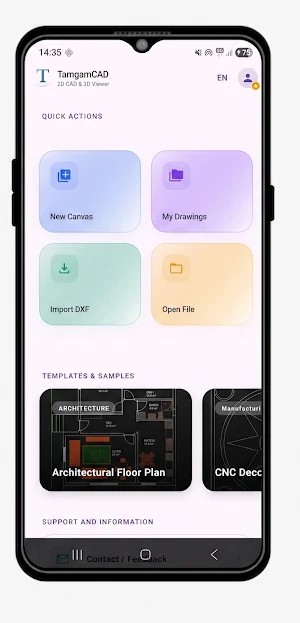

About TamgamCAD: 2D CAD & DXF Viewer
Professional 2D CAD drawing is now available everywhere with TamgamCAD!
Technical drawing is much more practical with its renewed interface.
Manage your projects anywhere with DXF support, precise technical drawing tools, layer management, and a modern interface fully compatible with all screen sizes.
Brand New 3D Viewing Support: You can now examine your technical drawings in three dimensions. With our 3D viewer, currently under development, controlling the depth of your projects is now much easier.
Flawless Experience on Mobile and Tablets: Thanks to our renewed interface, whether you are in the field or in the workshop, experience fast, fluid, and precise drawing without needing a computer.
🚀 Professional 2D CAD Features
📐 Precise Technical Drawing Tools
Create professional 2D drawings with line, cropping, geometric shapes, and detailed editing tools. Work with millimeter precision thanks to its powerful mathematical infrastructure.
🗂 Layer Management
Manage your complex CAD projects in an organized manner. Create, hide, lock layers and simplify your professional workflow.
🔄 DXF and PDF Support
Import, edit, and export DXF files. Share your drawings in PDF format and work seamlessly with other CAD programs.
⚡ Enhanced CAD Experience for Mobile
Create fast technical drawings thanks to a user-friendly interface that delivers smooth performance on tablets and phones.
📦 3D Project Viewing
View your projects in 3D! With this developing new feature, observe the 3D projections of your 2D work from your mobile device.
🛠 More Power with Pro Features
Complete your projects faster with advanced CAD tools, DXF processing, and professional drawing features.
Prepare professional technical drawings without being tied to a computer. Transform your phone or tablet into a powerful 2D CAD workspace.
Technical drawing is much more practical with its renewed interface.
Manage your projects anywhere with DXF support, precise technical drawing tools, layer management, and a modern interface fully compatible with all screen sizes.
Brand New 3D Viewing Support: You can now examine your technical drawings in three dimensions. With our 3D viewer, currently under development, controlling the depth of your projects is now much easier.
Flawless Experience on Mobile and Tablets: Thanks to our renewed interface, whether you are in the field or in the workshop, experience fast, fluid, and precise drawing without needing a computer.
🚀 Professional 2D CAD Features
📐 Precise Technical Drawing Tools
Create professional 2D drawings with line, cropping, geometric shapes, and detailed editing tools. Work with millimeter precision thanks to its powerful mathematical infrastructure.
🗂 Layer Management
Manage your complex CAD projects in an organized manner. Create, hide, lock layers and simplify your professional workflow.
🔄 DXF and PDF Support
Import, edit, and export DXF files. Share your drawings in PDF format and work seamlessly with other CAD programs.
⚡ Enhanced CAD Experience for Mobile
Create fast technical drawings thanks to a user-friendly interface that delivers smooth performance on tablets and phones.
📦 3D Project Viewing
View your projects in 3D! With this developing new feature, observe the 3D projections of your 2D work from your mobile device.
🛠 More Power with Pro Features
Complete your projects faster with advanced CAD tools, DXF processing, and professional drawing features.
Prepare professional technical drawings without being tied to a computer. Transform your phone or tablet into a powerful 2D CAD workspace.
What’s new
Version 2.4.4 · Updated November 4, 2026
• Improvements have been made to increase app performance.
Alternatives to TamgamCAD: 2D CAD & DXF Viewer
Looking for apps like TamgamCAD: 2D CAD & DXF Viewer? Here are 6 similar Android apps on Google Play. 5 of the 6 are free to download.






| App | Rating | Price | Installs | Last updated | Compare |
|---|---|---|---|---|---|
| TamgamCAD: 2D CAD & DXF Viewer | – | Free | 500+ | Nov 4, 2026 | |
| Groupt | – | Free | 5+ | Sep 28, 2026 | Compare |
| Almaks Projects Manager - APM | – | Free | 1+ | – | Compare |
| IEC Husaini | – | Free | 100+ | – | Compare |
| ProgressPruved | – | 3.99 USD | 1+ | Feb 7, 2026 | Compare |
| Asddata | – | Free | 500+ | Sep 3, 2026 | Compare |
| TechoStop: Client Portal | – | Free | 1+ | Aug 23, 2026 | Compare |
Similar apps on Google Play
- Groupt
- Almaks Projects Manager - APM
- IEC Husaini
- ProgressPruved
- Asddata
- TechoStop: Client Portal
- Loggd: Habit Tracker & Planner
- Fabe: Offline Task Manager
- Relateful
- Gegita:Gelir Gider Takip
- AmoreAdvice
- Fonex - Smart Phoneshop POS
- WakeUpDrive
- Banknote Identifier
- EchoCAD Mobile
- SOFE
- mid. - Productivity & Energy
- Gantt Chart
- iomoupsc
- Opsense Pro
- TMS LogeX 3.0
- App Portale360
- ClocksNest
- Trendly - AI Social Planner
- GPS Mobile Navi